
Question

Navigation in network mount not possible

  • June 8, 2016
  • 10 replies
  • 36 views

Forum|alt.badge.img+3

Hi all,

I have an issue concerning the mounting of a shared drive.

I use a configuration profile to mount a share drive in smb : smb://"DOMAIN"/shares

When I open my session the shared drive appears correctly on the desktop but when I navigate into it, no file appear.
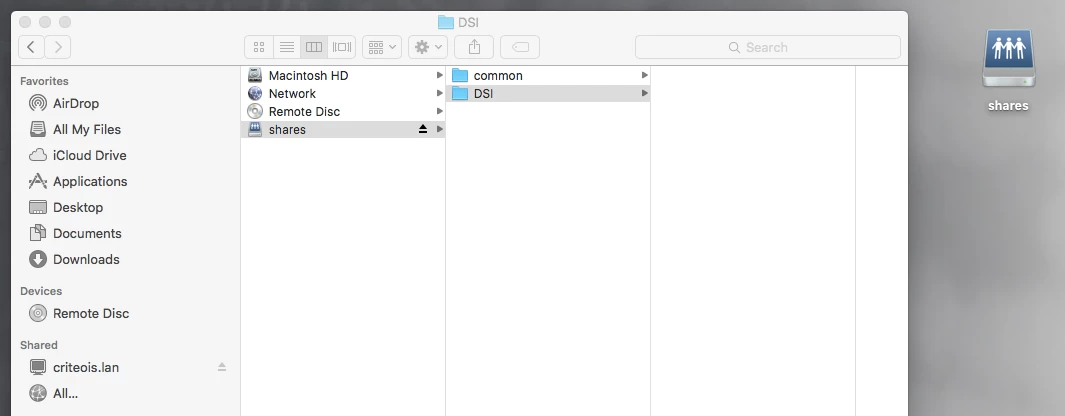
I have check the Kerberos ticket : I have a valid ticket krbtgt/DOMAIN@DOMAIN

If you have any idea ?

Thanks for your help.

10 replies

Forum|alt.badge.img+8
  • Contributor
  • June 8, 2016

Looks more like a permissions issue on the share itself. Is it SMB or AFP?


Forum|alt.badge.img+3
  • Author
  • New Contributor
  • June 8, 2016

Hi @al_platt this is SMB.

But when I try do mount the volume manually (Finder > Connect to server), I am prompted for my AD credentials once and then I can see all the files in the shared drives.


Forum|alt.badge.img+8
  • Contributor
  • June 8, 2016

Hi,

OK, bit odd then but i've had some kerberos weirdness recently, says i have a ticket but wont authenticate against groups for our palo alto.

Have you removed the ticket and re issued? I sometimes find that works.


Forum|alt.badge.img+3
  • Author
  • New Contributor
  • June 8, 2016

@al_platt,

Yes I have renewed the ticket and it is still not working.

What I have noticed is that when I use the complete path of the shared folder it is working well ( smb://url to my folder).

When I use the domain name (smb://DOMAIN) it is not working.


Forum|alt.badge.img+6
  • Contributor
  • June 8, 2016

@j.chowwingbom it shouldn't prompt for your username and password if you use command + k

is your mac bound?


Forum|alt.badge.img+3
  • Author
  • New Contributor
  • June 8, 2016

hi @dprakash, yes the mac is bound.

Just to give more détails :

The share drives I have acces to are Comon and DSI.
With command + k, when I enter the complete url (smb://server/common or smb://server/dsi) I am prompted for my credentials. If I enter my credential, I can see the différent files in each folder.

The shares drives can also be accessed by using the DFS namespace (smb://domain/shares) : the 2 drives are automaticaaly mounted. When I do so, no credential is requested and the folder are blank.


Forum|alt.badge.img+14
  • Contributor
  • June 8, 2016

We switched to CIFS and theses issues disappeared for us. Downside, CIFS is slower.


Forum|alt.badge.img+3
  • Author
  • New Contributor
  • June 8, 2016

Hi @Aziz , it is still not working with CIFS. Folder are still blank when I mount with DFS namespace.

I have noticed that when I try to access to share drive in command line I have this error : -bash: cd: DSI/: Authentication error

I don't have it when I use the complete url with server name (since I had entered my credentials).


Forum|alt.badge.img+6
  • Contributor
  • June 8, 2016

@j.chowwingbom sounds like permissions on the share aren't quite right.

do you have search domains set manually?
or does your mac pick up search domains from dhcp?


Forum|alt.badge.img+3
  • Author
  • New Contributor
  • June 8, 2016

@dprakash , we have no manual settings.