Question

Authentication for JamfAAD

  • September 29, 2020
  • 5 replies
  • 45 views

bwoods
Forum|alt.badge.img+14

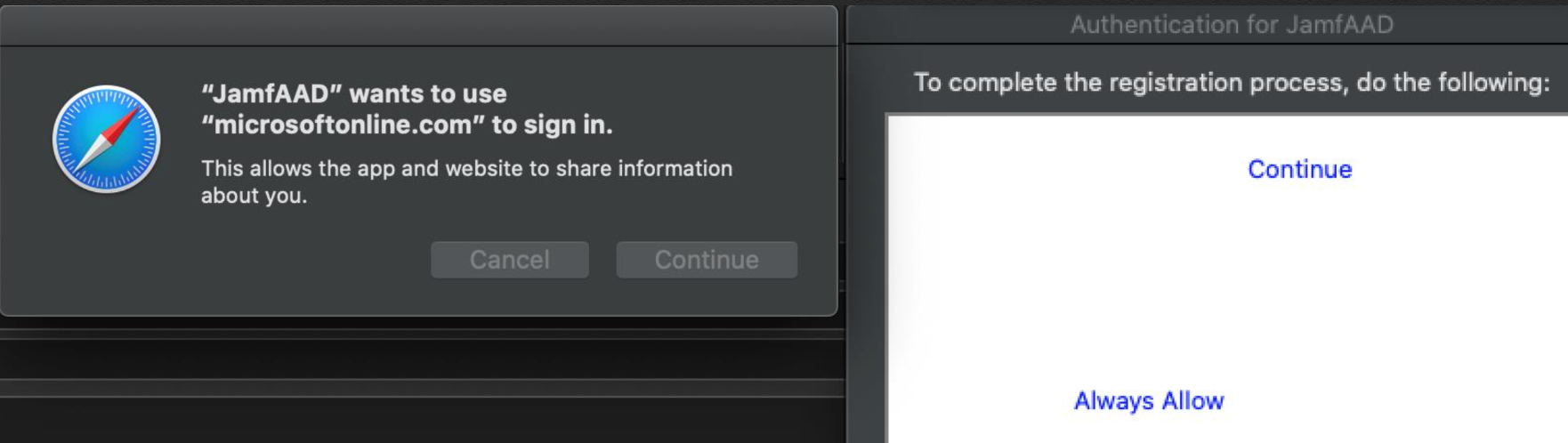
For those of you with a jamf/Intune integration, it looks like Jamf has added a notice for JamfAAD atuthentication. You may want to notify your users about these changes. I noticed this after upgrading to Jamf Pro 10.24.2.


5 replies

whitebeer
Forum|alt.badge.img+7
  • Contributor
  • October 1, 2020

We are also affected and our users raised tickets for that. I can't find any documentation on that either in the admin documentation nor the release notes. Also the dialog is not display correctly.


Forum|alt.badge.img+11
  • Valued Contributor
  • October 1, 2020

This explanation was posted out on the #jamf-intune-integration MacAdmins slack channel.

new steps with the integrated MSAL library for authentication. Due to the webpage redirection needed for the ASWebAuthenticationSession needed. macOS forces the prompt so more detail was added since it was not intuitive. But long term that opens the door for SSOe/cache for Microsoft then. So a step forward and back that hopefully leads to a leap way ahead in 2021.

In my case, I have separate accounts for my standard O365 account for e-mail/onedrive and an admin account for accessing the Azure/Intune consoles. I would get multiple prompts throughout the day to verify I was logging into the Jamf Native macOS connector. Limiting my Admin console access to another browser like edge/chrome seems to have eliminated the multiple prompts.

@whitebeer

Also the dialog is not display correctly.

This seems to only occur when the Mac is using Night/Dark mode.


whitebeer
Forum|alt.badge.img+7
  • Contributor
  • October 2, 2020

I raised a ticket with jamf yesterday and got the following answer

I’ve checked internally and the change of the registration process are caused by Microsoft Authentication Library (MSAL v1.1) changes for macOS 10.15+ https://docs.microsoft.com/en-us/azure/active-directory/develop/customize-webviews

@FritzsCorner they also confirmed that the broken messagebox in dark mode is already classified as a product issue.
I complained about the missing official jamf-documentation about the pop-ups, the customer success team is investigating. For us there were a lot of customer incidents on that topic.


Forum|alt.badge.img+1
  • New Contributor
  • October 12, 2020

The only resolution I have seen is to set the machines default browser to Safari and then run the azure ad registration again or re-enrolling the device. Even then you have to have the default browser set to Safari.


bwoods
Forum|alt.badge.img+14
  • Author
  • Honored Contributor
  • September 21, 2021

Upvote this: JamfAAD should use web view instead of | Jamf Nation Feature Requests. Complain to your customer success reps as well.