After switching from Profile Manager to Casper, I continued deploying printers using a configuration profile and scoped to computer groups. I have the full HP printer package installed on all the computers and I define the printers manually in Printers under Computer Management in JSS. The printers are all shared on a windows print server. The problem I am having is that the printers will show up and print fine using any application, but the printers do not show up in system preferences. Since we install some printers locally, it would be useful for locally installed and managed printers to show up in that list. Has anyone else run into this problem?

Solved
Printers deployed by Profiles not showing in System Preferences
 +3
+3Best answer by GabePPS
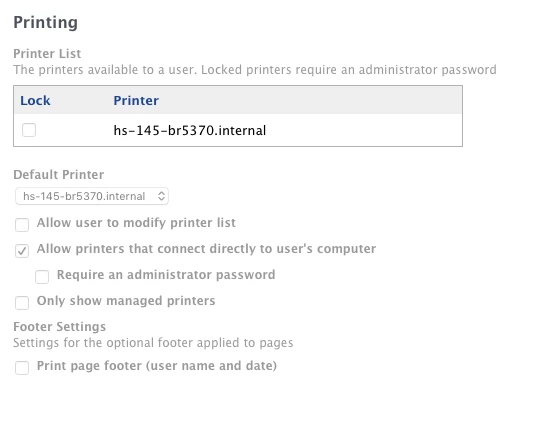
This is a known bug with printer profiles.
To fix it you have to check the box in the configuration profile that says "Allow printers that connect directly to user's computer"
For some reason if this isn't checked, the printers won't show up in the list.
Gabe Shackney
Princeton Public Schools



Enter your E-mail address. We'll send you an e-mail with instructions to reset your password.