Question

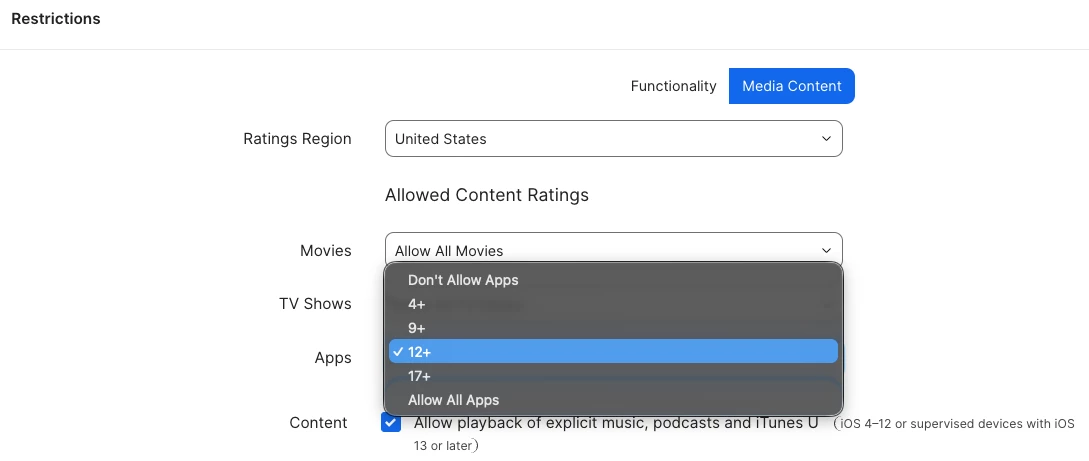
Apps Media Content Rating - iOS Restriction Profile

  • January 12, 2026
  • 4 replies
  • 87 views

Forum|alt.badge.img+7

Does anyone know if JAMF is working on adding the 13+ rating to the drop down menu in JAMF School iOS restriction profile under the media content tab?



4 replies

Corey-Ribble
Forum|alt.badge.img+2
  • Contributor
  • January 14, 2026

I have not seen a feature request for that on there site, or heard of anything. But ​@TraceyJoyce might be able to shed more light on this. She is off this week, so you may not see a reply until next week sometime. 


TraceyJoyce
Forum|alt.badge.img+10
  • Employee
  • January 22, 2026

Hey all! Just back from PTO and am looking into this now. Will get back to you all as soon as I hear! Thanks for tagging me ​@Corey-Ribble


Corey-Ribble
Forum|alt.badge.img+2
  • Contributor
  • February 3, 2026

Hey all! Just back from PTO and am looking into this now. Will get back to you all as soon as I hear! Thanks for tagging me ​@Corey-Ribble

@TraceyJoyce Wanted to pop in and see if you have heard anything back on this yet. 


TraceyJoyce
Forum|alt.badge.img+10
  • Employee
  • February 6, 2026

Hey all! So the team says this is scheduled for Q2 and hopefully in Blueprints! However, if you need this restriction in the meantime, an awesome colleague shared this with me: 

I just did some testing. and if they need this restriction with the updated age limits deployed with Jamf School they can upload a custom profile. Here are the steps:

  1. Use iMazing Profile Editor to create a configuration with the payload: Restrictions > Content & Media > Allowed content ratings. Select a value (it doesn't matter which value: 4+. 9+ etc) as we will change it later).
  2. Save that profile to your computer. Choose Do Not Sign.
  3. Open that profile with your favorite Text Editor.
  4. Find the following payload key:
    1. <key>ratingApps</key>
    2. <integer>300</integer>
  5. Choose the new integer value from the following options from Apple's developer documentation:https://developer.apple.com/documentation/devicemanagement/restrictions
    • 1000: All
    • 621: 21+
    • 620: 20+
    • 619: 19+
    • 618: 18+
    • 600: 17+
    • 416: 16+
    • 415: 15+
    • 314: 14+
    • 313: 13+
    • 300: 12+
    • 211: 11+
    • 210: 10+
    • 200: 9+
    • 108: 8+
    • 107: 7+
    • 106: 6+
    • 105: 5+
    • 100: 4+
    • 3: 3+
    • 2: 2+
    • 1: 1+
    • 0: None
  6. Save this updated profile and upload it to Jamf School and scope to a TEST device group to verify before deploying it to the larger device groups.