Jamf School in K-12: What’s Working Well & What Needs Improvement?

  • January 12, 2026
  • 6 replies
  • 119 views

Corey-Ribble
Forum|alt.badge.img+2

As this new K-12 Jamf School community gets going, I thought it would be helpful to start an open discussion around everyone’s real-world experiences specifically with Jamf School (not Jamf Pro).

This thread is intentionally focused on Jamf School workflows, features, and challenges in K-12 environments. While Jamf Pro has plenty of existing discussion spaces, this is meant to give Jamf School admins a place to share what actually applies to their day-to-day work.

I’d love to hear from fellow admins about anything that’s on your mind related to Jamf School. The list below is just meant to help get the conversation started—you don’t need to limit your thoughts to these topics at all:

  • What Jamf School features or workflows you rely on and like

  • What you wish worked better or differently in Jamf School

  • Any current Jamf School–specific issues or limitations you’re running into

  • Areas where documentation or guidance feels lacking

  • Wins, workarounds, or lessons learned using Jamf School in K-12

If there’s something else you’re thinking about—big or small—feel free to bring it up. Questions, ideas, frustrations, and success stories are all welcome.

Whether you manage a small deployment or a large district, every Jamf School perspective helps. The goal isn’t just to vent, but to learn from one another, share practical solutions, and help shape better conversations—and hopefully improvements—around Jamf School moving forward.

Jump in wherever you’re comfortable. Even a short comment can be helpful to someone else.

Looking forward to the discussion.

6 replies

red_beard
Forum|alt.badge.img+8
  • Valued Contributor
  • January 20, 2026

Here are some Improvements I’d like to see that come to mind. If you see something in my list that is possible already please let me know!
 

  1. When selecting multiple devices, showing them all on screen for group actions or changes to be applied to.
  2. Search for multple devices at once (e.g. Like pasting in multiple serial numbers separated by commas into the search field. Similar to Jamf Pro).
  3. Customize dashboards.
  4. Update the device record so that both the location and the assigned user (owner) can be changed in a single edit and saved once, instead of having to:

    1. Change the location and save

    2. Reopen Edit Details

    3. Assign a new owner and save again

  5. Student and Teacher app - App redownloading: If a student or staff deletes an app that was pushed out to their iPad home screens, it doesn’t appear in the Student App or Teacher app for redownloading.

  6. Show all groups a device belongs to regardless of which location (top-level) or specific location you are viewing the device record in.

  7. Jamf Teacher - blocklist functionality instead of just allow lists. The allow list route is complicated once you involved embedded content in different LMS systems. Making it very onerous for a teacher to try and allow all the content. I’m surprised Jamf Parent can do this but not Jamf Teacher app.


Corey-Ribble
Forum|alt.badge.img+2
  • Author
  • Contributor
  • February 3, 2026

The biggest issue i have with Jamf School lately is the “Notification Center”. With there update where bulk commands or exports get placed in there with a Notification, and you can’t clear or resolve them. So i currently have 76 unread notifications when i open jamf. I have already missed important notifications for our tokens, but Jamf doesn't have a time frame on when it will be fixed and can’t clear them from the back end. 


If you have this issue to and would like to try and push a fix higher up there list, here is Jamfs internal ticket number for this issue. PI140156


Forum|alt.badge.img+7
  • Valued Contributor
  • February 11, 2026

Jamf School for the most part does what we need.  Here are some things I’d like to see improved.

  1. The ability to schedule OS updates.  For example I would like to have the system try to push out new OS updates weekly on Thursday at 3pm without me having to kick it off each week.  Teachers and students just don’t like to run updates, so we really need an easy way to try to keep things patched better.  Thankfully DDM based updates are working better at least.  
  2. The ability to copy configuration profiles from a child location back to the parent one.
  3. The ability to export the user installed software inventory globally would be nice for auditing.

Forum|alt.badge.img+16
  • Contributor
  • February 11, 2026

Here are some Improvements I’d like to see that come to mind. If you see something in my list that is possible already please let me know!
 

  1. When selecting multiple devices, showing them all on screen for group actions or changes to be applied to.
  2. Search for multple devices at once (e.g. Like pasting in multiple serial numbers separated by commas into the search field. Similar to Jamf Pro).
  3. Customize dashboards.
  4. Update the device record so that both the location and the assigned user (owner) can be changed in a single edit and saved once, instead of having to:

    1. Change the location and save

    2. Reopen Edit Details

    3. Assign a new owner and save again

  5. Student and Teacher app - App redownloading: If a student or staff deletes an app that was pushed out to their iPad home screens, it doesn’t appear in the Student App or Teacher app for redownloading.

  6. Show all groups a device belongs to regardless of which location (top-level) or specific location you are viewing the device record in.

  7. Jamf Teacher - blocklist functionality instead of just allow lists. The allow list route is complicated once you involved embedded content in different LMS systems. Making it very onerous for a teacher to try and allow all the content. I’m surprised Jamf Parent can do this but not Jamf Teacher app.

#7 is right on the money. We pushed our staff to use the Teacher app to refocus our kids, but it ended up being an annoyance to the point I had to deploy an exam browser for web based quizzes and tests because teachers didn’t want to and did not allow list enough for them to function properly. 


Forum|alt.badge.img+4
  • Contributor
  • February 19, 2026

The biggest issue i have with Jamf School lately is the “Notification Center”. With there update where bulk commands or exports get placed in there with a Notification, and you can’t clear or resolve them. So i currently have 76 unread notifications when i open jamf. I have already missed important notifications for our tokens, but Jamf doesn't have a time frame on when it will be fixed and can’t clear them from the back end. 


If you have this issue to and would like to try and push a fix higher up there list, here is Jamfs internal ticket number for this issue. PI140156

What’s even worse is that the count is different depending on the screen you are on.


If I go to the ‘Inventory’ screen, it shows 84, if I go to any other screen, it shows 79.

Why the difference?

Jamf School is starting to become a joke at this point, it’s like they have no idea how they want it to work, and worse still, the Inventory screen will sometimes forget what columns I wanted, and if I include all the columns I do want, it causes a horizontal scrollbar which wasn’t present on the old inventory screen.


There isn’t even a column anymore for showing the proper storage space, the only one they have is for the max storage capacity of the device (eg. 32GB, 64GB, etc...) on the old inventory screen, it would show me how much is used and what the max is.

The other thing that has always confused me is on the device update screen, why is there a filesize difference for the update from what the actual update screen on the iPad shows?

For instance, quite often on the iPad itself it will say the update say is say 1.5GB, but on Jamf School it will report the update size as 4 or 5GB?

The update screen doesn’t properly refresh like it used to in days gone by, forcing me to often have to ‘refresh’ all the devices.

I could go on, but I don’t think anyone would like me posting a 10 page short story :P


agungsujiwo
Forum|alt.badge.img+8
  • Contributor
  • February 25, 2026


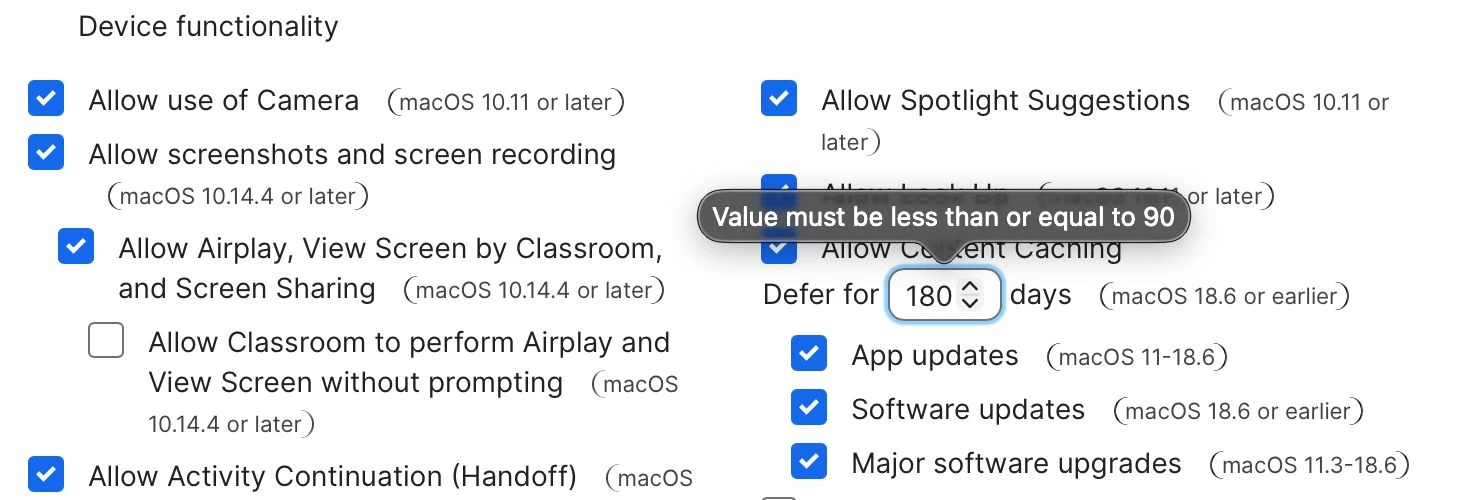
Are you also seeing macOS 18 in the Restrictions section on your end?

It appears that macOS 18 is not listed in the official Apple version list.

Additionally, the Defer macOS 26 update option seems to be deprecated and is no longer available in the Apple Developer list.