Question

How do I set Screen Saver to Never?

  • January 31, 2017
  • 9 replies
  • 66 views

Forum|alt.badge.img+7

Hi Everyone,
I have a couple lobby displays with mac minis connected to display pictures/slideshows. How can I set the screen saver to Never? I've tried settings in Configuration Profiles and Managed Preference Profiles, but nothing seems to be straight forward and clear as to resolve this so I'm confused. Thank you in advance for any help.

9 replies

bburdeaux
Forum|alt.badge.img+11
  • Contributor
  • January 31, 2017

Your easiest solution may be to package up Caffeine with the proper settings and deploy it to the minis.


Forum|alt.badge.img+10
  • Contributor
  • January 31, 2017

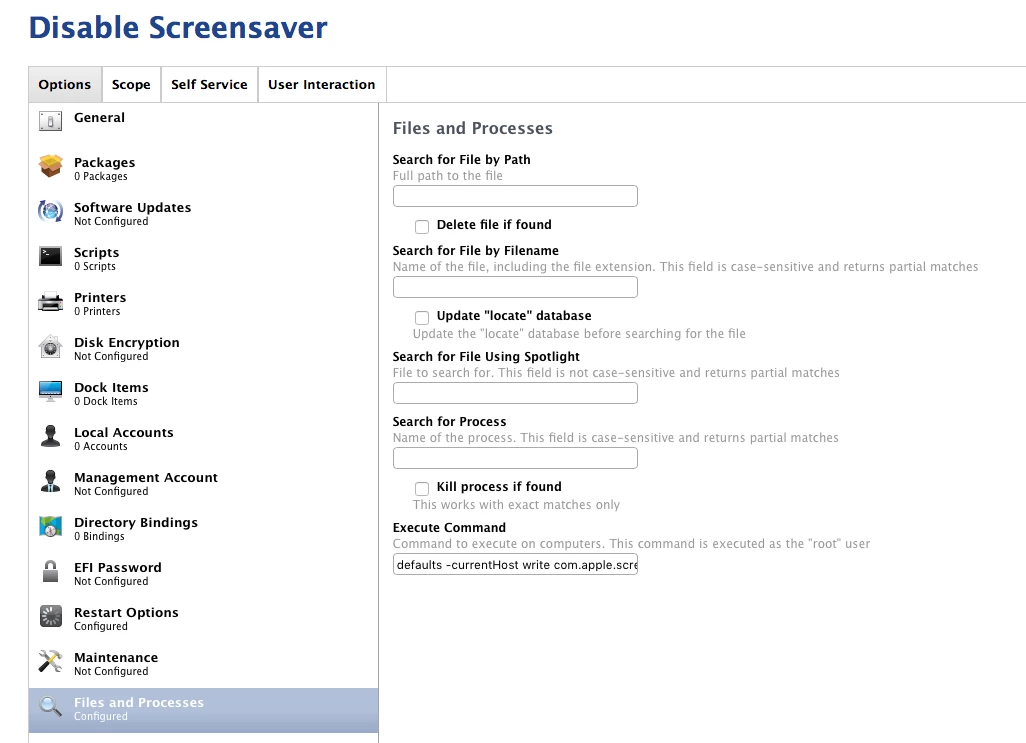
You can create a policy that executes the following command

defaults -currentHost write com.apple.screensaver idleTime 0

Scope that policy to the required computers and they will no longer display a screensaver


Forum|alt.badge.img+14
  • Contributor
  • February 1, 2017

defaults -currentHost write com.apple.screensaver idleTime 0


Forum|alt.badge.img+5
  • Contributor
  • September 15, 2017

This appears to be a user level setting. When I run it at login it does not affect the currently logging in user.


Forum|alt.badge.img+5
  • Contributor
  • February 21, 2018

The command does not work.


Forum|alt.badge.img+4
  • Contributor
  • February 21, 2018

would the following work:

user1=stat -f "%Su" /dev/console
sudo -u $user1 defaults -currentHost write com.apple.screensaver idleTime 0


Forum|alt.badge.img+14
  • Valued Contributor
  • August 22, 2018

This works: defaults write com.apple.screensaver idleTime 0


Forum|alt.badge.img+5
  • Contributor
  • August 23, 2018

With things like this I use configuration profiles github is a great source for this kind of thing


Forum|alt.badge.img+14
  • Valued Contributor
  • August 23, 2018

Agreed.. You can also add this to a Custom Profile as is so it will be enforced.