Question

Firefox JSON file on Macs

  • September 18, 2018
  • 15 replies
  • 120 views

Forum|alt.badge.img+26

Would folks on here be willing to share sample JSON files for deploying/managing Firefox with? Nothing too sensitive about your environment, but I’m having trouble wrapping my brain around the change to using a JSON file instead of using previous cck2 methods to manage with.

15 replies

Forum|alt.badge.img+16
  • Valued Contributor
  • September 18, 2018

We continue to use CCK2. You have to open the CCK2 extension itself in an older version of Firefox, but the autoconfig files it generates seem to still work fine with the current apps.


Forum|alt.badge.img+14
  • Contributor
  • September 18, 2018

Perhaps helpful ....

https://support.mozilla.org/en-US/kb/deploying-firefox-customizations-macos

https://addons.mozilla.org/en-US/firefox/addon/enterprise-policy-generator/

https://github.com/neilmartin83/autopkg-recipes/blob/master/Mozilla/FirefoxPolicies.pkg.recipe


Forum|alt.badge.img+15
  • Esteemed Contributor
  • September 18, 2018

Here's ours... The certificates part doesn't work on Firefox for Mac yet.

{
    "policies":
    {
        "Authentication":
        {
            "SPNEGO": ["example.com", "https://example.com"],
            "Delegated": ["example.com", "https://example.com"],
            "NTLM": ["example.com", "https://example.com"]
        },
        "Certificates":
        {
            "ImportEnterpriseRoots": true
        },
        "DisablePocket": true,
        "DisableTelemetry": true,
        "DontCheckDefaultBrowser": true,
        "Homepage":
        {
            "URL": "https://www.example.com"
        },
        "OverrideFirstRunPage": "https://www.example.com"
    }
}

Forum|alt.badge.img+4
  • Contributor
  • February 8, 2019

{ "policies": { "DisableAppUpdate": true, "DontCheckDefaultBrowser": true, "SearchBar": "separate", "Authentication": { "SPNEGO": ["xxxx.int", "xxxx.com"], "AllowNonFQDN": { "SPNEGO": true }, "Certificates": { "ImportEnterpriseRoots": true }, "DisableBuiltinPDFViewer": true, "DisableTelemetry": true, "DontCheckDefaultBrowser": true, "Homepage": { "URL": "http://ssoportal.xxxx.int/", "Locked": true, "StartPage": ["homepage", "previous-session"] }, "OverrideFirstRunPage": "http://ssoportal.xxxx.int", "OverridePostUpdatePage": "http://ssoportal.xxxx.int" }
}
}

However can't make it work...


Forum|alt.badge.img+5
  • Contributor
  • February 8, 2019

Forum|alt.badge.img+17
  • Valued Contributor
  • February 9, 2019

Since version 64, you can now configure Firefox using a configuration profile. A policy.json file is therefore no longer required unless you wish to package it up with the app.

https://github.com/mozilla/policy-templates/blob/master/mac/README.md


Forum|alt.badge.img+5
  • New Contributor
  • March 8, 2019

@grahamrpugh We can't get it to work with a configuration profile. Any tips?

We changed the Homepage in the original plist.
org.mozilla.firefox.plist > Custom payload on Computer Level. Firefox wasn't picking the changes.

Tested on v64 and v65.


Forum|alt.badge.img+5
  • Contributor
  • March 8, 2019

@iMathijs

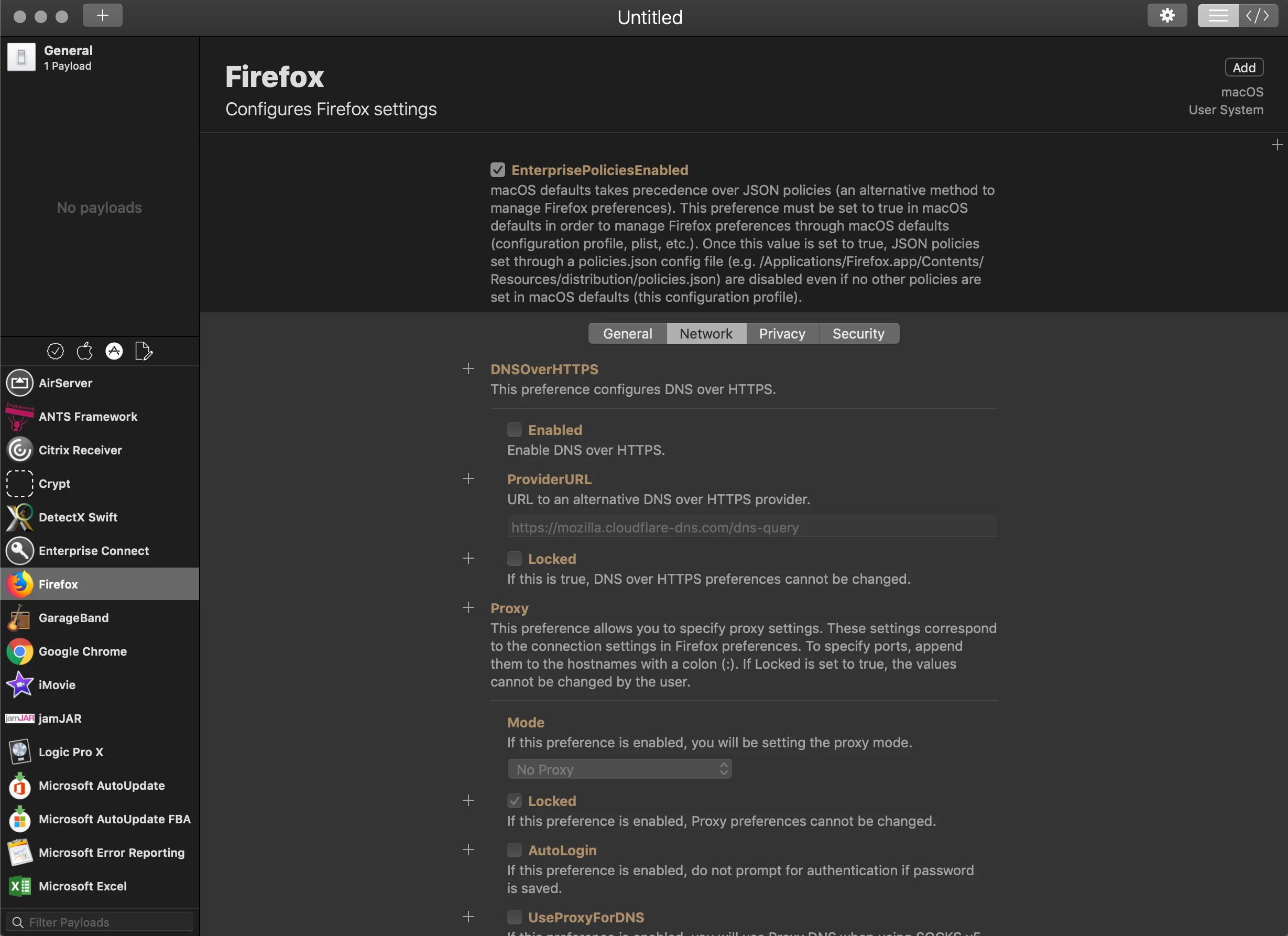
Make sure "EnterprisePoliciesEnabled" is set to true in the plist file.


Forum|alt.badge.img+5
  • New Contributor
  • March 8, 2019

@kroberts1 Awesome. Thx


Forum|alt.badge.img+3
  • New Contributor
  • March 8, 2019

Take a Look at ProfileCreator and save yourself a lot of work..
https://github.com/erikberglund/ProfileCreator/releases/tag/v0.2.4-beta.9


Forum|alt.badge.img+5
  • New Contributor
  • March 8, 2019

I've played with ProfileCreator a few months ago. Totally forgot about it. Thanks helps a lot.


Forum|alt.badge.img+2
  • New Contributor
  • May 31, 2019

@daniel.hayden ProfileCreator: what a wonderful time-saving tool! Thank you for sharing!


Forum|alt.badge.img+9
  • Valued Contributor
  • March 5, 2020

I'm trying to set the following configs for Firefox and i'm struggling. With a configuration profile i was able to successfully enable:
EnterprisePolicyEnabled and ImportEntepriseRoots. What I can't figure out how to do is enable network.negotiate-auth.delegation-uris and network.negotiate-auth.trusted.uris. at this point is it even possible to manage those specific configurations with a .plist and config profile or do i have to use a .json file to manage this?

Edit I realized after opening up profile creator what keys and dictionaries Firefox was actually wanting.

<?xml version="1.0" encoding="UTF-8"?>
<!DOCTYPE plist PUBLIC "-//Apple//DTD PLIST 1.0//EN" "http://www.apple.com/DTDs/PropertyList-1.0.dtd">
<plist version="1.0">
<dict>
    <key>EnterprisePoliciesEnabled</key>
    <true/>
    <key>Certificates</key>
    <dict>
        <key>ImportEnterpriseRoots</key>
        <true/>
    </dict>
    <key>Authentication</key>
    <dict>
        <key>SPNEGO</key>
        <array>
            <string></string>
            <string></string>
            <string></string>
        </array>
        <key>Delegated</key>
        <array>
            <string></string>
        </array>
    </dict>
</dict>
</plist>

Forum|alt.badge.img+26
  • Author
  • Valued Contributor
  • March 5, 2020

Glad this old post generated a healthy following...Since I originally asked the question I switched from doing the JSON file to a mobile config file that I handcrafted making sure to import enterprise roots and of course the setting to enable the use of mobile config files along with everything else we normally customize.

For anyone interested this Bugzilla submission talks about using the Mac’s preference management system to enable proper management of Firefox. Keeps me from having to repackage: https://bugzilla.mozilla.org/show_bug.cgi?id=1445943


Forum|alt.badge.img+6
  • Contributor
  • May 28, 2020

+1 to daniel.hayden and ProfileCreator suggestion.

I was struggling with Firefox and Chrome settings files syntax and understanding what the settings do. Profile Creator has explanations for each and lets you configure ALL the settings in a GUI. I exported as .plist and imported to a profile using the Application and Custom Settings payload.

To Daniels "save yourself a lot of work" I would add Do yourself a favor!