Solved

Monterey v12.1 update not available

  • January 25, 2022
  • 12 replies
  • 52 views

Forum|alt.badge.img+14

Hey folks...

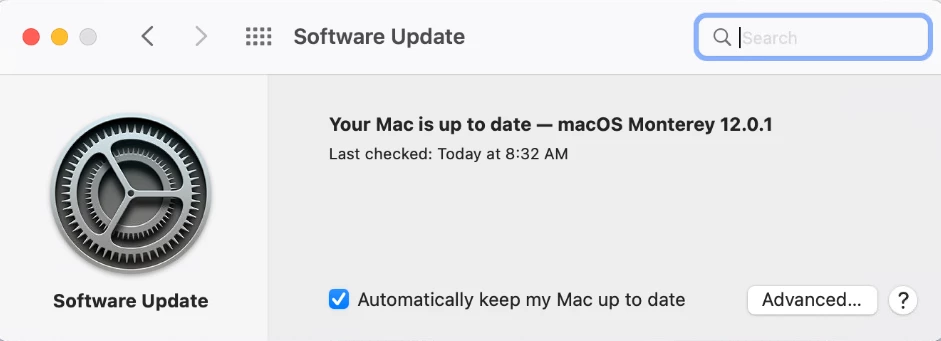
We are not blocking any software updates, yet we have a handful of Monterey Macs running 12.0.1 which are saying they are up to date, and not even giving the option to install 12.1.  Has anyone seem something similar and know how to fix?  Again, we have no config profiles in place that block or defer any software updates.

Best answer by ooshnoo

So we finally figured this problem out.  Our security team requires all laptops...mac and windows to use Zscaler, and while working with them I found the issue.

In the Zscaler admin console, they had whitlelisted Apple's entire IP range of 17.0.0.0... however they had it set to 17.0.0.0/24 ...which is only 256 addresses.

I noticed this and had them change it to 17.0.0.0/8, and voila!  All macs could see and download all updates.

What a big hassle.  I knew they had whitelisted apple IP in the past, so never thought anything of it.  But thanks now to my keen eye, it's fixed!

Thanks everyone who tried to help. I appreciate it your time.


P.S.  Zscaler is the devil.  don't ever use it!!!

12 replies

ljcacioppo
Forum|alt.badge.img+17
  • Jamf Heroes
  • January 25, 2022

You can try to kickstart the software update process

sudo launchctl kickstart -k system/com.apple.softwareupdated; sleep 5

ljcacioppo
Forum|alt.badge.img+17
  • Jamf Heroes
  • January 25, 2022

You can try to kickstart the software update process

sudo launchctl kickstart -k system/com.apple.softwareupdated; sleep 5

Also, just a note, you may have to relaunch System Preferences after running that command


Forum|alt.badge.img+14
  • Author
  • Honored Contributor
  • January 25, 2022

.


Forum|alt.badge.img+14
  • Author
  • Honored Contributor
  • January 25, 2022

You can try to kickstart the software update process

sudo launchctl kickstart -k system/com.apple.softwareupdated; sleep 5

Unfortunately it didn't work.


mvu
Forum|alt.badge.img+20
  • Jamf Heroes
  • January 25, 2022


mvu
Forum|alt.badge.img+20
  • Jamf Heroes
  • January 26, 2022

Did it work?


Forum|alt.badge.img+14
  • Author
  • Honored Contributor
  • January 26, 2022

Did it work?


I've passed the info onto our support team who will work with user to validate.


Forum|alt.badge.img+14
  • Author
  • Honored Contributor
  • February 7, 2022

Did it work?


it did not work unfortunately


mvu
Forum|alt.badge.img+20
  • Jamf Heroes
  • February 7, 2022

Forum|alt.badge.img+14
  • Author
  • Honored Contributor
  • February 7, 2022

Give this thread a read: https://community.jamf.com/t5/jamf-pro/big-sur-11-6-x-software-update-hangs/m-p/257912/emcs_t/S2h8ZW1haWx8dG9waWNfc3Vic2NyaXB0aW9ufEtaOExOQU1LRTRZWlJHfDI1NzkxMnxTVUJTQ1JJUFRJT05TfGhL#M238747


The command should help: sudo launchctl kickstart -k system/com.apple.softwareupdated


thanks.  I've had the command running every day for a couple weeks now.  will uncheck the box in inventory and see if that makes a diff


Forum|alt.badge.img
  • New Contributor
  • February 17, 2022

Did it work?


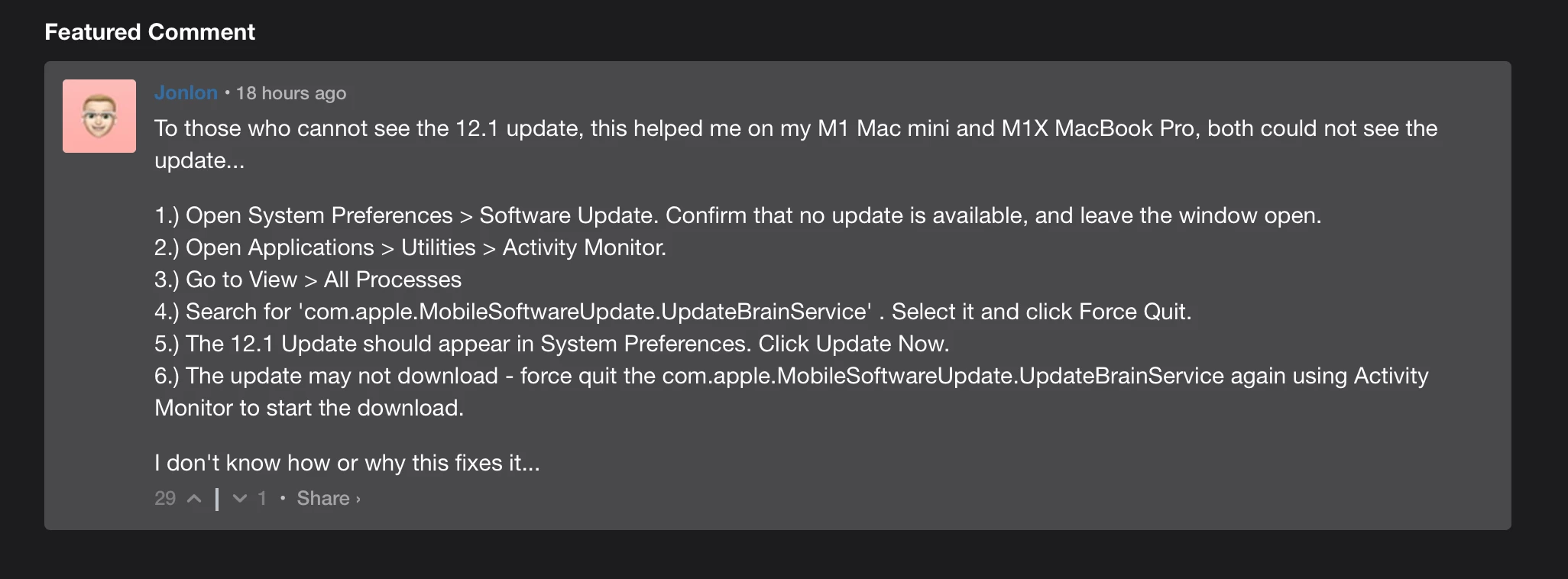
FWIW, I had an M1 mini in this state as well, and was stumped.  The directions in the screenshot above almost did it, but the process I had to kill was actually com.apple.NRD.UpdateBrainService -- the one mentioned in the snippet wasn't running.


Forum|alt.badge.img+14
  • Author
  • Honored Contributor
  • Answer
  • February 17, 2022

So we finally figured this problem out.  Our security team requires all laptops...mac and windows to use Zscaler, and while working with them I found the issue.

In the Zscaler admin console, they had whitlelisted Apple's entire IP range of 17.0.0.0... however they had it set to 17.0.0.0/24 ...which is only 256 addresses.

I noticed this and had them change it to 17.0.0.0/8, and voila!  All macs could see and download all updates.

What a big hassle.  I knew they had whitelisted apple IP in the past, so never thought anything of it.  But thanks now to my keen eye, it's fixed!

Thanks everyone who tried to help. I appreciate it your time.


P.S.  Zscaler is the devil.  don't ever use it!!!