Question

802.1.X Wired Identity Preferences

  • February 10, 2014
  • 16 replies
  • 79 views

antoinekinch11
Forum|alt.badge.img+9

How do you set 802.1.X Identity preferences in a script for a wired network? For wireless the command is:

security set-identity-preference -s com.apple.network.eap.user.identity.wlan.ssid.YOURNETWORKNAME -Z $cert

What would it be for wired? What replaces com.apple.network.eap.user.identity.wlan.ssid.YOURNETWORKNAME"

Thanks!

16 replies

Forum|alt.badge.img+19
  • Contributor
  • February 10, 2014

apple's mobileconfig profiles generate a UUID that gets used there. The UUID used is listed in the profiles preference pane as the "Enterprise Profile ID" for that payload.

The format's slightly different for wired, too. it's com.apple.network.eap.system.identity.profileid.uuid
I've never needed to look into it any further than that, though.


antoinekinch11
Forum|alt.badge.img+9
  • Author
  • Contributor
  • February 11, 2014

So the line would be com.apple.network.eap.system.identity.profileid.uuid.NUMBERHERE ?

Thanks @nkalister][/url , I am going to try testing this today!


antoinekinch11
Forum|alt.badge.img+9
  • Author
  • Contributor
  • February 11, 2014

@nkalister][/url, what I have discovered is that the UUID is not static (unique) for the Enterprise Profile ID on each machine connecting to the network (obviously although I wished it wasn't). So in the script I need to know how to flag/identify the UUID and then have the user Cert ($cert) that is identified applied to it.


Forum|alt.badge.img+19
  • Contributor
  • February 11, 2014
Posted Today at 7:36 AM by bajankinch So the line would be com.apple.network.eap.system.identity.profileid.uuid.NUMBERHERE ?

almost- it's com.apple.network.eap.system.identity.profileid.NUMBERHERE


Forum|alt.badge.img+1
  • New Contributor
  • May 27, 2016

Is there any way to retrieve "Enterprise Profile ID" of the profile? so that we can use it for setting identity preference


Forum|alt.badge.img+5
  • New Contributor
  • May 27, 2016

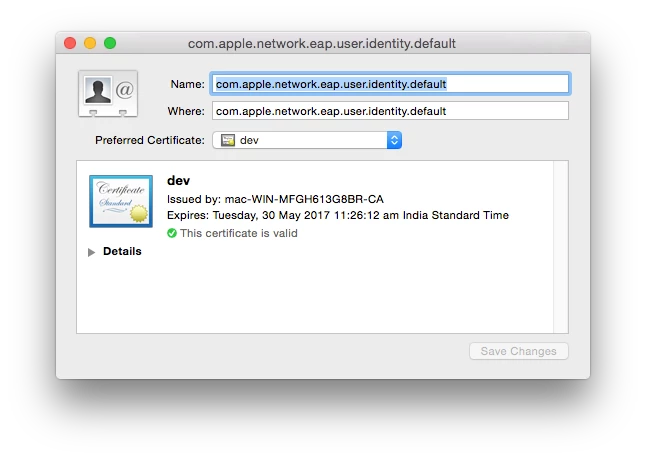
we just use 'com.apple.network.eap.user.identity.default'


Forum|alt.badge.img+1
  • New Contributor
  • May 30, 2016

I am currently using the below command to, "security set-identity-preference -c <Common name of the Certificate> -s com.apple.network.eap.user.identity.default"
to set the identity preference.

In Keychain access,
I am able to see the respective certificate getting linked to the identity.

But still I am getting "Select Certificate" popup during connection, it is not picking the certificate from identity.

Is there any other extra steps necessary to set identity preference for ethernet?


Forum|alt.badge.img+8
  • Contributor
  • May 31, 2016

Do you have more than one identity certificate in the Keychain?

This is the message I got from Apple Enterprise Support.

At this point the "Certificate Picker" will always show if you have more than one. It's not possible to set a default. Yet.

There is a feature request on it.

If you ever find a way. Please share it in here.


Forum|alt.badge.img+5
  • Contributor
  • June 21, 2016

@macninja_IO is there a way to upvote that feature request?


Forum|alt.badge.img+14
  • Valued Contributor
  • June 21, 2016

If you're looking for auto-connect without a pop-up for certificates, you could use machine certificates for authentication. Not sure if that's possible for the people in this thread but if so, makes life a lot easier.

You would still deploy your 802.1x profile via a configuration profile but instead it would use a machine based certificate that would be used to authenticate to your internal network.


Forum|alt.badge.img+5
  • Contributor
  • June 21, 2016

@perrycj I am deploying a config profile with scep+rootcert+wifi. In WiFi config the root cert is added to trusts and identity certificate the scep payload is picked. The 802.1x connects but the "Select Certificate" always pops up first time when connecting to the corporate network and machinecert is selected, then it works. The other certificate that is on all managed macs is the MDM cert. If this could be hidden i guess it could work.


Forum|alt.badge.img+14
  • Valued Contributor
  • June 21, 2016

@Jens.Mansson Do you have AD in your environment? If so, do you have a certificate template you can use with your profile?

What type of connection are you trying to use, i.e., EAP-FAST, EAP-TLS, etc. for wired?


Forum|alt.badge.img+14
  • Valued Contributor
  • June 22, 2016

If you're looking for auto-connect without a pop-up for certificates, you could use machine certificates for authentication. Not sure if that's possible for the people in this thread but if so, makes life a lot easier.

You would still deploy your 802.1x profile via a configuration profile but instead it would use a machine based certificate that would be used to authenticate to your internal network.


Forum|alt.badge.img+5
  • Contributor
  • June 22, 2016

The scep+wifi config is just what you say. The scep payload let the machine pull a machinecert from a NDES relay and is added to certificate auth for wifi, the clients gets the cert, the 802.1x connects but since there are more than one cert, we still need to choose the correct one from a dropdown list (select cert). This worked in yosemite and early elcap, now its its imposssible to force the right one. If you have a solution, please do tell.

Edit: to clarify. To use a machine cert with wifi, the payload for scep/ndes must be in the same config. I suspect that Apple changed this in elcap as it worked flawless in yosemite.


Forum|alt.badge.img+14
  • Valued Contributor
  • June 22, 2016

@Jens.Mansson I don't know why it posted my post twice, sorry about that.

For your wired profiles, are you using a certificate template from AD?


Forum|alt.badge.img+14
  • Valued Contributor
  • June 22, 2016

@Jens.Mansson Also, you have to make sure your configuration profiles are in system mode if you want to auto-connect. If you are creating them from scratch in the JSS, they will always be in user mode and the pop up box will persist. This is product defect that JAMF just filed. It is still broken as of 9.92 of the JSS.

Right now the only way to make them stay in system mode is create them in profile manager, sign them and then add them to the JSS. If you add without signing, the JSS will junk up the profile and strip (or ignore) system mode and the profile will be in user mode, causing pop-ups.