Question

Active Directory Password Expiration Login Prompt

  • December 3, 2015
  • 19 replies
  • 44 views

Forum|alt.badge.img+6

What's up Group!

We've searched for this high and low and we've read multiple topics on AD here at JAMF. We were was wondering if anyone knows how to disable/kill the AD password expiration prompt our users get when they log into their machines?
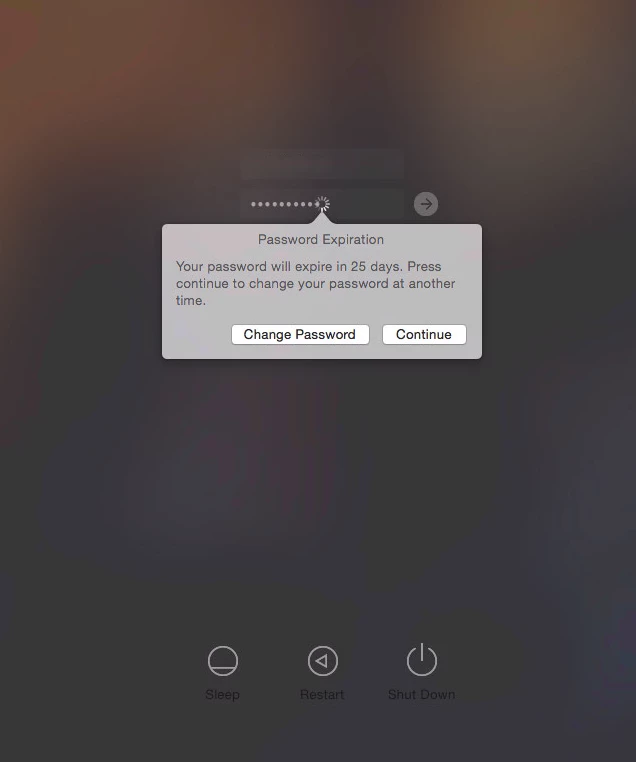
We'd like to use the ADPassMon utility going forward for password changes that a bunch of you have praised and suggested using. We are pretty much FED UP with how AD and Keychain don't get along! Any thoughts? Thanks a bunch!


19 replies

Forum|alt.badge.img+16
  • Honored Contributor
  • December 3, 2015

I'm fairly certain that if the user is a Mobile User and you are connected to the domain at login, there is no way to disable that prompt.


bentoms
Forum|alt.badge.img+35
  • Hall of Fame
  • December 3, 2015

@monaronyc Funnily enough, I just added how to the ADPassMon wiki yesterday. :)

@hkabik see above. You can. :)


Forum|alt.badge.img+16
  • Honored Contributor
  • December 3, 2015

@bentoms Someday I'm going to have to buy you a beer. Or 100.


bentoms
Forum|alt.badge.img+35
  • Hall of Fame
  • December 3, 2015

@hkabik haha. A couple at JNUC2016?


Forum|alt.badge.img+16
  • Honored Contributor
  • December 3, 2015

You're on.


davidacland
Forum|alt.badge.img+18
  • Valued Contributor
  • December 3, 2015

@monaronyc just out of curiosity, what makes you want to remove the prompt? If a user's password is going to expire soon, isn't it better they know so they can take action?


Forum|alt.badge.img+6
  • Author
  • Contributor
  • December 3, 2015

@bentoms EXCELLENT! I was a little skeptical with the screenshots being we're Yosemite but I just tried it and it worked! THANK YOU! THANK YOU! THANK YOU!

@davidacland We've been inundated with Keychain problems more than we know what to do with. It stems from users changing their passwords from the prompt above in the screenshot. If they change their passwords there, Keychain is a mess. Computer becomes unresponsive due to all the keychain login prompts. If we disable it, this will force them to use the ADPassMon menu to change it where it should to be changed.


kishjayson
Forum|alt.badge.img+7
  • Contributor
  • December 4, 2015

@bentoms Thanks for sharing this! Just out of curiosity, how are AD users notified that their password will be expiring if this prompt is suppressed. I'm entertaining the idea of suppressing it as well because of the disconnect it causes with the Keychain, but I'm afraid users won't "know" to change their password and will need to call our IT Service Desk more often due to account lockouts.


Forum|alt.badge.img+10
  • Contributor
  • December 4, 2015

@monaronyc I had the same problem I ran the following script on all computers. I've not seen the password expiring prompt at login since doing this.

Our users get several emails telling them that their password is about to expire.

#!/bin/sh
sudo defaults write /Library/Preferences/com.apple.loginwindow PasswordExpirationDays -int 0

Forum|alt.badge.img+6
  • Author
  • Contributor
  • December 4, 2015

@kish.jayson If you use the ADPassMon utility, it places a number (the number of days their AD password is due to expire) and depending on when you set the preference to notify the user, a notification alert will appear as well. So there's a few indications the user will know. But just the number itself appearing in the menu bar is clear enough.


Forum|alt.badge.img+5
  • Contributor
  • December 5, 2015

Somewhat related, has anyone been looking into Enterprise Connect? I sat through one of two meetings about it. It doesn't solve all of the issues I'm facing, but as far as password resets/keychain updates, it seems to fit the bill. I've also heard that it may be a free addition to an upcoming version of OS X.


Forum|alt.badge.img+9
  • Valued Contributor
  • December 5, 2015

@ndobric I asked my Apple Business rep about it, and he said he'd get back to me (that was Tuesday). Haven't heard from him since. So, to me, it's a mythical beast, like unicorns or dragons. I have no proof it exists except for the crazy ramblings of JAMFNation users who say they've seen it (like Loch Ness monster sightings).


mpermann
Forum|alt.badge.img+22
  • Valued Contributor
  • December 6, 2015

@itupshot Enterprise Connect is a real product/service available from Apple. Have a look at this thread. The first post is by @rjlemmon from Apple Professional Services with a basic overview of the product. He has been answering questions from folks so you could post on the thread and he would likely respond.


Forum|alt.badge.img+14
  • Contributor
  • December 6, 2015

@ndobric

free addition to an upcoming version of OS X

I hope this is true.


Forum|alt.badge.img+9
  • Valued Contributor
  • December 6, 2015

@mpermann I was trying to make a joke.

I've been following that thread. In fact, that's how I first read about the product. However, like I said, when I asked our Apple Business rep about it, he hasn't gotten back to me all week.

I think I'll just end up using ADPassMon because those darned "Local Items" keychain issues after my users change their password are really REALLY annoying me.


mpermann
Forum|alt.badge.img+22
  • Valued Contributor
  • December 6, 2015

@itupshot sorry, I missed the joke and didn't see you had posted in the thread. Not all Apple reps are as responsive as others, so you may need to bug yours a bit more than others. Hopefully you'll get the information you're needing.


Forum|alt.badge.img+9
  • Contributor
  • June 29, 2016

Hey all...

A little late, but better later than never....right?

Is there any way to just remove the 'Change password' button in this prompt? I'd like to remind our users with the standard AD prompt at Mac OS login, but changing the password here is where the keychain issue occurs. I'd like to drive our users to the Sys Prefs/Users and Groups/Change Password. When they change the password here, keychains get updated as expected.

Thanks,

Dev


mm2270
Forum|alt.badge.img+24
  • Legendary Contributor
  • June 29, 2016

@devlinford

Is there any way to just remove the 'Change password' button in this prompt?

I seriously doubt it. That pop up is generated and controlled by the OS, not a simple script, so I don't think you could remove just the button without hacking the OS and breaking something in the process.

I'd look at other solutions, like some of the ones mentioned here.


Forum|alt.badge.img+9
  • Contributor
  • June 29, 2016

@mm2270

Yeah, thanks....I was afraid of this...

I am looking into the other options available, such as, deleting this notification all together and taking care of it within the user account:

https://jamfnation.jamfsoftware.com/discussion.html?id=4619

Thanks,