Question

AD login on wifi....

  • December 10, 2015
  • 17 replies
  • 9 views

Forum|alt.badge.img+10

hi all... i have been reading all posts regarding users login to AD on wifi on laptop for first time... and not getting it to work...

Normally, users get to login on their laptop for first time while they are connected to network... then they can login on wifi no problem since they have mobile accounts...

But we want now the users to be able to borrow any laptops and be able to login on those laptops for first time on wifi...

I tried configuration profile adding Network item... and configuring for our WPA2 enterprise.... with options to user AD credentials etc...

on my laptop login window i know see the Wifi selection drop down menu... i select our Wifi...

then enter user and password, i see for a small second the wifi icon top right of the screen blinking one time like if it wanted to connect... and then nothing. It returns to the login windows like if the credentials were wrong...

Tried multiple configurations... no luck....

17 replies

Forum|alt.badge.img+12
  • Valued Contributor
  • December 10, 2015

We have this working in 10.10, not as sure about 10.11 yet. We have an account in AD that the laptops connect to in their Profile under the 802.11 payload. That account gets the laptop online with AD to begin with, so that wireless users can do lookups and authenticate over Wi-Fi as a second step. It's been working for at least 4 years now successfully under 10.7-10.10.


Forum|alt.badge.img+10
  • Author
  • Contributor
  • December 10, 2015

hi @SGill

thanks for your reply... we tried that but for some reason it does not kick in... could you provide a screen shot without any personnal details of your configuration profile ?

thanks in advance...


Forum|alt.badge.img+11
  • Contributor
  • December 10, 2015

I think you have to use 802.1x with computer authentication not user.


Forum|alt.badge.img+10
  • Author
  • Contributor
  • December 10, 2015

@pblake yes we have selected computer level


Forum|alt.badge.img+11
  • Contributor
  • December 10, 2015

@jmercier - I am not referring to Configuration Profile levels, I mean AD certificate levels for 802.1x. You can do 8021.x for AD user authentication, or computer based authentication in AD.
Meaning if a computer is connected via 802.1x with computer based AD certificates then any user even local users can use wifi because the computer is authenticated with a computer certification from the Radius server.
If you use User Based authentication n 802.1x then those certs need to be installed first per user.


Forum|alt.badge.img+12
  • Valued Contributor
  • December 10, 2015

Let me know if you still need those shots or if the info above fixed things for you...


Forum|alt.badge.img+11
  • Contributor
  • December 10, 2015

@jmercier - think of it like the chicken and the egg. If the computer doesn't know you yet, meaning you have never logged in, it can let you use wireless because you are not an authenticated user. You can't try and log in, using the wifi to create a profile, to tell the computer you are authorized.

Multi-User machines you want machine based authentication, not user, for 802.1x

https://jamfnation.jamfsoftware.com/discussion.html?id=15419


Forum|alt.badge.img+12
  • Valued Contributor
  • December 10, 2015

Yea, that's how we're doing it, too


Forum|alt.badge.img+11
  • Valued Contributor
  • December 10, 2015

pblake is right. We have the same setup and I have to constantly remind our Network Services group to not do away with computer authentication for wireless. They have a report running through Aruba to do an inventory scan on our JSS every 30 minutes for wireless MAC addresses. The devices are identified and authorized by the MAC addresses.


Forum|alt.badge.img+10
  • Author
  • Contributor
  • December 10, 2015

hi @SGill

Hi

i will read all the documentation you guys gave me... but yes i would take the screenshot to help me to understand more the concept of this... i really appreciate...


Forum|alt.badge.img+12
  • Valued Contributor
  • December 10, 2015

Hi @jmercier

Will send to you via email soon...


Forum|alt.badge.img+10
  • Author
  • Contributor
  • December 11, 2015

Thanks @SGill

i really appreciate


Forum|alt.badge.img+13
  • Honored Contributor
  • December 11, 2015

@SGill if you could post/host your config that would be great. Starting on this next week

tia

Larry


Forum|alt.badge.img+12
  • Valued Contributor
  • December 11, 2015

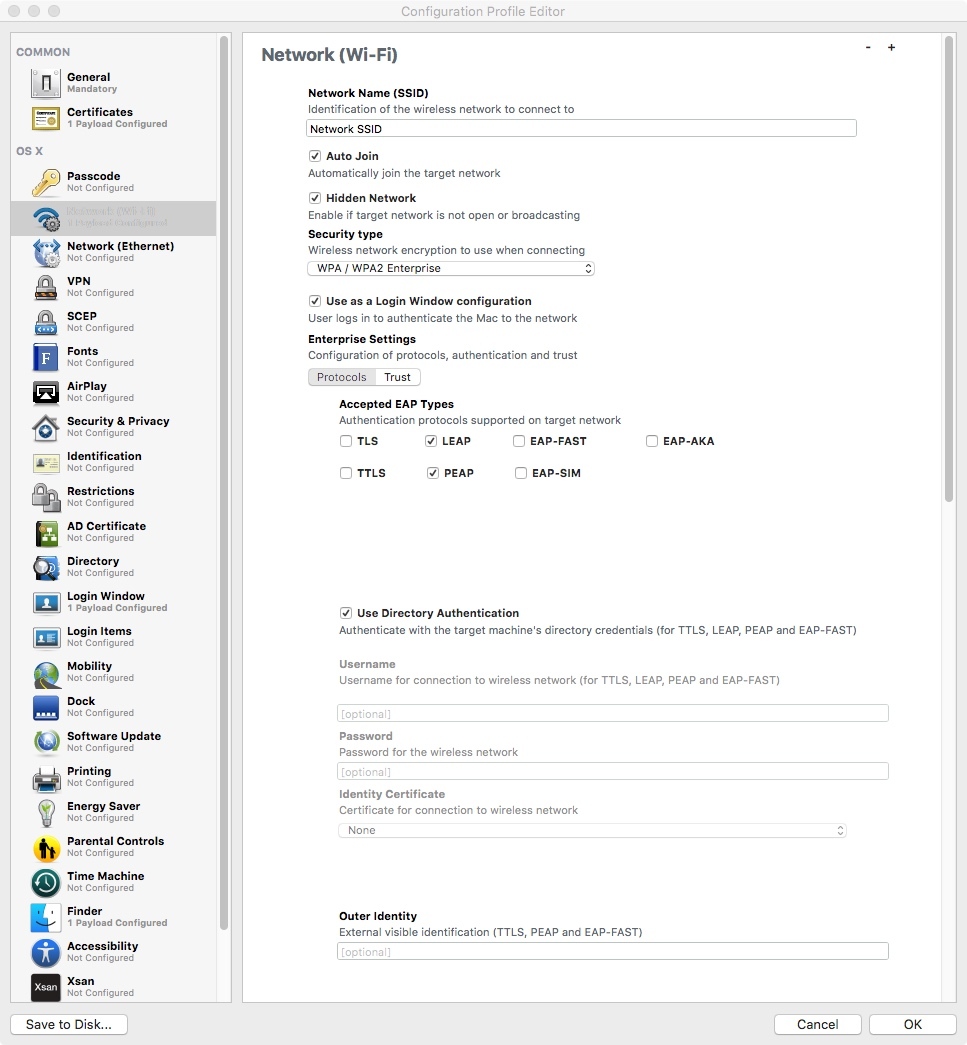
This should be the payload that is most relevant...add your info for the "connection account" described by the other users above. You should be able to do this in any app that supports pushing out Configuration Profiles (OS X Server/Casper/others).

Also, make sure to check for cert trouble/expirations with your network admins. That could be killing your ability to establish a working connection, as well.


Forum|alt.badge.img+10
  • Author
  • Contributor
  • December 11, 2015

hi... we have casper... thats exactly how its configured...

i boot the computer... see the drop down menu with our wifi network... i enter the AD account with password...

then i see the wifi icon blink 2 times... then i wait... and the login shakes like saying wrong password... tried multiple users... and then i connect the ethernet cable... and i can login after... but not wifi...


Forum|alt.badge.img+12
  • Valued Contributor
  • December 11, 2015

You shouldn't have to enter anything at the login screen except the end users' AD credential....

The "connection account" should be embedded with no need to enter it manually once deployed.

Check your network's wireless access controllers to see whether the account you created in AD is attempting to connect, and whether it is successful.

I think you're trying to use a user account setup...you need the 802.1x computer-level connection instead.


Forum|alt.badge.img+10
  • Author
  • Contributor
  • December 11, 2015

Thats probably what im missing... the way to configure everything to have computer level connection...