Solved

Add a Login Item via configuration or better suggestion (Cisco Secure Client question)

  • March 20, 2024
  • 4 replies
  • 137 views

Forum|alt.badge.img+3

I'm deploying the latest version for Cisco Secure Client (5.1.2.42), which I have the configuration profiles for to provide the needed permissions for deployment, but this version of the Cisco Secure Client prompts users to add or enable the "Cisco Secure Client - AnyConnect VPN Service" as a login item.


Any suggestions as to how to enable this without any user intervention for all users?


Best answer by Ltru


Hi Jose,
I had the same issue as you, the Cisco administration document should contain all the info you need.

https://www.cisco.com/c/en/us/td/docs/security/vpn_client/anyconnect/Cisco-Secure-Client-5/admin/guide/b-cisco-secure-client-admin-guide-5-1/macos11-on-ac.html


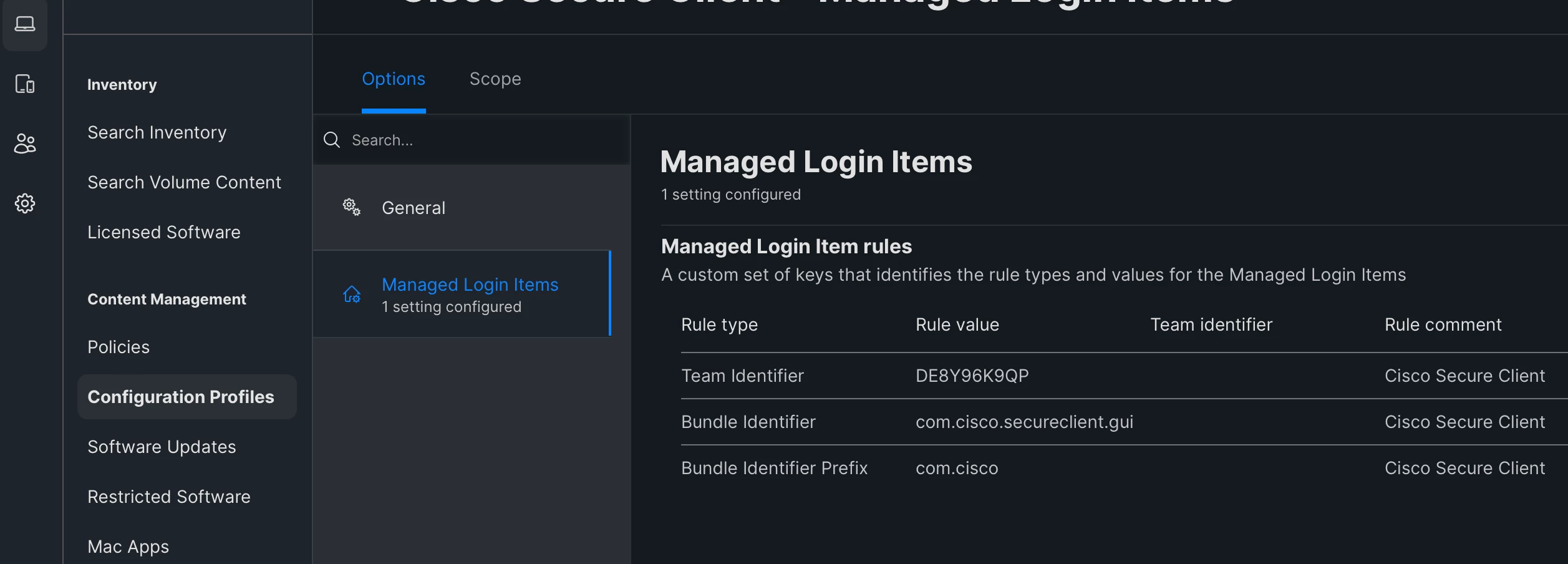
I created a config profile using Managed Login Items using the Team identifier, DE8Y96K9QP .

Hope this helps!

4 replies

Forum|alt.badge.img+3
  • New Contributor
  • Answer
  • March 20, 2024
 

Hi Jose,
I had the same issue as you, the Cisco administration document should contain all the info you need.

https://www.cisco.com/c/en/us/td/docs/security/vpn_client/anyconnect/Cisco-Secure-Client-5/admin/guide/b-cisco-secure-client-admin-guide-5-1/macos11-on-ac.html


I created a config profile using Managed Login Items using the Team identifier, DE8Y96K9QP .

Hope this helps!


Forum|alt.badge.img+3
  • New Contributor
  • March 20, 2024

Hopefully this helps you out. I've recently deployed it to my Org. I also set a payload to stop notifications. 
Create a configuration profile or just add to the existing one;
Configured Setting: Managed Login Items
Rule Type: Team Identifier           Rule Value: DE8Y96K9Q           Team identifier: left empty         

Sorry, I cannot upload an image for some reason. 


mvu
Forum|alt.badge.img+20
  • Jamf Heroes
  • March 20, 2024


Forum|alt.badge.img+3
  • Author
  • New Contributor
  • March 22, 2024
 

Hi Jose,
I had the same issue as you, the Cisco administration document should contain all the info you need.

https://www.cisco.com/c/en/us/td/docs/security/vpn_client/anyconnect/Cisco-Secure-Client-5/admin/guide/b-cisco-secure-client-admin-guide-5-1/macos11-on-ac.html


I created a config profile using Managed Login Items using the Team identifier, DE8Y96K9QP .

Hope this helps!


Thank you. It worked!