Solved

Add Chrome to the Dock

  • July 30, 2019
  • 19 replies
  • 102 views

Forum|alt.badge.img+4

I'm sure I'm missing something easy but I cannot find a way to add non-apple apps to the dock via Jamf. Any suggestions?

Best answer by sshort

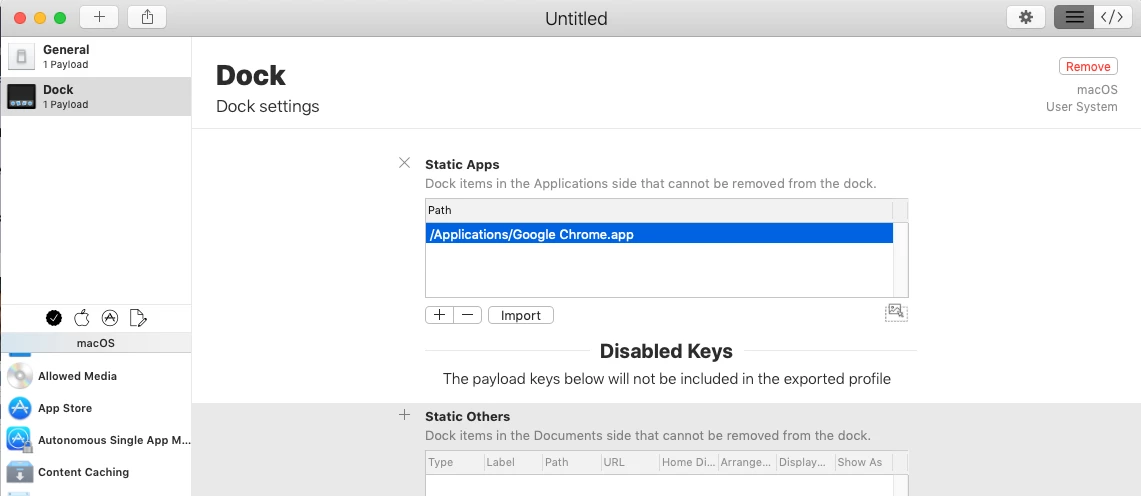
Check out ProfileCreator to make a dock profile with 3rd party apps. You'll want to sign the profile before uploading to Jamf, as well.
19 replies

Forum|alt.badge.img+11
  • Contributor
  • 76 replies
  • July 30, 2019

I will assume you mean macOS and not iOS, correct?


Forum|alt.badge.img+15
  • Valued Contributor
  • 301 replies
  • Answer
  • July 30, 2019

Check out ProfileCreator to make a dock profile with 3rd party apps. You'll want to sign the profile before uploading to Jamf, as well.


Forum|alt.badge.img+4
  • Author
  • Contributor
  • 13 replies
  • July 30, 2019

Yep on MacOS,

Great I'll try that profile maker. Thanks all!


Forum|alt.badge.img+13
  • Contributor
  • 341 replies
  • July 30, 2019

Settings -> Computer Management -> Dock Items -> +NEW -> Add display name and path to app (e.g. file://Macintosh HD/Applications/Google Chrome.app)

Now make a policy set to run at login and ongoing. Add Dock items on the left side and Add Chrome -> Add to Beginning (or end) of Dock.


Forum|alt.badge.img+4
  • Author
  • Contributor
  • 13 replies
  • July 30, 2019

Awesome I'll give that a try ty!


Forum|alt.badge.img+5
  • Contributor
  • 30 replies
  • July 31, 2019

@sshort Can you also remove unwanted icons with a profile?

Thanks


Forum|alt.badge.img+15
  • Valued Contributor
  • 135 replies
  • August 1, 2019

I use dockutil - https://github.com/kcrawford/dockutil - makes it super easy to manage all things dock

#!/bin/sh
/usr/local/bin/dockutil --remove all --no-restart --allhomes

sleep 2

/usr/local/bin/dockutil --add "/Applications/System Preferences.app" --allhomes
/usr/local/bin/dockutil --add "/Applications/Launchpad.app" --allhomes
/usr/local/bin/dockutil --add "/Applications/Google Chrome.app" --allhomes
/usr/local/bin/dockutil --add "/Applications/Slack.app" --allhomes
/usr/local/bin/dockutil --add "/Applications/Self Service.app" --allhomes

sleep 2

killall Dock

sleep 2

Forum|alt.badge.img+9
  • Contributor
  • 55 replies
  • August 1, 2019

I manage my staff and lab macs separately by using Configuration profiles. Managing the Dock through config profile allows me to customize each lab and add any .app I wan along with removing all but what I want displayed, for staff I Merge with users dock to allow them to add/remove their own apps.


Forum|alt.badge.img+15
  • Valued Contributor
  • 301 replies
  • August 1, 2019

@piagetblix Yes, the default behavior is to replace the existing dock with the items you define in your profile. However, you can also select the "merge with user's dock" option to keep the existing dock items, and just add what you have in your profile.

As long as "prevent modifying items in dock" is not enabled, the user is free to adjust the dock.


Forum|alt.badge.img+12
  • Contributor
  • 181 replies
  • August 3, 2019

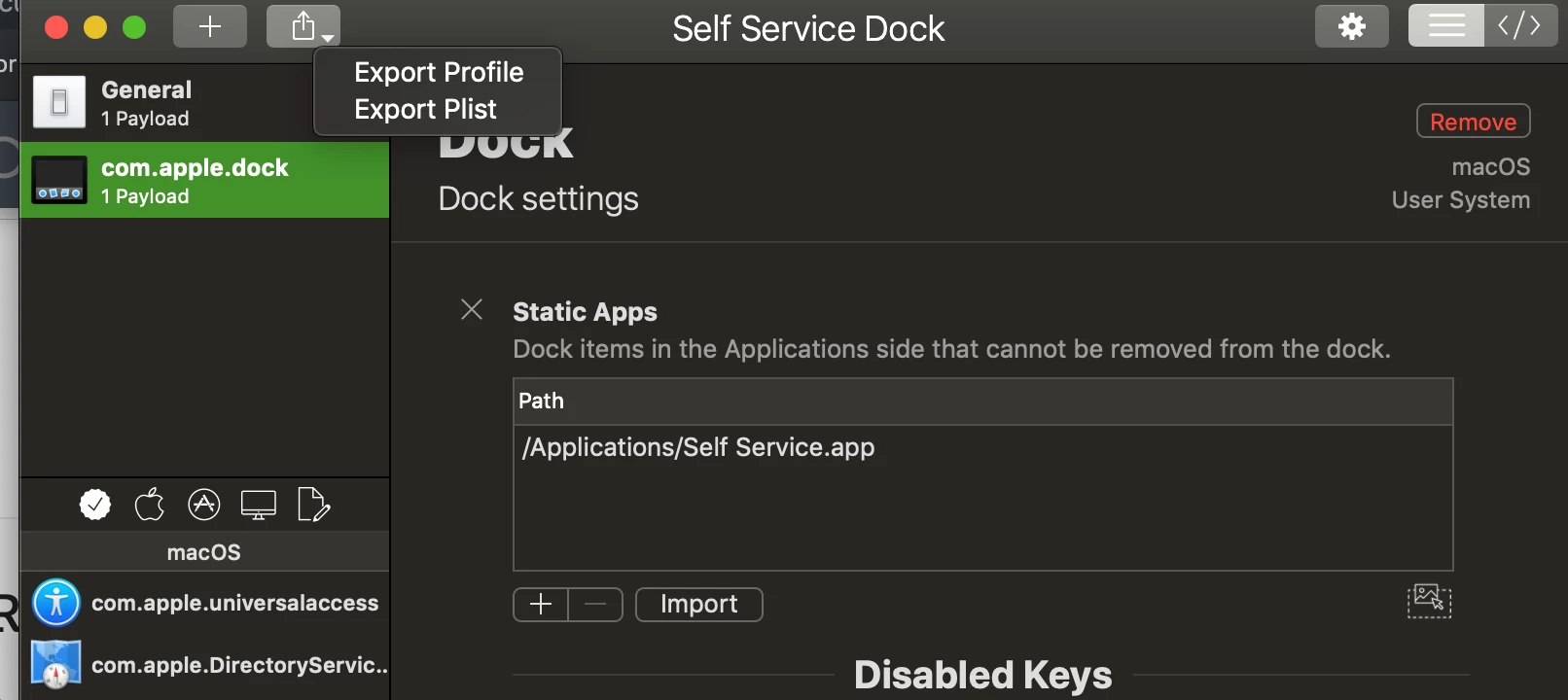
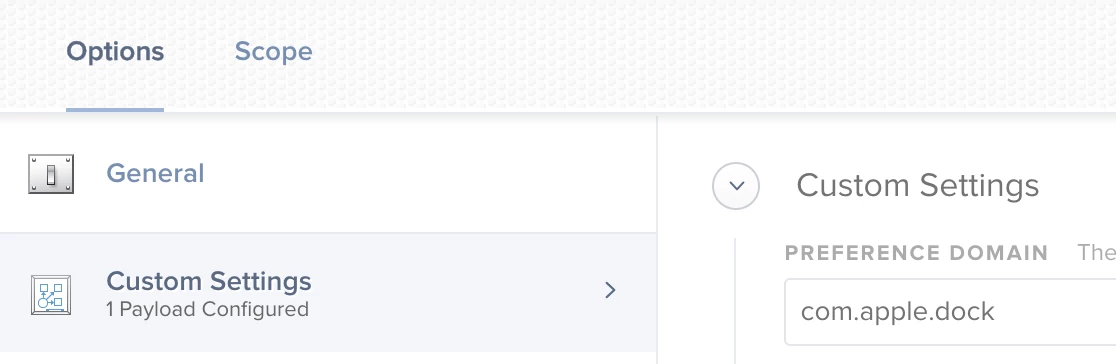
I would second using profile creator. You can make a dock profile that adds to the existing and use the export plist option, long click on the export button, then you can just add that as a custom setting in a profile so no need to sign it. Advantage is you can still see the settings in the profile because when they are signed you can't.


Forum|alt.badge.img+4
  • Author
  • Contributor
  • 13 replies
  • August 5, 2019

Ok awesome, @marklamont so you don't need to sign it? I haven't had one work yet and thought that was my issue.


Forum|alt.badge.img+12
  • Contributor
  • 181 replies
  • August 5, 2019

no need to sign, just make sure you export plist and add as custom.


Forum|alt.badge.img+18
  • Esteemed Contributor
  • 831 replies
  • August 8, 2019

@sshort It seems even if I have "prevent modifying items in dock" unchecked it won't allow me to remove apps from the dock that are specified in the profile. I supposed you have to check the merge button to allow things to be deleted?
Gabe Shackney
Princeton Public Schools


Forum|alt.badge.img+4
  • Author
  • Contributor
  • 13 replies
  • August 8, 2019

@marklamont alright that was crazy helpful. Can you have more than one plist per Config Profile? I pushed it to a test group yesterday and the profiles seem to be failing when they attempt to apply to the macs.


Forum|alt.badge.img+18
  • Esteemed Contributor
  • 831 replies
  • August 8, 2019

@amorse I just tested with both a dock and a Desktop picture plist to the custom section of one profile and it seems to work pretty well.
Gabe Shackney
Princeton Public Schools


Forum|alt.badge.img+5
  • Contributor
  • 40 replies
  • August 9, 2019

This whole thread just alleviated my frustration. I finally have a working dock for this lab configuration I'm putting together. Thanks.


jaellington
Forum|alt.badge.img+4
  • Contributor
  • 16 replies
  • September 19, 2019

This may seem like a silly question, but how do I export the profile from Profile Creator as a .plist?


jaellington
Forum|alt.badge.img+4
  • Contributor
  • 16 replies
  • September 19, 2019

NVM, turns out you can find answers when you read things carefully... :p


Forum|alt.badge.img+8
  • Valued Contributor
  • 86 replies
  • December 2, 2020

Looks like Big Sur broke Profile Creator?

Crashes out as soon as I launch it.