Question

Add Sites to Google Chrome's Pop Up Blocker's Managed Exceptions

  • October 19, 2015
  • 5 replies
  • 23 views

Forum|alt.badge.img+23

I'm hoping I'm not the first to tackle this issue...

I'm looking for a way to add a site to Google Chrome's pop up blocker's list of managed exceptions.

I've seen some older posts that create or overwrite files, taking the sledgehammer approach of destroying all settings in the given file. I'm hoping to identify the appropriate file in which to add a managed exception.

Of course, I want to do this in a scalable, programmatic fashion.

Anyone already there?

Thanks!

5 replies

mm2270
Forum|alt.badge.img+24
  • Legendary Contributor
  • October 19, 2015

I have not done it myself, but I think (not sure) that the com.google.Chrome.manifest file may be able to help you do this in a managed way. But maybe others have tried to do it and it doesn't work? I'm not certain.
I just poked around in it and I see a few keys:
PopupsAllowedForUrls and PopupsBlockedForUrls. I would look there as a start


Forum|alt.badge.img+7
  • New Contributor
  • October 19, 2015

@milesleacy Configuration profile might be your best bet, i used mcxToProfile to create this:

<?xml version="1.0" encoding="UTF-8"?>
<!DOCTYPE plist PUBLIC "-//Apple//DTD PLIST 1.0//EN" "http://www.apple.com/DTDs/PropertyList-1.0.dtd">
<plist version="1.0">
<dict>
    <key>PayloadContent</key>
    <array>
        <dict>
            <key>PayloadContent</key>
            <dict>
                <key>com.google.Chrome</key>
                <dict>
                    <key>Forced</key>
                    <array>
                        <dict>
                            <key>mcx_preference_settings</key>
                            <dict>
                                <key>DefaultPopupsSetting</key>
                                <integer>2</integer>
                                <key>PopupsAllowedForUrls</key>
                                <array>
                                    <string>http://www.tomholbrook.co.uk</string>
                                </array>
                            </dict>
                        </dict>
                    </array>
                    <key>mcx_targets</key>
                    <array>
                        <string>user-managed</string>
                    </array>
                </dict>
            </dict>
            <key>PayloadEnabled</key>
            <true/>
            <key>PayloadIdentifier</key>
            <string>MCXToProfile.bceaecbb-e125-42f0-b827-85066b2b01c3.alacarte.customsettings.d8e1254e-7c7e-4f50-955d-467f41a49f8b</string>
            <key>PayloadType</key>
            <string>com.apple.ManagedClient.preferences</string>
            <key>PayloadUUID</key>
            <string>d8e1254e-7c7e-4f50-955d-467f41a49f8b</string>
            <key>PayloadVersion</key>
            <integer>1</integer>
        </dict>
    </array>
    <key>PayloadDescription</key>
    <string>Included custom settings:
com.google.Chrome pop-up settings.
</string>
    <key>PayloadDisplayName</key>
    <string>Chrome: Pop-up settings</string>
    <key>PayloadIdentifier</key>
    <string>uk.co.tomholbrook.Chrome</string>
    <key>PayloadOrganization</key>
    <string></string>
    <key>PayloadRemovalDisallowed</key>
    <true/>
    <key>PayloadScope</key>
    <string>System</string>
    <key>PayloadType</key>
    <string>Configuration</string>
    <key>PayloadUUID</key>
    <string>bceaecbb-e125-42f0-b827-85066b2b01c3</string>
    <key>PayloadVersion</key>
    <integer>1</integer>
</dict>
</plist>

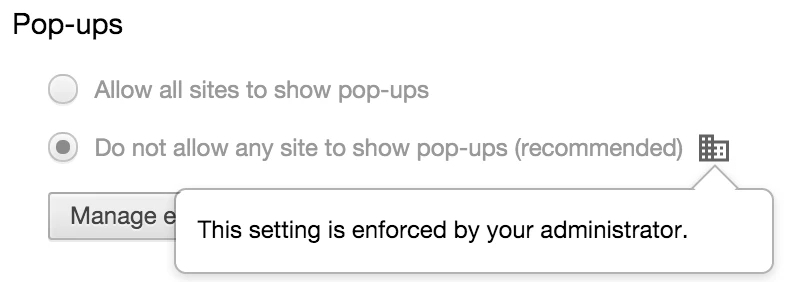
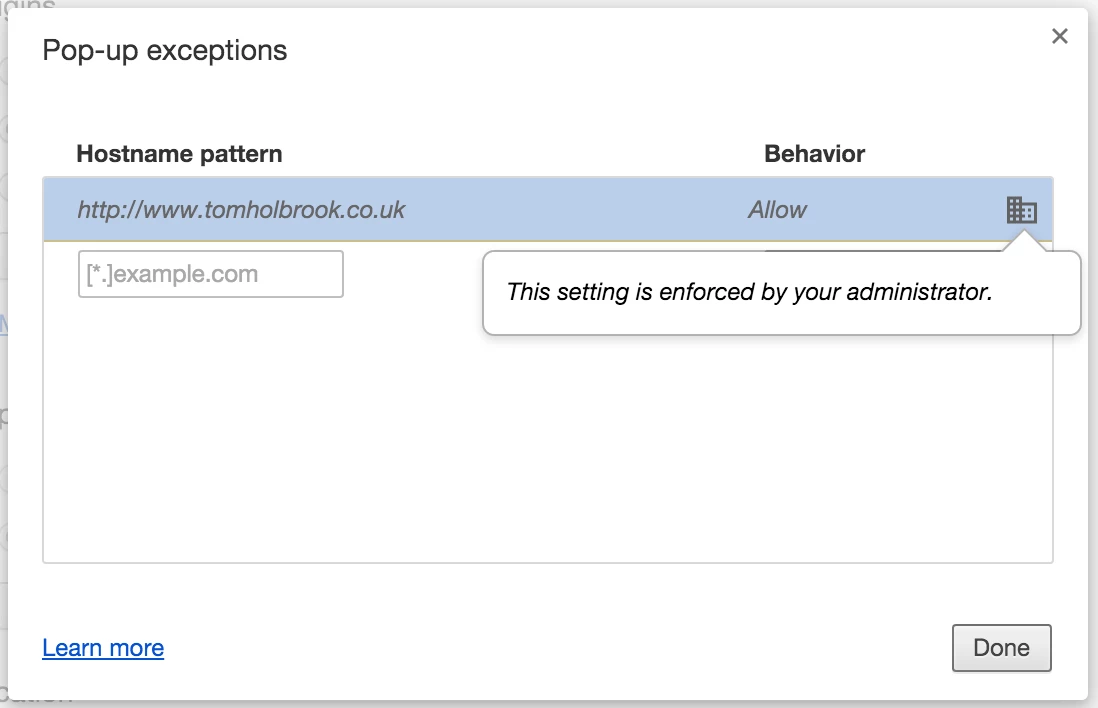
Here's that profile installed in Version 46.0.2490.71:


Forum|alt.badge.img+23
  • Author
  • Valued Contributor
  • October 19, 2015

Thanks gents. Looks promising. I'll give it a go and report back.


acodega
Forum|alt.badge.img+15
  • Valued Contributor
  • October 19, 2015

This is a lot better than the sledgehammer approach, or managing Chrome via Google for Work, (which involves signing existing employees out and back into Chrome)

Thanks for the config profile.


Forum|alt.badge.img+3
  • New Contributor
  • October 23, 2015

Works! And doesn't trample existing whitelist (even better).