Question

Adobe CS6 package won't install - AAMEE

  • January 6, 2016
  • 20 replies
  • 68 views

Forum|alt.badge.img+8

Dear Forum Members,
I have followed the following Tech Paper to build the CS6 package with JSS v9.82.
http://resources.jamfsoftware.com/documents/technical-papers/Administering-Adobe-Creative-Suite-6-with-the-Casper-Suite-v9.0-or-Later.pdf
I am running 10.9.5 on the client iMacs. I downloaded AAMEE 3.1 on the iMac and created the installation package. It created a "Build" folder with two files inside: CS6_Install.pkg and CS6_Uninstall.pkg. I then copied the CS6_Install.pkg to Casper Admin to later create a deployment policy. The deployment failed with the following error:
Installation failed. The installer reported: installer: Package name is Adobe CS6 Master Collection
installer: Installing at base path /
installer: The install failed (The Installer encountered an error that caused the installation to fail. Contact the software manufacturer for assistance.)

The error didn't help much. I then check the Console and the error logged is exactly the same.
The next thing I tried is to run "CS6_Install.pkg" directly on the iMac, it failed too with the same error in the Console.
Which part did I get it wrong?
Thanks for any advice!

20 replies

Forum|alt.badge.img+16
  • Valued Contributor
  • January 6, 2016

If you still see a failure when you install manually/interactively, then the problem probably lies with the AAMEE package itself. Have you tried rebuilding it to rule out any weirdness in that file?


Forum|alt.badge.img+4
  • New Contributor
  • January 6, 2016

I ran into issues with CS6 installation as well. After a little searching I ran across a discussion that stated Java needs to be installed before CS6. The Java from Apple is the needed package https://support.apple.com/kb/dl1572?locale=en_US
Depending on the OS, you might need to reboot after installing Java, before you try to install CS6.


Forum|alt.badge.img+14
  • Contributor
  • January 6, 2016

This works for me: https://jamfnation.jamfsoftware.com/article.html?id=161

The package you get straight out of AMEE should work locally though, so if you are saying that doesn't work then look at recreating the package (or look at how you are moving it, if you are putting it on a file share try wrapping it in a DMG first as described in the linked article).


Forum|alt.badge.img+8
  • Author
  • Contributor
  • January 7, 2016

Thanks guys for the response. I have tried to recreated the package using AAMEE twice. It finds the updates and creates the package with no errors. That process seems fine. But I am using the latest Java 8 Update 66. So I will try to remove that and installed the legacy java posted by Jerod. And also I will try wrap the pkg inside dmg suggested by Josh.
I will keep you guys updated.
Thanks heaps!


Forum|alt.badge.img+8
  • Author
  • Contributor
  • January 7, 2016

Hey Guys,
I have removed JAVA 8 completely base on Oracle article:
sudo rm -fr /Library/Internet Plug-Ins/JavaAppletPlugin.plugin sudo rm -fr /Library/PreferencePanes/JavaControlPanel.prefpane
Then installed the Download Java for OS X 2015-001 from Apple.
https://support.apple.com/kb/dl1572?locale=en_US
That didn't work out, even when I installed that Install.PKG locally.
Then I tried Josh's method:
https://jamfnation.jamfsoftware.com/article.html?id=161
When I deployed it through Computer Policy, I received the following error.

Executing Policy Install CS6 Master Collection Mounting CasperDP01 to /Volumes/CasperShare... Caching package CS6_Install.dmg... Running script installPKGfromDMG.sh... Script exit code: 0 Script result: Variable "dmgName" value is set to: CS6_Install.dmg
Mounting the DMG CS6_Install.dmg...
DMG mounted successfully as volume /Volumes/Adobe on device /dev/disk1.
ls: /Volumes/Adobe: No such file or directory
Installing Package from mount path /Volumes/Adobe...
/Library/Application Support/JAMF/tmp/installPKGfromDMG.sh: line 169: /usr/sbin/jamf: No such file or directory
There was an error installing the package. Exit Code: 1
Unmounting disk /dev/disk1...
"disk1" unmounted.
"disk1" ejected.
Unmounting file server...

Any idea?
Thanks!


Forum|alt.badge.img+12
  • Contributor
  • January 7, 2016

The script is pretty lazy and doesn't allow for spaces in names. If you manually mount your CS6_Install.dmg, what is the mount point called in terminal?

For example, copy your CS6_Install.dmg to /tmp and then run

/usr/bin/hdiutil mount -private -noautoopen -noverify /tmp/CS6_Install.dmg -shadow

You should get the output with the name of the Volume.

The script is also back to front regarding error checking. Even if the mount fails, the script will log output as if it mounted correctly.

Try changing the script.

From:

log "Mounting the DMG $dmgName..."
mountResult=`/usr/bin/hdiutil mount -private -noautoopen -noverify /Library/Application Support/JAMF/Waiting Room/$dmgName -shadow`
mountVolume=`echo "$mountResult" | grep Volumes | awk '{print $3}'`
mountDevice=`echo "$mountResult" | grep disk | head -1 | awk '{print $1}'`

if [ $? == 0 ]; then

To:

log "Mounting the DMG $dmgName..."
mountDevice=`/usr/bin/hdiutil mount -private -noautoopen -noverify /Library/Application Support/JAMF/Waiting Room/$dmgName -shadow  | awk '/Volumes/ {print $1}'`
mountVolume=`diskutil info $mountDevice | awk '/Mount Point/ {$1=$2=""; print $0}'`

if [[ "$mountDevice" =~ "/dev/disk" ]]; then

This will then allow for spaces and also provide correct log info.


mpermann
Forum|alt.badge.img+22
  • Valued Contributor
  • January 7, 2016

@wangl2 it looks like you may have a couple issues. One would be the volume name of your DMG as noted by @sean and the other is the path to the jamf binary. I think the location for the jamf binary was changed in version 9.8 to /usr/local/bin/jamf. If you're using 9.8 or later you'll want to fix that as well.


Forum|alt.badge.img+13
  • Valued Contributor
  • January 7, 2016

if you can hang on till i get to work tomorrow i think i can help...


Forum|alt.badge.img+8
  • Author
  • Contributor
  • January 8, 2016


Thanks guys for the vast response.
@mpermann @sean I read my error log and corrected two things.
Since I am on Casper 9.82, I changed /usr/sbin/jamf to /usr/local/bin/jamf in the script.
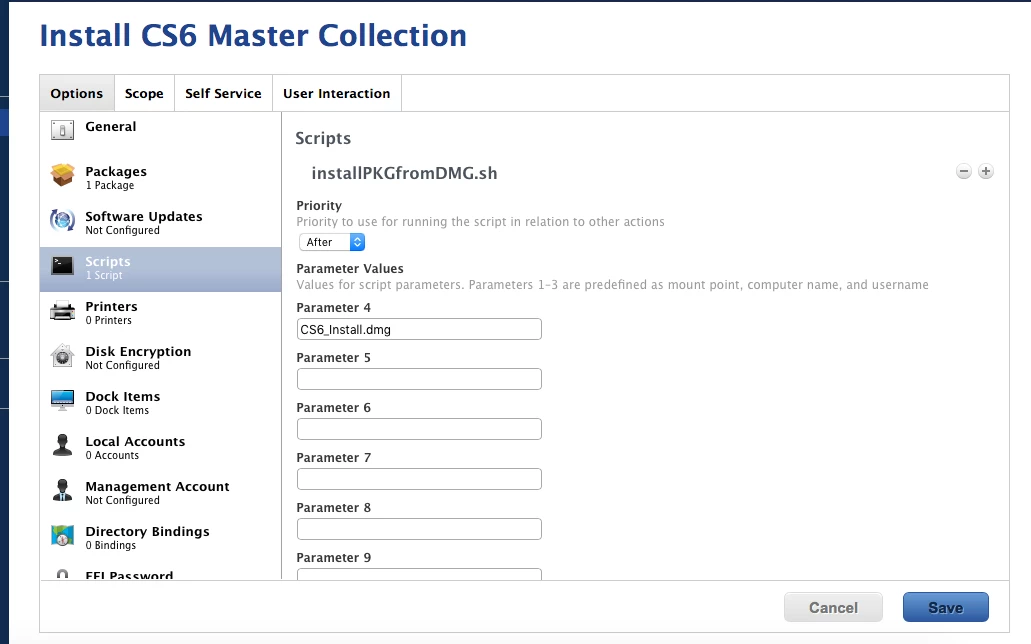
In terms of the path of the package, I am a bit confused here. The "CS6_Install.dmg" was uploaded through Casper Admin and it is saved to my file repository on the DP. The actually location of the file is on the second Data partition of the DP (/Volumes/Data/CasperShare/Packages/). I did not specify the path in the script. The only thing I did in the script is specify the name "CS6_Install.dmg" in Parameter 4 in policy. Is there anymore to configure in the policy?
I am testing the installation again with this updated script before I change anything else. I will keep you guys updated.
Thanks.


mpermann
Forum|alt.badge.img+22
  • Valued Contributor
  • January 8, 2016

@wangl2 when you double-click on the CS6_Install.dmg to mount it what is the name of the volume that mounts on your desktop? Is the name CS6_Install or is it something else?


Forum|alt.badge.img+8
  • Author
  • Contributor
  • January 10, 2016

@mpermann Hi Michael, I called my pkg as "Adobe CS6 Master Collection _install.pkg" and name the DMG as "CS6_Install.dmg". Reading the script requirement, they need to be the same name. I am changing it now and test it again. Good call and thank you!


Forum|alt.badge.img+8
  • Author
  • Contributor
  • January 11, 2016

@mpermann @sean Just a quick update for people who is interested. I have re-created the package using AAMEE and called it "AdobeCS6" with no space. Then I follow the JAMF article and created the dmg using Disk Utility, with the same name this time! So with AdobeCS6_install.pkg and AdobeCS6_install.dmg created, I uploaded the dmg to the Casper via Admin Console. I also modified the script with the new binary location
(changed /usr/sbin/jamf to /usr/local/bin/jamf in the script) and @sean suggestion in the previous post. After I uploaded the script, I tried the installation using the policy. Here is the result:
*Executing Policy Install CS6 Master Collection Mounting CasperDP01 to /Volumes/CasperShare... Caching package AdobeCS6_Install.dmg... Running script installPKGfromDMG.sh... Script exit code: 0 Script result: Variable "dmgName" value is set to: AdobeCS6_Install.dmg
Mounting the DMG AdobeCS6_Install.dmg...
hdiutil: mount failed - no mountable file systems
There was an error mounting the DMG. Exit Code: 1
Installing Package Adobe CS6 Master Collection_Install.pkg from mount path ...
Error: The package (Adobe) could not be found.
There was an error installing the package. Exit Code: 1
Unmounting disk ...
hdiutil: detach failed - No such file or directory

Unmounting file server... *
I also manually ran the AdobeCS6_Install.dmg locally on the machine. It failed as well with a bunch of "deny file-read-data" error in the console.
The CS6 still puzzles me. Thanks for any advice!


Forum|alt.badge.img+12
  • Contributor
  • January 11, 2016

As it says, it failed to mount the dmg. It looks like there is something wrong with your new dmg.

Before you get involved with Casper, test the dmg.

Mount the dmg manually. Check the name of what is mounted (this must be done in Terminal rather than Finder as the script won't care about the name Finder reports; they can be different).

As the dmg didn't mount, then of course the script will fail to install, but I notice that the script reported the name of the installer to be "Installing Package Adobe CS6 Master Collection_Install.pkg...". This is more successful than last time, as it hasn't cut it short to "Installing Package Adobe..."

When testing, try also mounting the dmg using the above same line the script uses, but change the dmg path to the location you've saved it.

/usr/bin/hdiutil mount -private -noautoopen -noverify [put your path to dmg here] -shadow  | awk '/Volumes/ {print $1}'

This should come back with something like:

/dev/disk1s2

If successful, then check what you have mounted in Terminal

df -lh

This should come back with a list of mounts and their names.

In the example below, you can see that "install_flash_player_20_osx-2.dmg" is mounted, but the name of the mount is "/Volumes/Flash Player"

# /usr/bin/hdiutil mount -private -noautoopen -noverify /tmp/install_flash_player_20_osx-2.dmg -shadow  | awk '/Volumes/ {print $1}'
/dev/disk2s2
# df -lh
Filesystem     Size   Used  Avail Capacity  iused    ifree %iused  Mounted on
/dev/disk0s2  111Gi   37Gi   74Gi    33%  9645409 19492772   33%   /
/dev/disk0s4  354Gi   50Gi  304Gi    15% 13127895 79587896   14%   /Users
/dev/disk2s2   17Mi   17Mi    0Bi   100%     8481        0  100%   /Volumes/Flash Player

Forum|alt.badge.img+8
  • Author
  • Contributor
  • January 14, 2016

Hi @sean,
Excuse my limited script/command knowledge. I have copied the CS6 dmg file to /tmp and ran following command:
/usr/bin/hdiutil mount -private -noautoopen -noverify /tmp/AdobeCS6_Install.dmg -shadow | awk '/Volumes/ {print $1}'

But I received an arrow prompting me type something.
Did I miss something in the step?
Thank you very much!


Forum|alt.badge.img+12
  • Contributor
  • January 14, 2016

You've either got double quotes at the end of the line of you've added an extra single quote.


bentoms
Forum|alt.badge.img+35
  • Hall of Fame
  • January 14, 2016

@wangl2 You shouldn't need to put the PKG in a DMG (as @Josh.Smith said). We don't & we're still on CS6.

Can you cache the PKG then install from cached? Or at imaging time install from boot volume?

Also, what is your DP? Have you migrated your main DP?


Forum|alt.badge.img+8
  • Author
  • Contributor
  • January 14, 2016

Hi @bentoms It would be the best if I can get it working with pkg straight out of AAMEE without re-package it to DMG. My DP is a Mac Server running on 10.9.5. What do you mean by migration?
I haven't tried install CS6 from the Casper Image at imaging time. I will try that tomorrow with the PKG. Also when you say Cached, do you mean to choose "Install from Cached" in the policy?
Thanks.


Forum|alt.badge.img+8
  • Author
  • Contributor
  • January 15, 2016

@sean yeah I tried it with single quote. the command runs but with error "No mountable file systems"...


Forum|alt.badge.img+12
  • Contributor
  • January 15, 2016

Sounds like your dmg is corrupt, assuming it doesn't mount when you double click it in Finder.


Forum|alt.badge.img+16
  • Employee
  • January 15, 2016

Just my quick two cents on this but we've seen the same issue with our CS5 Master Collection installer. Not sure what changed besides the JSS upgrade to 9.82 but our CS5 policy fails left and right now.

If I pull the DMG directly from the server, copy it to a client, open it and run the pkg inside, the install succeeds. I then tried uploading the pkg (not in a dmg) to Casper Admin and set up a cache/install policy. That failed with the same error. This same file, when run manually on a client succeeds without error.

Where it gets mildly interesting is that if I take the install function out of my install policy and leave it as a caching only policy, I can call the installer package from an "after" script that runs after caching the pkg. This script (below) is messy...but troubleshooting is often messy.

Long story, short...there seems to be a problem with something in how the Adobe installer is being handled by the JAMF binary. I worked with my TAM on this issue and he built out a test environment and couldn't reproduce the issue. I'm just glad to see I'm not the only one out there having this issue.

ditto -xk /Library/Application Support/JAMF/Waiting Room/AdobeCS5MasterCollection.pkg.zip /Library/Application Support/JAMF/Waiting Room/ && rm -rf /Library/Application Support/JAMF/Waiting Room/AdobeCS5MasterCollection.pkg.zip && rm -rf /Library/Application Support/JAMF/Waiting Room/AdobeCS5MasterCollection.pkg.zip.cache.xml && installer -pkg /Library/Application Support/JAMF/Waiting Room/AdobeCS5MasterCollection.pkg -target / && rm -rf /Library/Application Support/JAMF/Waiting Room/AdobeCS5MasterCollection.pkg