
Answer

Adobe RUM is not keeping all Adobe CC products up-to-date

  • August 13, 2021
  • 6 replies
  • 78 views

Forum|alt.badge.img+7

So I have a policy that runs 


/usr/local/bin/RemoteUpdateManager


once a week. I've noticed lately that not all apps are updating to the latest with this method but most are. So I ran it manually on a computer I know wasn't fully updated. The output said no available updates, you are fully updated. But I know that it's not, comparing it to Patch Management. What's weirder is that when I log into the machine and open Adobe CC Desktop app, it says it's up to date with an out of date version number.
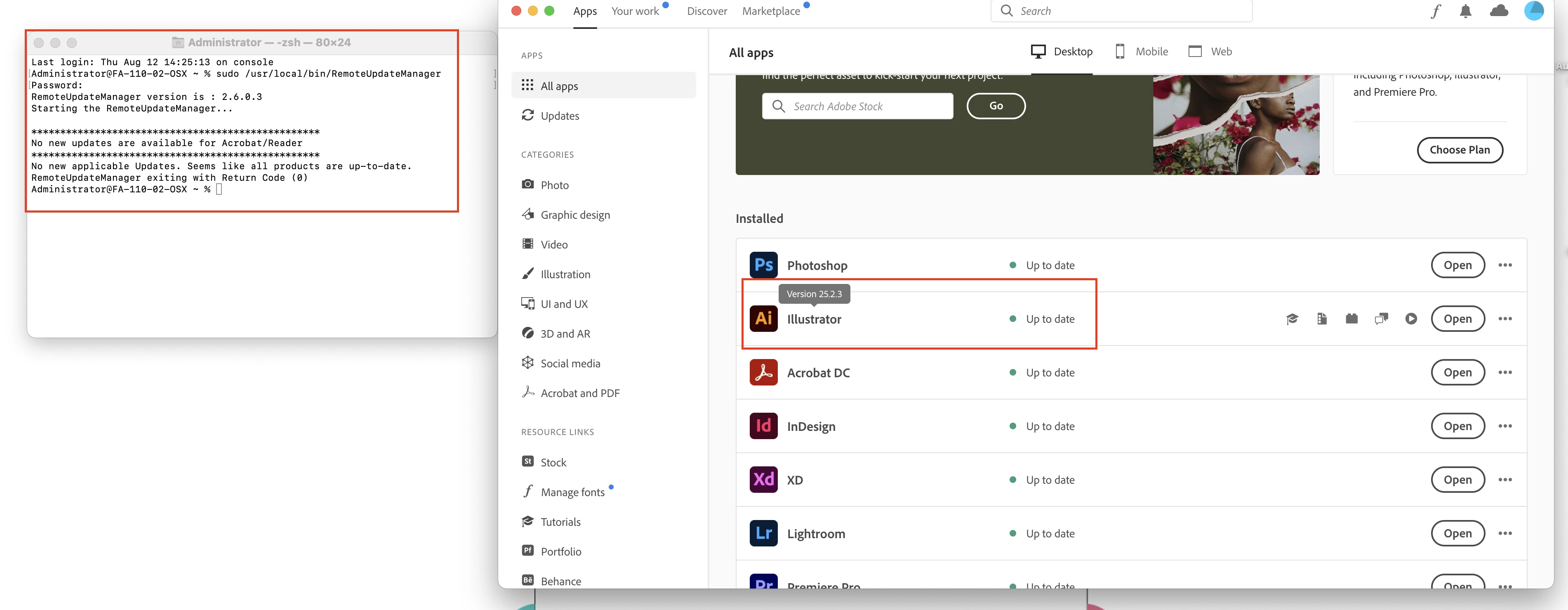
 

Has anyone else seen something like this or have a working process of keeping you Adobe CC products up-to-date?


Best answer by cnelson

I just downloaded the latest Adobe RUM from Adobe Admin Console and once I replaced /usr/local/bin/RemoteUpdateManager and HUM.dylib on the machine, I could run /usr/local/bin/RemoteUpdateManager from ARD as root and the updates finally happened!

https://community.adobe.com/t5/enterprise-teams/remote-update-manager-mac-not-updating-cc-apps/m-p/10903000

6 replies

Forum|alt.badge.img+7
  • Valued Contributor
  • August 16, 2021

I have noticed even using the RUM updater, Adobe still doesn't fully update. But it makes sure you have the CC App installed even though some can't even use it.


Forum|alt.badge.img+7
  • Author
  • Contributor
  • Answer
  • August 16, 2021

I just downloaded the latest Adobe RUM from Adobe Admin Console and once I replaced /usr/local/bin/RemoteUpdateManager and HUM.dylib on the machine, I could run /usr/local/bin/RemoteUpdateManager from ARD as root and the updates finally happened!

https://community.adobe.com/t5/enterprise-teams/remote-update-manager-mac-not-updating-cc-apps/m-p/10903000


Forum|alt.badge.img+7
  • Valued Contributor
  • August 16, 2021

Our issue is License related, that it can not be updated via CC App, so say Adobe. Yet it forces RUM to install the App & runs all that Adobe junk in the background. Good to see you got your immediate issue fixed.


Forum|alt.badge.img+7
  • Author
  • Contributor
  • August 16, 2021

I just downloaded the latest Adobe RUM from Adobe Admin Console and once I replaced /usr/local/bin/RemoteUpdateManager and HUM.dylib on the machine, I could run /usr/local/bin/RemoteUpdateManager from ARD as root and the updates finally happened!

https://community.adobe.com/t5/enterprise-teams/remote-update-manager-mac-not-updating-cc-apps/m-p/10903000


This may be just a temporary solution. If RUM doesn't update itself over time, I may have to do this again.


Forum|alt.badge.img+3
  • New Contributor
  • December 21, 2021

Hate to dig up an old thread, but how did you deploy the new RUM to the correct location and deploy the HUM.dylib to the correct location? 


Forum|alt.badge.img+7
  • Author
  • Contributor
  • December 22, 2021

Hate to dig up an old thread, but how did you deploy the new RUM to the correct location and deploy the HUM.dylib to the correct location? 


You can either use Apple Remote Desktop to copy them over or create a package using Composer. 

RUM: /usr/local/bin/RemoteUpdateManager

HUM.dylib: /Library/Application Support/Adobe/Adobe Desktop Common/HDBox