
Question

Allow Standard user to Modify Privacy & Security

  • June 10, 2024
  • 4 replies
  • 162 views

Forum|alt.badge.img+2

Has anyone figured out an automated way to allow non admin users to the System Preferences -> Security & Privacy -> Privacy to be able to Allow anyways to open apps. i've tried 


#!/bin/sh
security authorizationdb write system.preferences allow
security authorizationdb write system.preferences.datetime allow
security authorizationdb write system.preferences.SecurityPrivacy allow
security authorizationdb write system.preferences.security allow
exit 0


But still cant get this to work with out admin credentials.
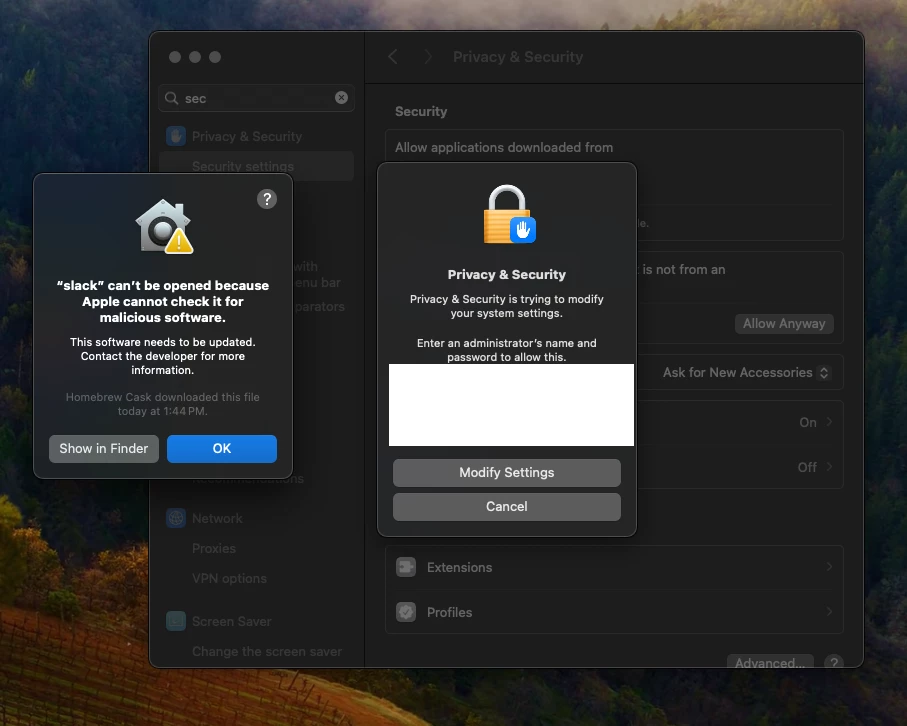
 

4 replies

jamf-42
Forum|alt.badge.img+17
  • Esteemed Contributor
  • June 10, 2024

not quite sure what your trying to achieve, but installing Slack via Homebrew seems kinda niche? Why not use JAMF App Installers? 


AJPinto
Forum|alt.badge.img+26
  • Legendary Contributor
  • June 10, 2024

For most privacy settings, you want to manage them with a Configuration Profile. Either auto allow or enabling the user to allow a setting without admin access.


For the Malicious software popup, that is because the application has not been notarized by Apple. This is gatekeeper and should not be disabled. Honestly, any instance of this you see you should be evaluating individually. Something like slack should be downloaded from slacks website, and it would be notarized, and you would not get this popup. I have no idea why you are trying to install an old version of slack, but don't. Generally speaking, Homebrew should be used very sparingly. 

Notarizing macOS software before distribution | Apple Developer Documentation

Apple can’t check app for malicious software - Apple Support

Mac | Downloads | Slack


Forum|alt.badge.img+2
  • Author
  • New Contributor
  • June 10, 2024

quick clarification not trying to install Slack from Homebrew. trying to install Slack CLI from homebrew is what is trying to be installed. 

https://api.slack.com/automation/quickstart


jamf-42
Forum|alt.badge.img+17
  • Esteemed Contributor
  • June 10, 2024

quick clarification not trying to install Slack from Homebrew. trying to install Slack CLI from homebrew is what is trying to be installed. 

https://api.slack.com/automation/quickstart


blimey.. https://downloads.slack-edge.com/slack-cli/install.sh

maybe take a look a this..

