Question

API - Flushing a Single Policy for a Single Computer

  • November 30, 2016
  • 13 replies
  • 63 views

Forum|alt.badge.img+5

Hi all

I am using API for the first time ever.

The need to use API has crept up as I have discovered that apparently there is now the ability to flush a single policy for a single device by using the API protocols. It was apparently implemented in 9.96 - check it out here.

Looking at the JSS REST API Resource Documentation, I have worked out that I can use it to obtain the necessary JSS IDs for a computer and a policy.

However looking at the '/commandflush' aspect of the API, I just can't work out how I would get the specific policy for a specific computer to be flushed. Basically what I am after, is the ability to tell (or 'Put' in API language) for the status of a computer ID to be changed to 'Pending' for a particular policy ID.

This is my early attempt of creating a bash script to achieve this....

#!/bin/sh

jssAPIuser=[input a jss account]
jssAPIpassword=[input the password]
jssURL=[input your jss url]
macName='systemsetup -getcomputername | awk '{print $3}''
policyName=[input policy name] | sed 's/ /%20/g'

macJSSid=curl -H "Accept: text/xml" -sfku "$jssAPIuser:$jssAPIpassword" "$jssURL/JSSResource/computers/name/$macName" | xpath /computer/general/id[1] | awk -F'>|<' '{print $3}')
policyID=curl -H "Accept: text/xml" -sfku "$jssAPIuser:$jssAPIpassword" "$jssURL/JSSResource/policies/name/$policyName" | xpath /policy/general/id[1] | awk -F'>|<' '{print $3}')

From the above script, I am up to the point of where I have obtained the computer ID and the policy ID. I am now a bit lost as to taking it further to implement the 'Put' I am trying to accomplish.

Can anybody help me out further here please?

Thanks in advance.

13 replies

Forum|alt.badge.img+15
  • Contributor
  • November 30, 2016

The JSS documentation says to use Delete and not Put. I'm using Delete in one of my scripts and it looks like this (notice -X DELETE)

    curl -H "Accept: application/xml" -sfku "$username:$password" "$server/JSSResource/computers/serialnumber/$i" -X DELETE

boberito
Forum|alt.badge.img+22
  • Jamf Heroes
  • November 30, 2016

I'm going to throw my 2 cents in here

I think /commandflush is for MDM Management Commands unfortunately not policies. And I think it just will sort of reset all of them to be pushed again?

What you're looking for I think is under /logflush ...but good luck with it. Because I'm not sure either how to do it.


boberito
Forum|alt.badge.img+22
  • Jamf Heroes
  • December 1, 2016

And to save the day, some help from the MacAdmins slack channel.

You need to create some XML with the info.

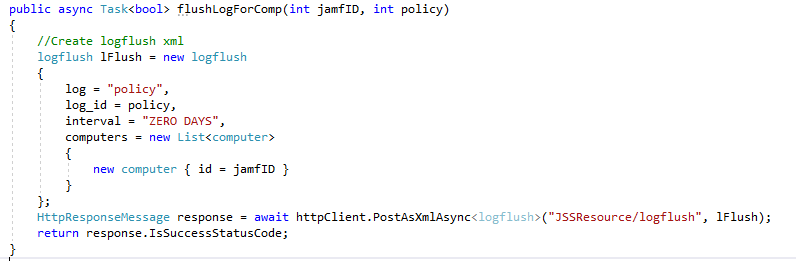
<logflush> <log>policy</log> <log_id>1</log_id> <interval>THREE MONTHS</interval> <computers> <computer> <id>1</id> </computer> </computers> </logflush>

Then send it this way
curl -X DELETE https://your.jss.org/JSSResource/logflush -d '<XML>'

So mine I did to try and test
curl -sSkiu APIUser:'APIPass' "https://mycasperserver:8443/JSSResource/logflush" -H "Content-Type: text/xml" -d '<logflush><log>policy</log><log_id>1427</log_id><interval>Zero Day</interval><computers><computer><id>1533</id></computer></computers></logflush>' -X DELETE

This flushed the policy for that computer immediately.


Forum|alt.badge.img+5
  • Author
  • Contributor
  • December 2, 2016

@boberito Thanks for helping out.

curl -sSkiu APIUser:'APIPass' "https://mycasperserver:8443/JSSResource/logflush" -H "Content-Type: text/xml" -d '<logflush><log>policy</log><log_id>1427</log_id><interval>Zero Day</interval><computers><computer><id>1533</id></computer></computers></logflush>' -X DELETE

I modified this for my setup, and it achieved a result. But rather than flushing a single policy, it instead flushed all of the policies for that one computer.

So I must have gone wrong somewhere...

What I did was changed the <log_id>1427</log_id> value to the same policy ID value. As this is the only part of the XML that seems to suggest some logical of specifying the specific policy. Is that correct?

I also changed the <computer><id>1533</id></computer> to ensure it only impacted the single computer (scope), which it seemed to have done correct.

Any ideas?

Many thanks.


boberito
Forum|alt.badge.img+22
  • Jamf Heroes
  • December 2, 2016

I have no idea. I wonder if it actually flushed all the policies as well for me! haha


Forum|alt.badge.img+1
  • New Contributor
  • March 16, 2017

It flushes all policies for that machine for me. I think someone at JAMF forgot an 'AND' in the SQL command...


Forum|alt.badge.img+5
  • Contributor
  • March 16, 2017

I’ve also been playing around with this and found that all policies for the computer in question are flushed. Has anyone made any progress - or is it worth flagging this as a bug?


Forum|alt.badge.img+5
  • Contributor
  • March 16, 2017

An alternative approach that seems to work is by specifying only the policy and not referencing any machines. This seems to flush all logs for that policy - which is useful in certain circumstances.

ALL THE FOLLOWING SHOULD BE ON ONE LINE (the variables will need to have been assigned for it to work):

curl -vks -u $apiUser:$apiPass https://${jssAddress}:8443/JSSResource/logflush/policy/id/$policyID/interval/Zero+Day -X DELETE


Forum|alt.badge.img+1
  • New Contributor
  • January 19, 2018


It flushes all for me. Would like to see this fixed so that our support tech can use our web portal instead of going to JSS.


Forum|alt.badge.img+1
  • New Contributor
  • July 31, 2019

@amosdeane i used your one liner it works great,
I also try to get a one-liner to push a single policy to all computers in scope but can't find the syntax.
can you help?

Thanks.


Forum|alt.badge.img+8
  • New Contributor
  • September 15, 2021

An alternative approach that seems to work is by specifying only the policy and not referencing any machines. This seems to flush all logs for that policy - which is useful in certain circumstances.

ALL THE FOLLOWING SHOULD BE ON ONE LINE (the variables will need to have been assigned for it to work):

curl -vks -u $apiUser:$apiPass https://${jssAddress}:8443/JSSResource/logflush/policy/id/$policyID/interval/Zero+Day -X DELETE


I'm trying to do this, but I keep getting "This Request requires user authentication". Any idea on what permissions are needed to do this? 


Forum|alt.badge.img+4
  • Contributor
  • August 8, 2022

HI, I know this is an old post but I have run across the need to do this now. Is it possible using the API to flush the log of a policy just for 1 computer?


ianatkinson
Forum|alt.badge.img+5
  • Contributor
  • December 17, 2022

This is unsupported by the looks if it:

Notice

The ability to flush logs is currently only supported for flushing all logs for a given policy or all logs for a given computer. There is no support for flushing logs for a given policy and computer combination.

From https://developer.jamf.com/jamf-pro/reference/logflush-1

Shame as it would be very useful!