Question

AppConfig Settings for Pulse Secure VPN?

  • April 13, 2017
  • 4 replies
  • 28 views

dstranathan
Forum|alt.badge.img+19

I recently noticed that Pulse Secure is part of the AppConfig community (https://appconfig.org/members/)

I'd like to auto-provision my iOS devices (and Macs?) with my company’s Pulse Secure VPN settings (i.e.; our SSL VPN URL, etc.).

Has anyone configured AppConfig data for Pulse Secure? Even an example snippet would be greatly appreciated. I have located this generator (https://appconfig.jamfresearch.com) but dont have the developer's metadata yet. I'm opening a ticket with Pulse Secure, but havent hear back yet.

4 replies

Forum|alt.badge.img+6
  • New Contributor
  • 7 replies
  • April 19, 2017

https://kb.pulsesecure.net/articles/Pulse_Secure_Article/KB29830


Forum|alt.badge.img+3
  • New Contributor
  • 6 replies
  • April 19, 2017

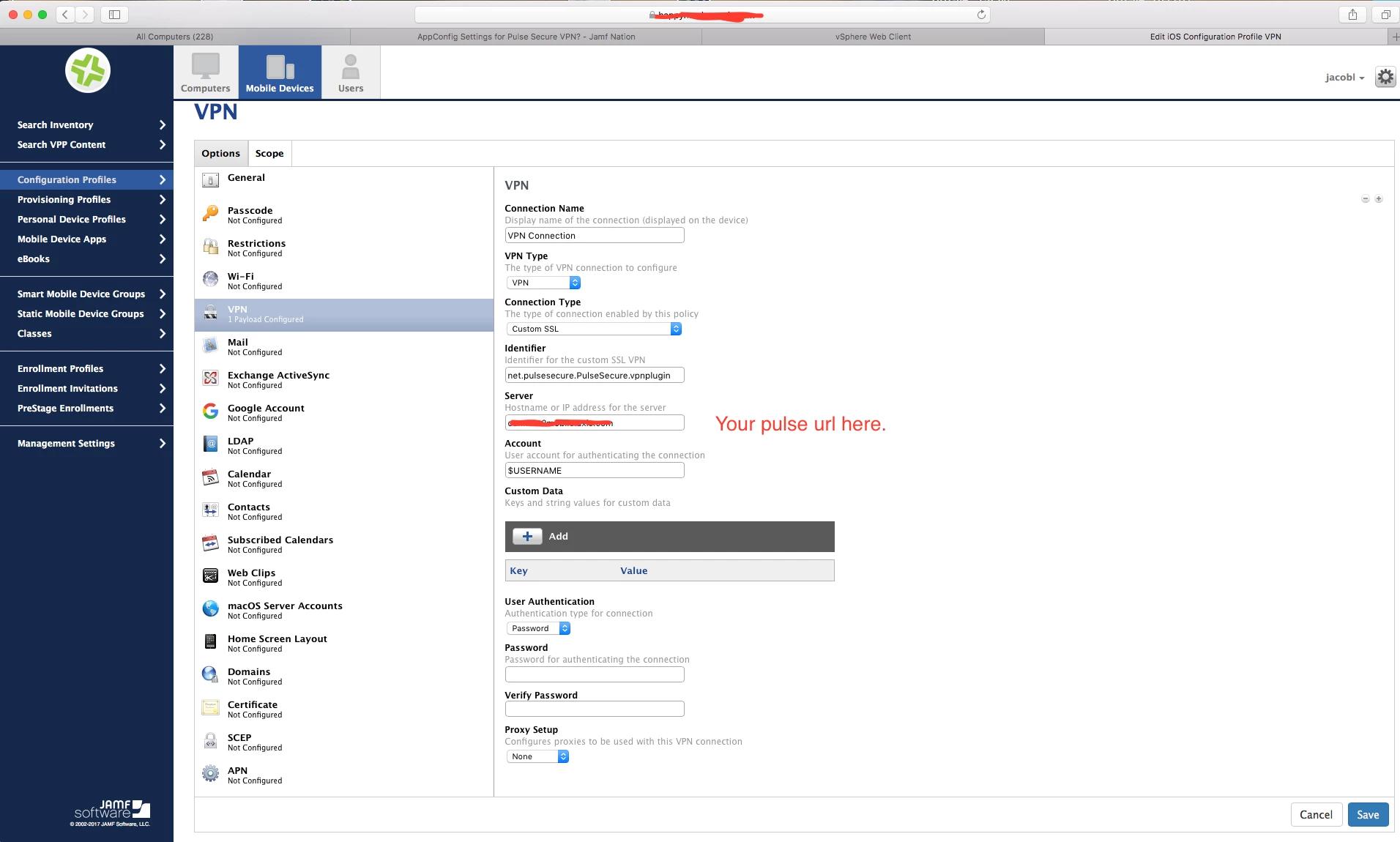
iOS config should look something like this.

And macOS i configured thru a script and Default.jnprpreconfig.txt Something like this:

#!/bin/sh
cd /Users/Shared
curl -o Default.jnprpreconfig.txt https://yourserver/Default.jnprpreconfig.txt
sleep 1
/Applications/Pulse Secure.app/Contents/Plugins/JamUI/jamCommand -importFile /Users/Shared/Default.jnprpreconfig.txt
sleep 1
rm /Users/Shared/Default.jnprpreconfig.txt
exit 0

jmahlman
Forum|alt.badge.img+17
  • Valued Contributor
  • 307 replies
  • September 22, 2017

Hey, did you ever get a response back from the dev? Making a config profile and adding that with the app does work, but it's not instantaneous, it takes time for the config profile to drop after the app is installed (at least for me it does).


Forum|alt.badge.img+5
  • Contributor
  • 27 replies
  • October 24, 2018

The iOS profile screenshot from @HangerS worked perfectly for me in Jamf Pro 10.7.1 - thanks!