Question

Apple Classroom on Teacher Macs in Jamf School - Possible without Managed Apple IDs? Education Profile (EDU Profile)

  • November 24, 2025
  • 4 replies
  • 70 views

red_beard
Forum|alt.badge.img+8

Apple Classroom on Teacher Macs in Jamf School - Possible without Managed Apple IDs?

We're migrating from Jamf Pro to Jamf School. Previously had Apple Classroom working with Macs and iPads via ASM roster syncing from our SIS—no Managed Apple IDs needed.

Current status in Jamf School:

  • ✅ Apple Classroom works on teacher iPads and student iPads
  • ✅ Jamf Teacher app works on teacher Macs (shows rostered classes)
  • ❌ Apple Classroom on teacher Macs won't load rostered classes

Teacher Macs aren't receiving the Education Profile despite fresh enrollments. I suspect it's related to MDM-capable users, but can't confirm. Class data is clearly flowing (iPads get it, Jamf Teacher gets it), so it seems like a device-specific enrollment issue.

Is Apple Classroom on teacher Macs possible in Jamf School without Managed Apple IDs?

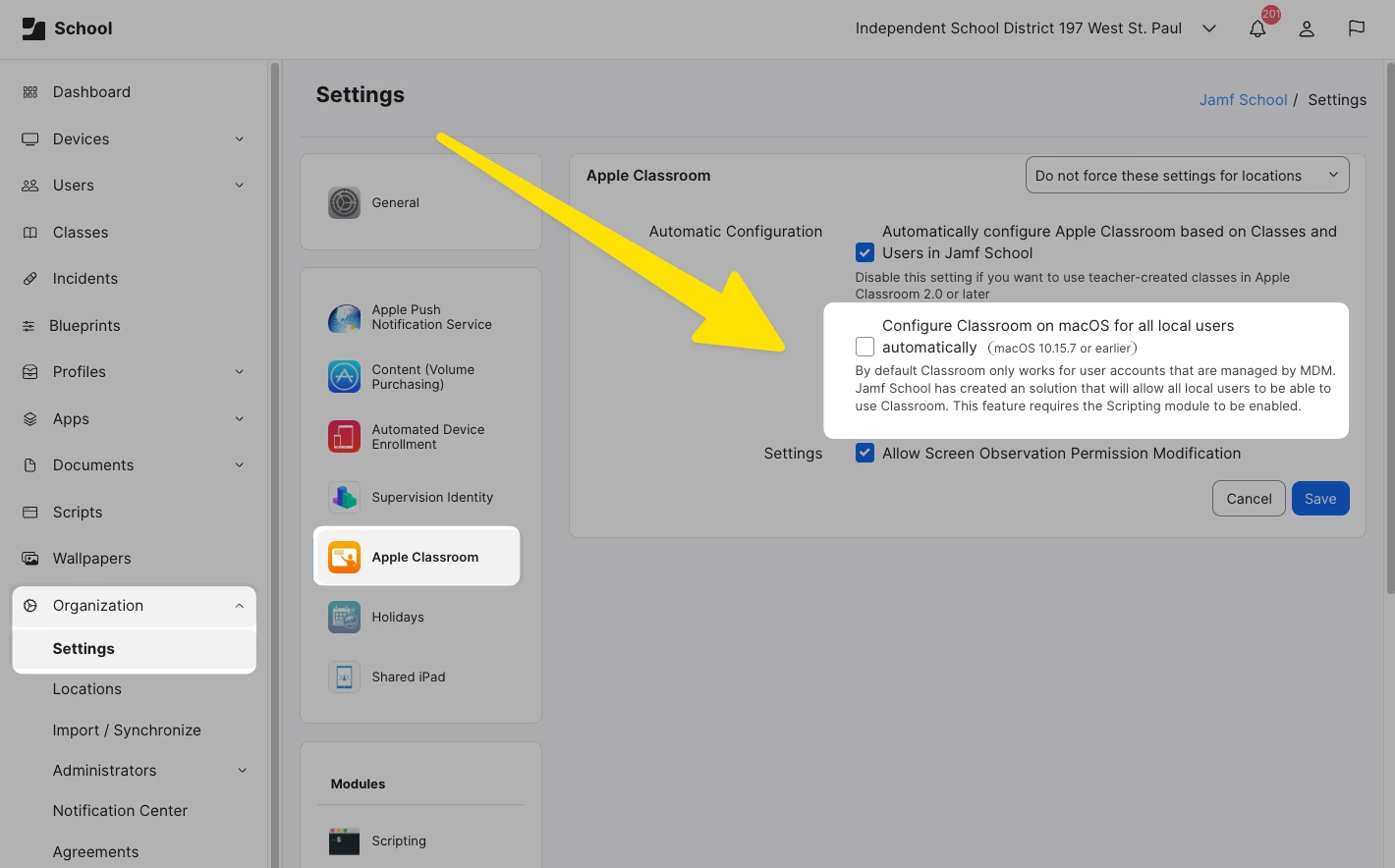
The solution seems tantalizing close based a on a checkbox still available in Jamf School - just that it only applied to pretty dated OS versions.
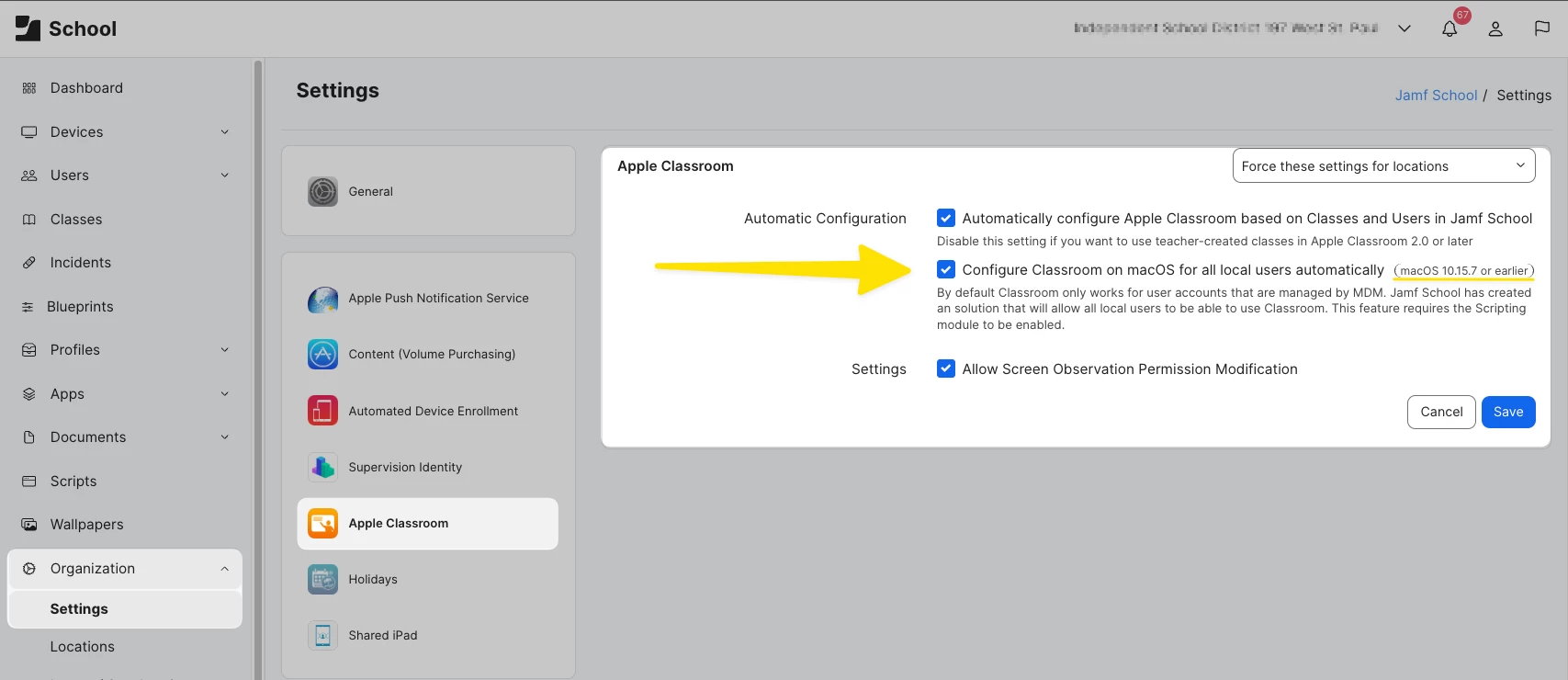


Other 2 year old post



4 replies

h1431532403240
Forum|alt.badge.img+6

Hi red_beard,

You've hit on a known limitation with Apple Classroom on Mac in Jamf School. The checkbox you highlighted — "Configure Classroom on macOS for all local users automatically" — is indeed the feature you're looking for, but as the UI indicates, it only works on macOS 10.15.7 or earlier.

Why this doesn't work on modern macOS:

According to Jamf's official documentation, this setting should be disabled if you're running macOS Big Sur or later. The underlying issue is that EDU profiles on macOS are user-level profiles, meaning they can only be installed for the one MDM-enabled local account on the Mac. This is typically the account used during enrollment.

Apple changed how user-level profiles work in Big Sur and later versions, breaking the workaround that Jamf School previously used to push EDU profiles to all local users. This is why Jamf Teacher works (it queries Jamf School directly via API for class roster data), but Apple Classroom doesn't receive the EDU profile it needs.

What's happening in your environment:

Your suspicion is correct — the issue is MDM-capable user related. For the EDU profile to install on a Mac:

  1. The Mac must be assigned to a user in Jamf School (Current Owner)
  2. That user's username in Jamf School must exactly match the local account username of the MDM-enabled user on the Mac
  3. The MDM-enabled user must be logged in for the EDU profile to install

Since you're using local accounts without Managed Apple IDs, and teachers likely log in with various local accounts, the EDU profile can't be delivered to all of them.

Your realistic options:

Option 1: Use Managed Apple IDs for teachers

This is Apple's intended workflow for Apple Classroom on Mac. Teachers sign in to System Settings with their Managed Apple ID, which pulls class information directly from Apple School Manager — bypassing the need for EDU profiles from Jamf School entirely.

Requirements:

  • Classes must exist in Apple School Manager (which you already have via SIS sync)
  • Teachers sign in to the Mac with their Managed Apple ID (System Settings > Apple Account)
  • In Jamf School, you may need to disable "Automatically configure Apple Classroom based on Classes and Users in Jamf School" to avoid conflicts, since class data will come from ASM directly via the Managed Apple ID instead

This is the only reliable way to get Apple Classroom working on teacher Macs with modern macOS.

Option 2: Strict MDM-enabled user alignment (limited usefulness)

If you absolutely cannot use Managed Apple IDs:

  1. Re-enroll each teacher Mac while logged in as the specific account that teacher will use daily
  2. In Jamf School, ensure the "Current Owner" username matches exactly the local account username
  3. Reassign the user in Jamf School (remove and re-add Current Owner) to trigger EDU profile deployment

Limitation: This only works if each Mac has a single, consistent teacher user. If multiple teachers share a Mac or teachers use different local accounts, this won't help.

The honest answer:

No, Apple Classroom on teacher Macs in Jamf School without Managed Apple IDs is not reliably achievable on modern macOS (Big Sur+). The legacy feature you found no longer functions due to Apple's changes to user-level profile handling.

Your only practical path forward for Apple Classroom on teacher Macs is to have teachers sign in with their Managed Apple IDs. The good news is your ASM roster sync is already in place, so the class data is there — teachers just need to authenticate with their Managed Apple IDs to pull it.

Reference:

Jamf Support article: https://support.jamf.com/en/articles/11010721-classes-are-not-showing-in-apple-classroom-on-a-computer-managed-by-jamf-school


red_beard
Forum|alt.badge.img+8
  • Author
  • Valued Contributor
  • January 19, 2026

I so appreciate this detailed response and potential ways to handle this.

Even though I’d rather not use Managed Apple Accounts, it was tempting to try if it just required teachers to use it on their Mac.

In my test case I was able to:

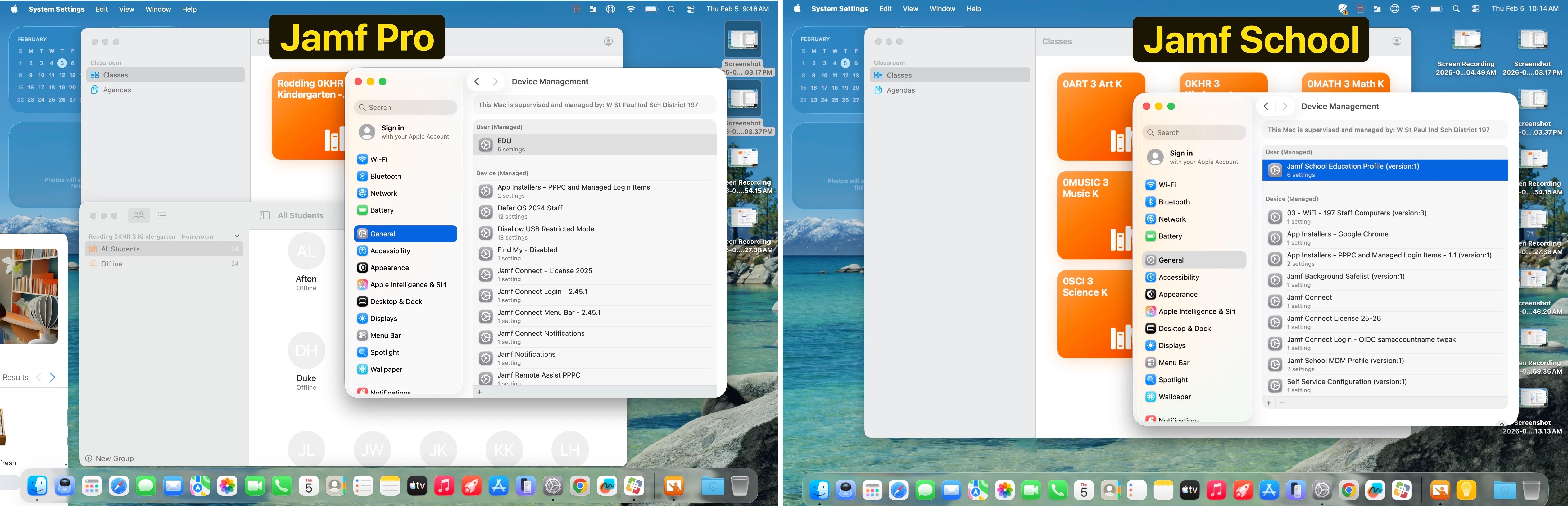
  1. Get a teacher’s Mac to show the classes. I could tell we were coming from ASM because they were the multi-colored blocks vs. the all-orange versions when the information is coming from Jamf (Pro). 
    1. In this state the Mac couldn’t “see” the students’ iPad activity. They were all just listed as offline.
    2. Then I tried to disable "Automatically configure Apple Classroom based on Classes and Users in Jamf School" to avoid conflicts. This didn’t seem to help the Mac see the iPad’s as online, but it did break a teacher’s iPad from being setup, so I reverted and checked the box again.


My next round of testing will have be related to the MDM-enabled user. Even though my scenarios is one teacher/one laptop so they are an MDM-enabled user. The username is complicated by the fact that our local AD username is different from Entra.

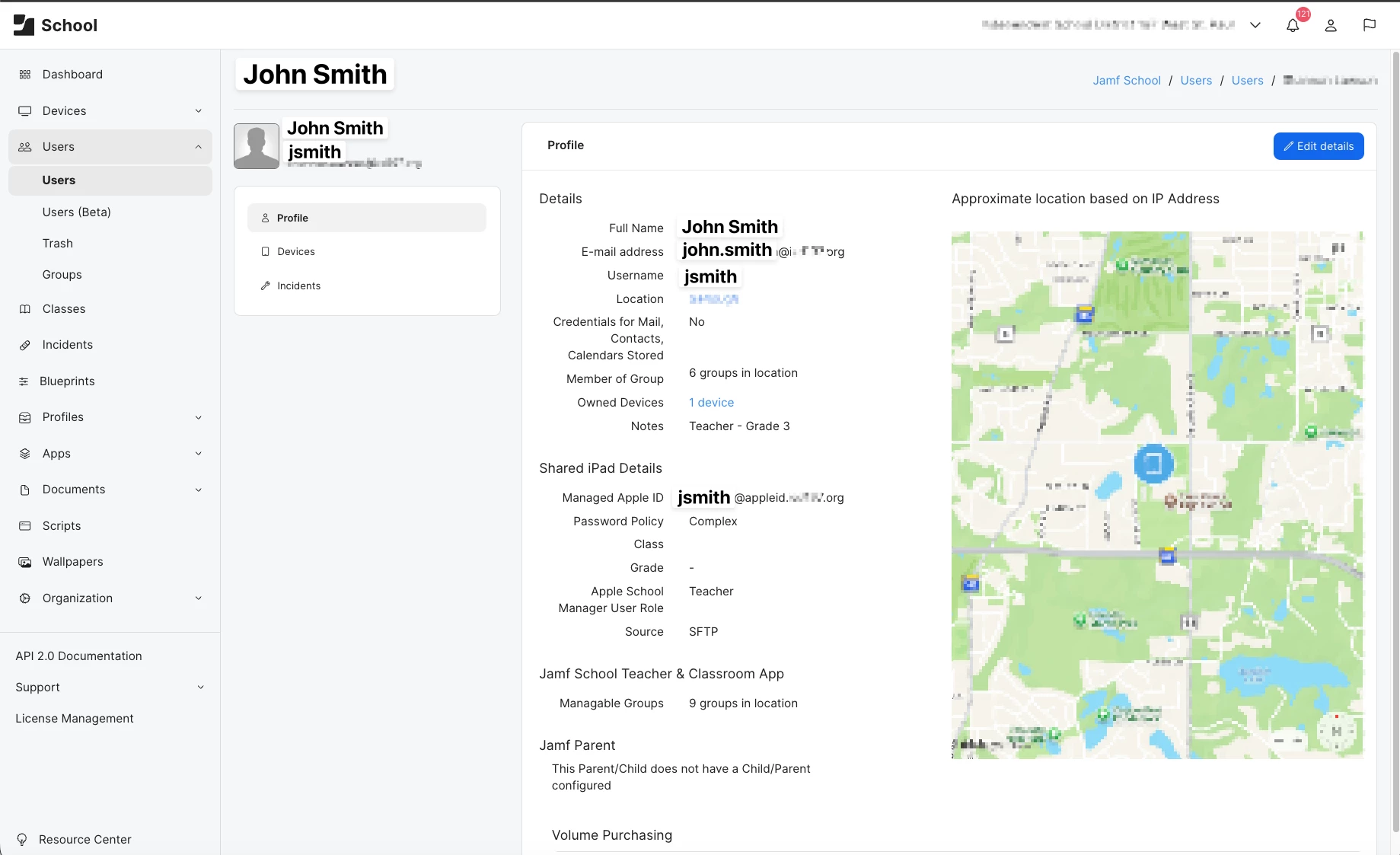
An example for John Smth:

  • Local AD: jsmith
  • Entra: John.smith

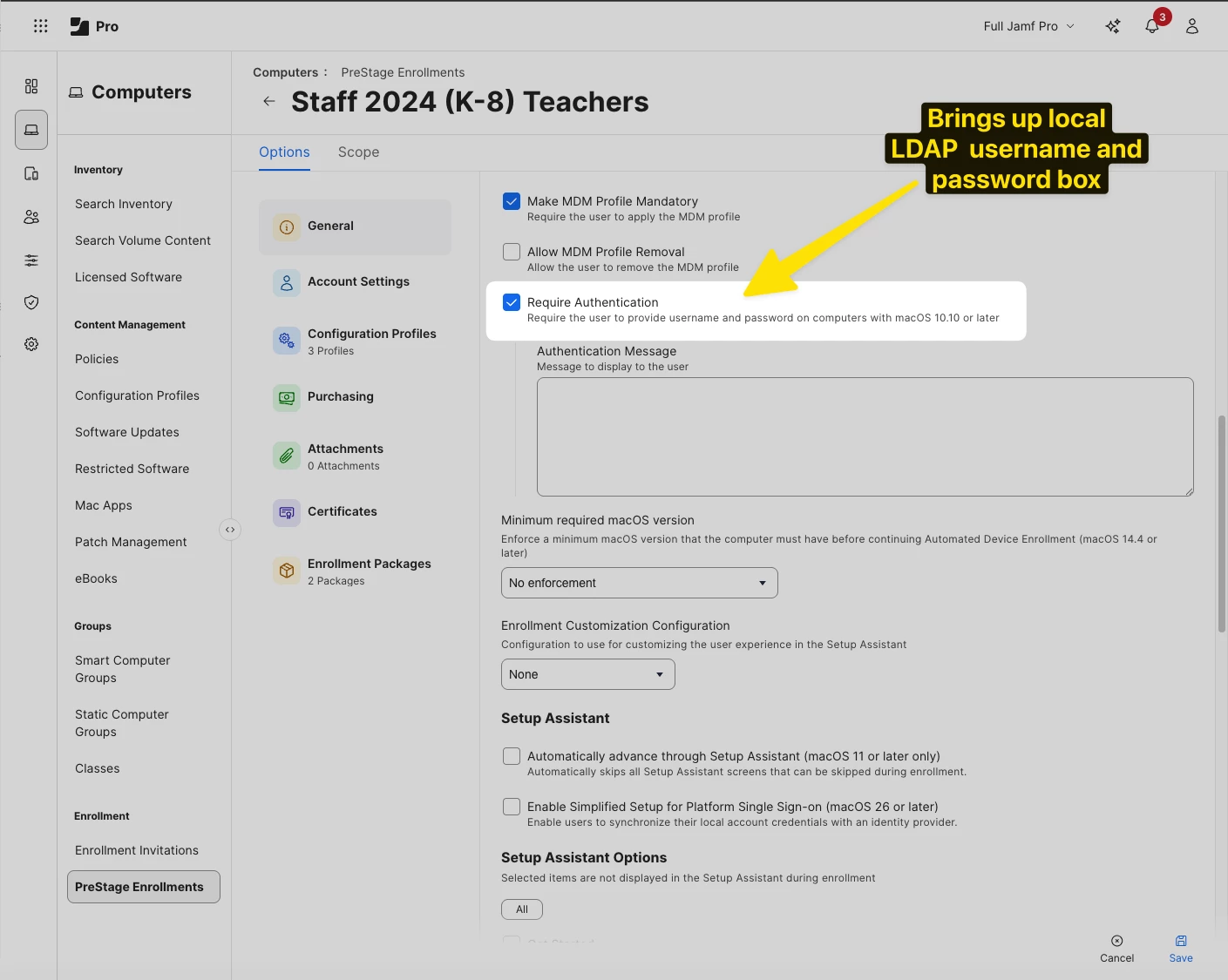
We got this to work in our previous Jamf Pro instance because our enrollment for Teachers would bring up a login box that seems to be fed from our local AD server (screenshot of Jamf Pro). I haven’t be able to figure out how to get this same behavior to happen in Jamf School even though a teacher’s user profile states their username correctly.

This I’m sure is also complicated by Jamf Connect and the Entra sign in screen

I’ve tried changed the computer user account from the “John.smith” to be “jsmth” using Apple’s documentation but haven’t been successful yet in that affecting the behavior.


​​​​​​​


h1431532403240
Forum|alt.badge.img+6

Thanks for the detailed testing results — you've actually uncovered the root cause of the "students showing offline" issue.

Why students show as offline when using Managed Apple ID on the teacher Mac:

The multicolored class blocks confirm you're pulling class data from ASM (ASM-synced classes). However, your student iPads are still receiving the EDU profile from Jamf School because "Automatically configure Apple Classroom" is enabled — meaning they're operating in MDM-created classes mode.

Apple explicitly states these two class types are incompatible: "These classes aren't compatible with the education configuration profile from the MDM solution that creates MDM-synced classes."

This is why disabling that checkbox broke your teacher iPad but didn't help the Mac see students — you created a configuration mismatch where neither mode could work properly.

To make ASM-synced classes work end-to-end:

  1. Disable "Automatically configure Apple Classroom based on Classes and Users in Jamf School" in Jamf School settings
  2. Students must also sign in with their Managed Apple IDs on their iPads (System Settings > Apple Account)
  3. Both teacher and student devices must operate in the same class mode (ASM-synced)

This is a significant workflow change since it requires students to authenticate with Managed Apple IDs — which you mentioned wanting to avoid.

Regarding the username mismatch (jsmith vs John.smith):

The "Require Authentication" checkbox in Jamf Pro's PreStage Enrollment triggers LDAP authentication during Setup Assistant, which is why you got the jsmith username from your local AD. Jamf School doesn't have this exact equivalent functionality built into its enrollment workflow.

For Jamf Connect, you can control the local account shortname using the OIDCShortName preference key. By default, Jamf Connect uses claims from the ID token in a specific order. To force it to use your local AD username format:

  1. Create a custom claim in Entra ID that contains the sAMAccountName (jsmith format)
  2. Configure OIDCShortName in your Jamf Connect login window profile to use that custom claim

Alternatively, if you're using Jamf Connect's migration mode, it will add the Entra username as an alias to an existing local account — but this requires the local account to already exist with the correct shortname.

References:


red_beard
Forum|alt.badge.img+8
  • Author
  • Valued Contributor
  • February 4, 2026

I haven’t given up on this yet! We’ve setup two different claims for testing individually. One to our onprem AD server and one to Entra.

The good news is that testing with either of them does produce a local user with the right username “smith” style which is very exciting.

  • Fresh computer install
  • First user account signed in (aside from admin account, Jamf Connect preference box unchecked so it doesn’t become MDM-capable)
  • Still no Education profile
  • Jamf Teacher classes appear
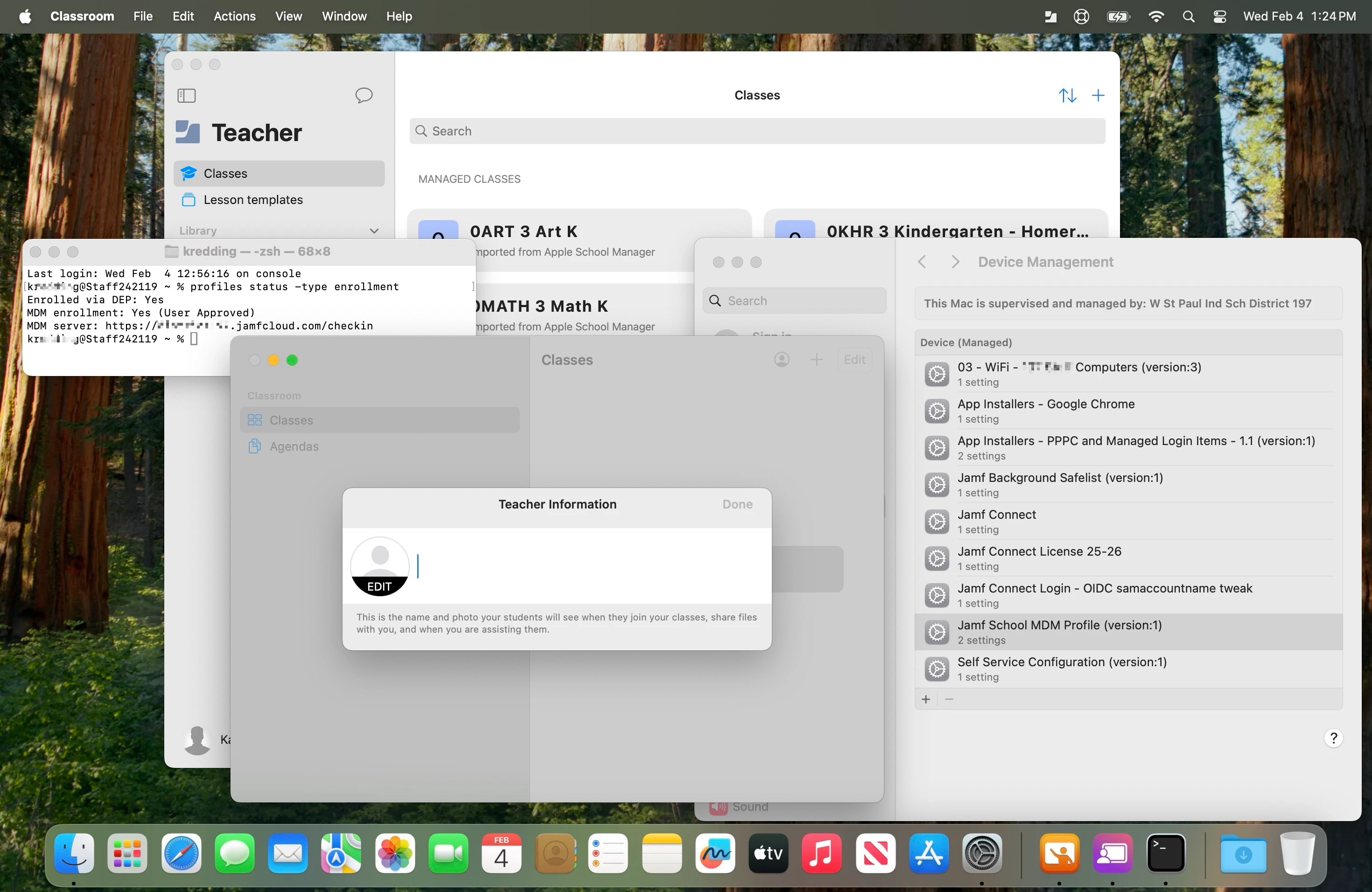
  • User appears MDM-capable based on terminal command if I’m inferring correctly.
  • Username and home folder have the proper proper format we want like “smith”