Question

Apple Configurator 2

  • November 9, 2017
  • 10 replies
  • 96 views

Forum|alt.badge.img+5

Hi we use the above to join non DEP ipads to our JAMF Pro but for some reason it has stopped working

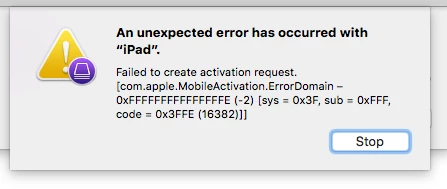
i get the message An unexpected error has occured with "ipad"

failed to create activation request. [com.apple.MobileActivation.ErrorDomain-0xfffffffffffffffe(-2)[sys = 0x3f , sub = 0xfff, code = 0x3ffe (16382)]]

Ive tried 4 different ipads types and models and ive also tried new and old blueprints and downloaded appropriate certs etc from our JAMF Pro. But nothing works even the original blueprint gives the same message?

Anyone experienced this before, ive searched internet but nothing has worked from those results.

10 replies

nvandam
Forum|alt.badge.img+9
  • Valued Contributor
  • November 9, 2017

Activation Locked?


Forum|alt.badge.img+12
  • Valued Contributor
  • November 9, 2017

What happens when you attempt to enroll the same device by hand?


Forum|alt.badge.img+1
  • New Contributor
  • December 20, 2017

I have the same issue with one iPad Mini. I can activate it via iTunes, but with Apple Configurator 2.6, I get the message that the OP sees. Of course, I'd like to get this one supervised, but it's too old to run iOS 11. Any other ideas?


Forum|alt.badge.img+1
  • New Contributor
  • December 20, 2017

Same issue here. iPad 2 GSM, not activation locked. Using apple config. 2.6


Forum|alt.badge.img+1
  • New Contributor
  • December 20, 2017

It would appear that if you get the device on the WiFi before starting the Apple Configurator process you can get past the error. Do not do anything past entering the WiFi key. Let me know what you find.

This is where I found it. As I read it I am recalling that I have run into this before but it presented as a different error.
[https://discussions.apple.com/thread/8074031](link URL)


Forum|alt.badge.img
  • New Contributor
  • January 3, 2018

I get the same error for any device running iOS 9 though not with iOS 11. I've tested this with multiple machines running AC2. It must be an issue with AC2. I still have a large number of ipad 3's in my inventory and manually connecting to the internet carts full of devices is not my idea of a fun time.


Forum|alt.badge.img
  • New Contributor
  • January 23, 2018

I'm having the same issue...also with older iPads on AC2. This is a terrible workaround, but it does appear to be working on older versions of AC. Running El Capitan, with AC v1.7.2, and the device activates without issue.


Forum|alt.badge.img+3
  • New Contributor
  • January 31, 2018

Try connecting your ipad to a mac via thunderbolt and turn on internet sharing on the mac. It should use the mac's internet to reach activation servers. You can enable that feature in the sharing menu of the settings pane.


Forum|alt.badge.img+5
  • Contributor
  • February 2, 2018

Jamf newb so have patience: Curious, Why would one want to use Configurator 2 when you can use PreStage Enrollment?


Forum|alt.badge.img+6
  • Contributor
  • February 2, 2018

Prestage Enrollment only applies to devices attached to a DEP account. These are non DEP devices.