Question

Apple Software Updates - SmartGroup Criteria or Extension Attribute?

  • April 23, 2015
  • 9 replies
  • 45 views

Forum|alt.badge.img+11

Our Self Service app provides the option for users to check for Apple updates on our SUS. With the latest round of security updates, I had queries from our users asking how can they confirm the updates were installed (um, your Mac restarted??). I would like to scope Macs that have impending Apple software updates (if any) as it is shown in the computer's inventory report in JSS.

The Install OS X Updates policy would then show up in Self Service and a second policy would show No OS X Updates Available for the Macs that do not need updates installed.

Please let me know if there is an extension or the best criteria to use to create a smart to report Macs that have pending Software Updates from SUS.

Thanks! Corbin

9 replies

Forum|alt.badge.img+11
  • Author
  • Valued Contributor
  • April 23, 2015

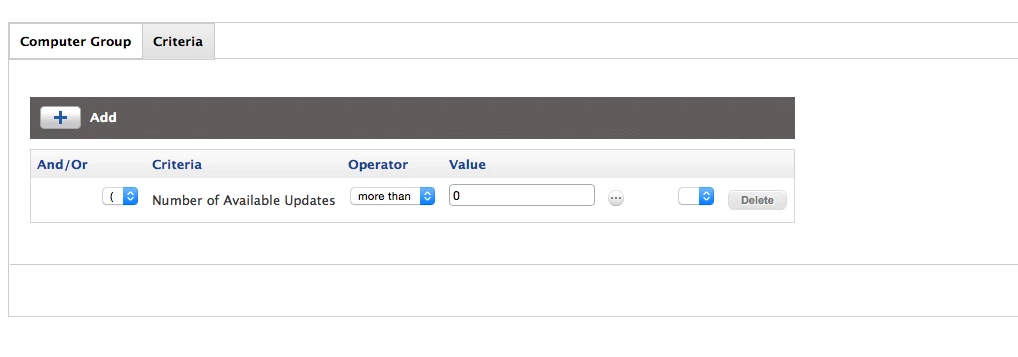
As most times, I answered my own question, the criteria is "Number of Available Updates"

Thanks for reading.

Corbin


Forum|alt.badge.img+13
  • Contributor
  • April 23, 2015

I use a smart group to show which machines have software updates remaining.

You could use that to scope your update policy.


RobertHammen
Forum|alt.badge.img+28
  • Esteemed Contributor
  • April 23, 2015

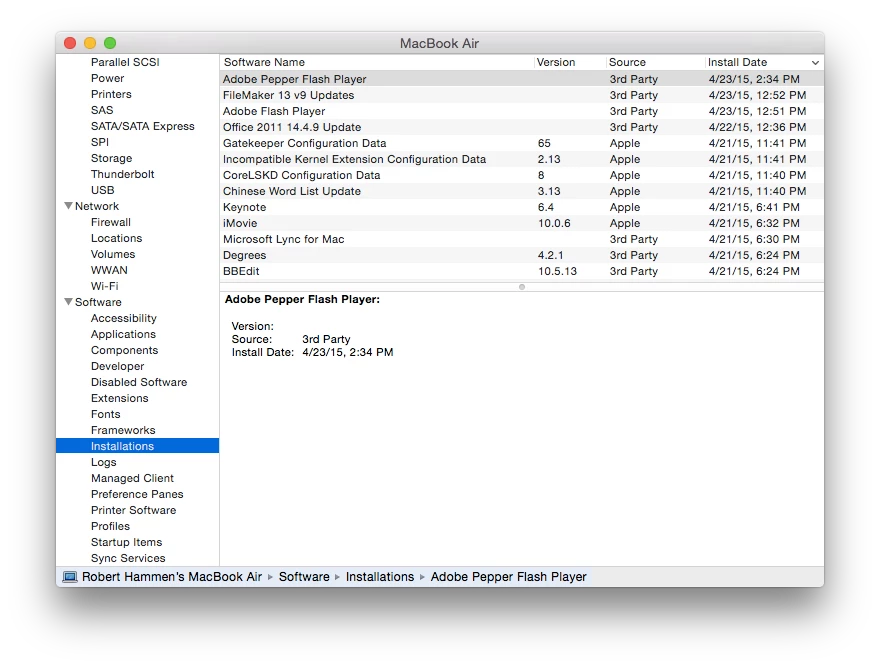
Users can also look in System Information, generate a System Report, Software, Installations and sort by date to see what was installed on their system, and when:


Forum|alt.badge.img+16
  • Valued Contributor
  • April 23, 2015

Second @jennifer_unger I just have a smart group that checks for Software Updates more than 0 and scopes an update button for them in self service.

I do like the idea of No OS X Updates Available. I'm going to scope a second group to put that little notification in self service.


Forum|alt.badge.img+13
  • Contributor
  • April 24, 2015

@RobertHammen Okay, I'll admit, I'm a little mad at myself for not knowing about that list.

I don't suppose you have a good way of grabbing that from remote computers (preferably in that easy to read format you pictured above).


RobertHammen
Forum|alt.badge.img+28
  • Esteemed Contributor
  • April 24, 2015

cat /var/log/install.log

Not sure if there's a way to do it via system_profiler... haven't tried.


Chris_Hafner
Forum|alt.badge.img+25
  • Jamf Heroes
  • April 25, 2015

Question. Any reason why the user shouldn't be encouraged to just open up the Mac App Store and check updates? With the exception of Yosemite the presented updates will honor your SUS. I prefer to make our offerings to our users via Self-Service yet we've moved to pointing our users in the direction of the MAS as they're constantly being pointed there by Apple marketing efforts anyways.

IN any event, we've used the "Any updates more than 0" methods mentioned and they worked quite well. I still use them for tracking the state of our departments updates.


Forum|alt.badge.img+11
  • Author
  • Valued Contributor
  • April 27, 2015

We try to encourage our customers to use our self service portal, it cuts down on confusion, plus we don't have VPP setup (yet).

With OS X updates scoped to Smart Groups the customer can easily determine if there are OS X updates available or not to install on their own. I do this for all our app updates as well. The built-in Self Service notifications doesn't provide a quick-look of updates available.

optional image ALT text

optional image ALT text


Chris_Hafner
Forum|alt.badge.img+25
  • Jamf Heroes
  • April 27, 2015

Makes perfect sense to me. I always try to follow @mm2270 as he keeps poking around with notifications.