
Question

Apps will not install after enrollment of iPad

  • December 14, 2016
  • 3 replies
  • 38 views

Forum|alt.badge.img+4


Yesterday I restored from an iCloud backup onto XXXXXXXXXXXX
The Restore finished normally, but the core apps that were scheduled for installation never went through after several attempts. I did a hard reboot of the iPad. Still no apps.

• Other commands go through with no issues. • Inventory update completes normally.
• All apps have enough licenses left to install according to the JSS.
• The iPad is logged into our internet filter portal

I formatted the iPad.

I set up as new iPad and authenticated with OD as card/card.

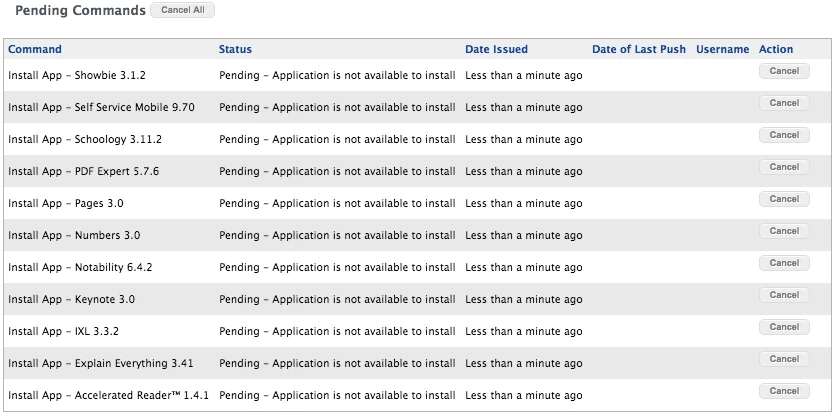
It still didn't work. All app installations are pending in JSS with the message

"Pending - Application is not available to install"

Today I tried restoring onto a different iPad - XXXXXXXXXXXX - same results.

Any ideas as to why this is no longer working?

3 replies

Forum|alt.badge.img+8
  • Contributor
  • December 14, 2016

We see this all the time in our environment. We have seen it take some times as long as a day for the apps to install. I know Yesterday I tested this for JAMF and it took an hour and half to get the APPS. If you wait you should see the apps get installed.


Forum|alt.badge.img+4
  • Author
  • Contributor
  • December 15, 2016

I talked to JAMF support. There was an issue with the VPP assignments.


bentoms
Forum|alt.badge.img+35
  • Hall of Fame
  • December 17, 2016

@spif_spaceman Self Service 9.70?

I thought 9.93 was current on iOS.. at least I think it's newer than 9.70 now.

Keynote should be 3.0.5.

I'm wondering if it's due to these being older versions of the apps.
