Solved

ARD 3.9 agent update - keychain error

  • February 21, 2017
  • 37 replies
  • 180 views

Forum|alt.badge.img+12

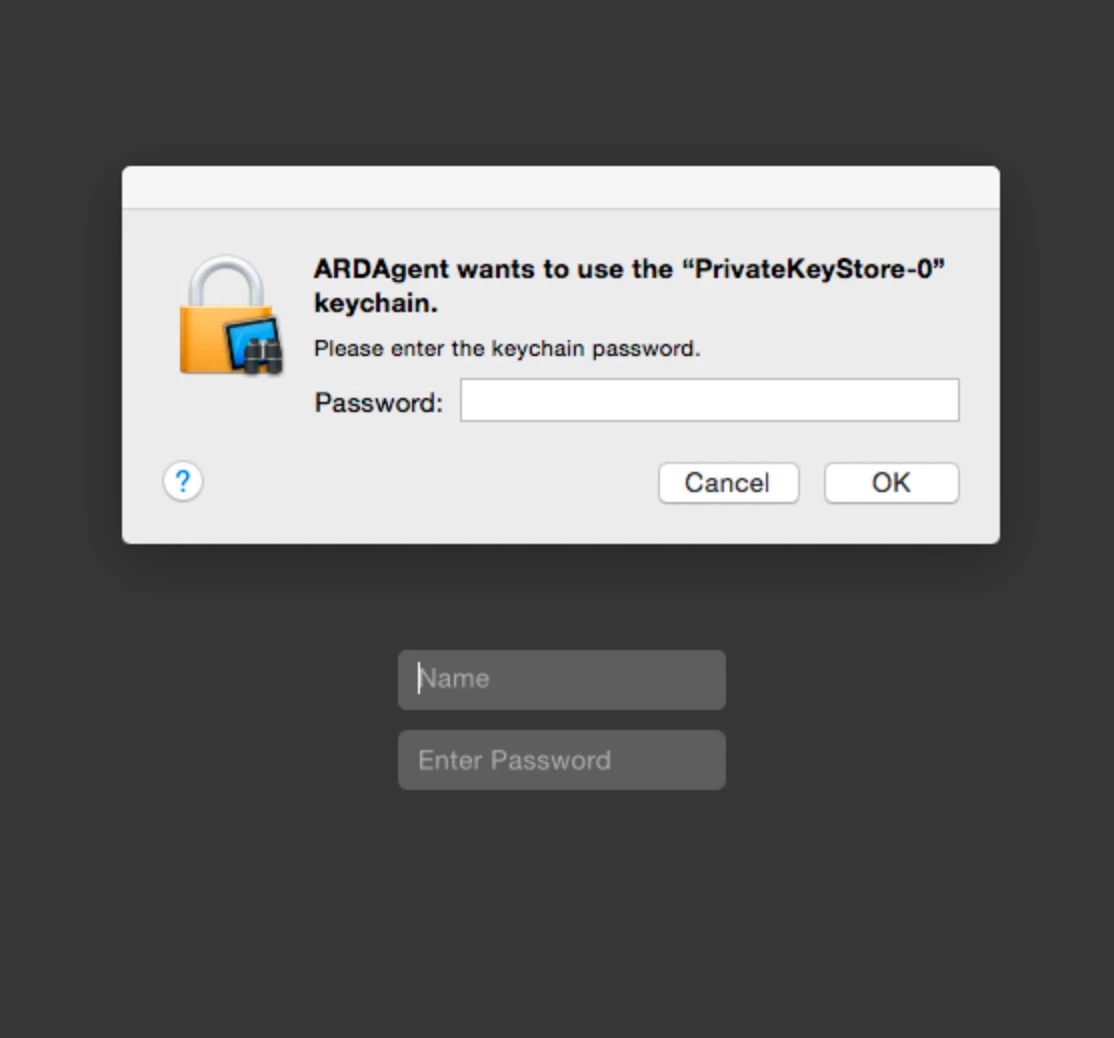
Anyone seeing keychain errors deploying the new ARD 3.9 client update released today?

Best answer by SGill

Yeah, restarting seemed to kill it here, too.

I added a restart to the package to see if that will help...also noticed that the default user context was current user --changed that to system account instead....thanks!


37 replies

Forum|alt.badge.img+3
  • New Contributor
  • February 21, 2017

We are getting this in our enterprise.


Forum|alt.badge.img+5
  • Contributor
  • February 21, 2017

Be wary of the ARD Admin update to 3.9. Installation/upgrade on an admittedly iffy 10.12.3 standard, non-privileged account results in failure to launch. Installation from a local admin appears to be normal.


Forum|alt.badge.img+3
  • New Contributor
  • February 21, 2017

What is the actual fix for this ?


bentoms
Forum|alt.badge.img+35
  • Hall of Fame
  • February 21, 2017

Restarting seems to fix the issue.

According to folks on the macadmins slack


RobertHammen
Forum|alt.badge.img+29
  • Esteemed Contributor
  • February 21, 2017

sudo /System/Library/CoreServices/RemoteManagement/ARDAgent.app/Contents/Resources/kickstart -restart -agent on the affected clients seems to do the trick at least for some short period of time. Not sure if this keychain prompt keeps re-occurring...


Forum|alt.badge.img+12
  • Author
  • Valued Contributor
  • Answer
  • February 21, 2017

Yeah, restarting seemed to kill it here, too.

I added a restart to the package to see if that will help...also noticed that the default user context was current user --changed that to system account instead....thanks!


Forum|alt.badge.img+3
  • New Contributor
  • February 21, 2017

We are seeing the following post restart. Casper Remote returning back password incorrect when trying to screen share. Also ARD appears to not see the machine when scanning the IP range in which the machine is on.


Forum|alt.badge.img+12
  • Author
  • Valued Contributor
  • February 21, 2017

Those might be 2 separate issues....not sure.

Can't duplicate either of those issues here with ARD Admin 3.9 and a mix of 3.9 and 3.8.5 clients....think my issue was simply installing with a logged-in user context instead of the system user. That fix appears to have resolved my install issue for now.


RobertHammen
Forum|alt.badge.img+29
  • Esteemed Contributor
  • February 22, 2017

For best results, make sure to restart the clients after getting the Agent update.

If you can't restart them, you may need to ssh in and run the kickstart -restart -agent command above with administrative credentials.

If you have clients/agents that ARD shows as being offline, but you can ssh into them and restart the agent, you can try the trick of "Get Info" on the computer in ARD, Edit it, and delete the IP address or name, then close the Get Info window. This will force the Remote Desktop app to re-try connecting to the client. Sometimes I have to re-enter administrative credentials to make this work. Worst-case scenario is to delete and re-add the client...


Forum|alt.badge.img+4
  • New Contributor
  • February 22, 2017

I'm not seeing the DeepFreeze status of my machines anymore. In 3.8.5 this information was displayed in ARD Field/Computer Info 1 column. Now it's just blank.


AVmcclint
Forum|alt.badge.img+21
  • Esteemed Contributor
  • February 22, 2017

I just discovered that Manage > Upgrade Client Software has been removed from ARD 3.9. So I launch ARD admin 3.9 and I see all machines listed with no information other than "Needs Upgrade". When I try to run a unix command (softwareupdate) it tells me the task is not authorized. How am I supposed to upgrade the agents and regain control of the Macs now?


Forum|alt.badge.img+8
  • Valued Contributor
  • February 22, 2017

Experiencing the same thing as @AVmcclint. Sort of at a lose what to do.


AVmcclint
Forum|alt.badge.img+21
  • Esteemed Contributor
  • February 22, 2017

Here is a workaround: If you still have a Mac with ARD admin 3.8 DO NOT UPGRADE IT YET. Use that version to connect to all your Macs and send the command softwareupdate -i RemoteDesktopClient-3.9.0 The task will appear to not finish because the agents are basically restarting and can't tell the admin Mac that it finished. Wait several minutes just to make sure enough time is given for the update to finish. Quit your ARD admin app and relaunch. If you display the column for ARD Version, you'll see those Macs were upgraded and you can still perform tasks on 3.9 clients with the 3.8 admin app.
Alternatively, you can make a JSS Policy to run the command at check-in and wait for things to happen. Once you have all your client Macs updated, then it should be safe to upgrade your admin app to 3.9. And don't forget to file a Bugreport with Apple on this. This is a pretty serious oversight.


AVmcclint
Forum|alt.badge.img+21
  • Esteemed Contributor
  • February 22, 2017

oops... don't update the ARD agent on your Mac that you are still running ARD admin 3.8. updating the agent will break your admin. :(


Forum|alt.badge.img+8
  • Valued Contributor
  • February 22, 2017

Thank you @AVmcclint

Have a good morning!


AVmcclint
Forum|alt.badge.img+21
  • Esteemed Contributor
  • February 22, 2017

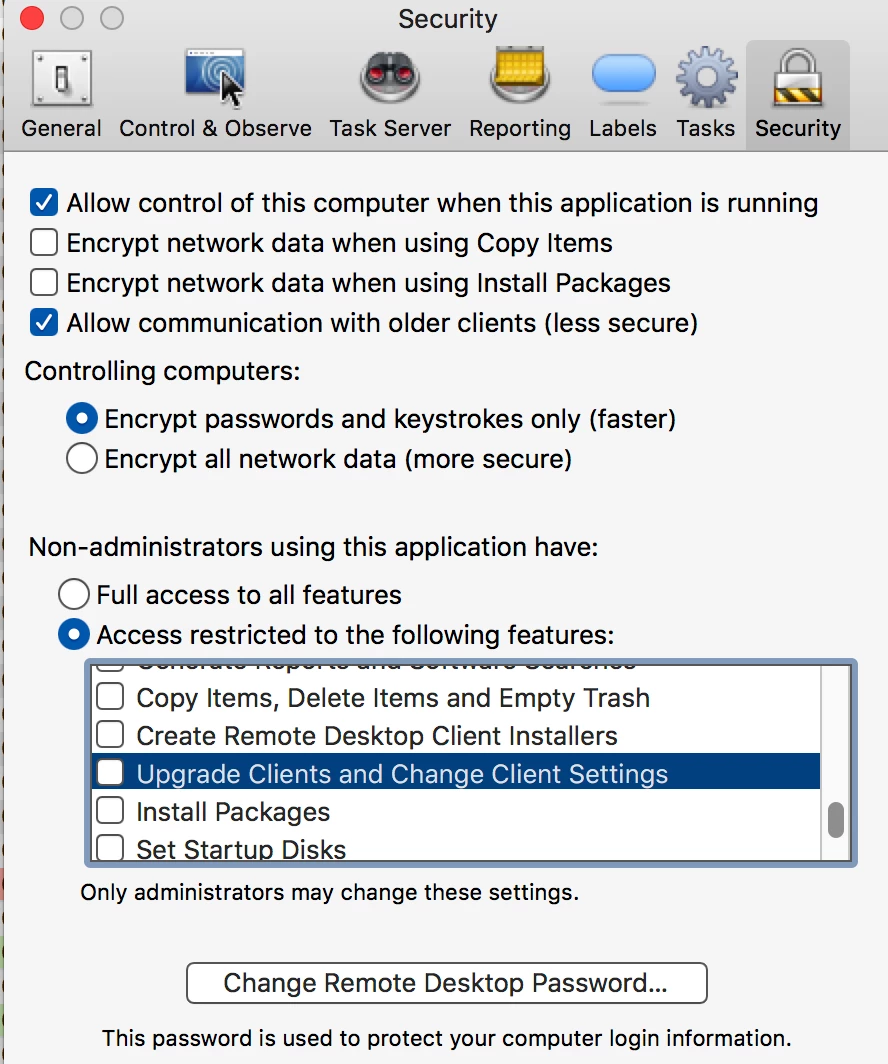
MORE INFO: In ARD 3.9 > Preferences > Security tab > Allow communication with older clients.

Checking this box seems to help with accessing older Macs but there doesn't appear to be any way to push an upgrade to the clients.... despite what the box in the bottom half of the window says.


Forum|alt.badge.img+5
  • Contributor
  • February 22, 2017

Seeing this issue on 10.11.6 clients too as they update.


Forum|alt.badge.img+12
  • Author
  • Valued Contributor
  • February 22, 2017

The "Allow communication with older clients" feature appears to be working here. I was looking all over for the upgrade client feature only to also discover that it's gone. I used my deployment app to send out the 3.9 update instead of ARD, and then discovered I needed to specify install as system user instead of logged-in user context the way Apple set it by default.


AVmcclint
Forum|alt.badge.img+21
  • Esteemed Contributor
  • February 22, 2017

I am starting to see the ARDagent pop-up asking for access to a keychain too. So far rebooting the Macs affected by it clears it but I don't know if enough time has elapsed to say that a reboot definitely stops the alert and it will never come up again.


Forum|alt.badge.img+12
  • Author
  • Valued Contributor
  • February 22, 2017

I gave it overnight on my affected macs, and it seemed to clear it up. I added a restart to the package because of that, but of course that slows down deployment because of the disruption of restarts everywhere....heh.


Forum|alt.badge.img+8
  • Contributor
  • February 22, 2017

I'm seeing the same behavior. I updated my ARD server to 3.9 and now all my clients are listed as "Needs Update". So, I thought, JAMF to the rescue ...

From the Casper Remote window I sent the command:

softwareupdate -i RemoteDesktopClient-3.9.0

and then the command

/System/Library/CoreServices/RemoteManagement/ARDAgent.app/Contents/Resources/kickstart -restart -agent

While the logs report successful completion, this combination of commands doesn't seem to have done anything. I'm new to running commands and scripts with the JAMF-Casper interface. Should I prepend "sudo" to all these system commands or does the casper agent run these as root anyway ???

Other thoughts?
Thanks all -
- Lynna Jackson, Williams College


Forum|alt.badge.img+12
  • Author
  • Valued Contributor
  • February 22, 2017

I don't know if I'd particularly recommend ARD client 3.9.0 just yet...think it needs a few tweaks first....ignore for now?


Forum|alt.badge.img+8
  • Contributor
  • February 22, 2017

Answered my own question - both commands MUST be prepended with sudo as follows:

sudo softwareupdate -i RemoteDesktopClient-3.9.0

and then:

sudo/System/Library/CoreServices/RemoteManagement/ARDAgent.app/Contents/Resources/kickstart -restart -agent

Since I have close to 300 macs to do this do I'm considering a using a script with a check-in policy. Thoughts?
- Lynna Jackson, Williams College


Forum|alt.badge.img+12
  • Author
  • Valued Contributor
  • February 22, 2017

@lynnaj I guess I didn't notice that one because I've always run those 2 commands with sudo. Sudo may also give you the System User installation context I found myself needing to avoid the few keychain errors that were popping up (original post) here.


Forum|alt.badge.img+8
  • Contributor
  • February 22, 2017

This is the script I came up with which seems to work to both update the ARD client to 3.9 and restart the agent:

#!/bin/sh softwareupdate -i 'RemoteDesktopClient-3.9.0' /System/Library/CoreServices/RemoteManagement/ARDAgent.app/Contents/Resources/kickstart -restart -agent exit 0

The single quotes around RemoteDesktopClient-3.9.0 are absolutely required. Otherwise the script returns an error not finding the update.

For the compete newbies like me:
First create this script in the JSS server section under " Management Settings - Computer Management - Scripts". Then create a Policy to run the script at the recurring check-in on your computers - once per computer and no restart is required so remove the restart configuration.

This script works if you log into the target computer and manually run:
sudo jams policy

It reports an error with no update availble if run at the random (i.e. normal) computer checkin. I going to post this as a different thread

Hope it helps someone else -
- Lynna Jackson, Williams College