Question

ARD Screen Sharing issue M1 Macs and Monterey

  • February 7, 2022
  • 155 replies
  • 1564 views

Show first post

155 replies

junjishimazaki
Forum|alt.badge.img+10

Hi kwoodward, I don't use a config profile. I only use the script and it works for me on M1/Intel macs. 


dan-snelson
Forum|alt.badge.img+30
  • Honored Contributor
  • May 29, 2022

On the off-chance that the eardm2 function proves helpful:

https://snelson.us/2022/05/bz-please/


route1337
Forum|alt.badge.img+1
  • New Contributor
  • June 7, 2022

This is my script to enable ARD/screen sharing on Monterey/M1


#!/bin/bash jamf_User="$4" jamf_Pass="$5" # Get the Jamf instance URL from the computer jss_Url=$( /usr/bin/defaults read /Library/Preferences/com.jamfsoftware.jamf.plist jss_url ) #Kick start command KICK_START_BINARY="/System/Library/CoreServices/RemoteManagement/ARDAgent.app/Contents/Resources/kickstart" echo "Enabling ARD..." # generate base64 ecnrypted password encoded_creds=$(printf "$jamf_User:$jamf_Pass" | iconv -t ISO-8859-1 | base64 -i -) # generate an auth token. tr truncates and removes all line feeds authToken=$( /usr/bin/curl -s "${jss_Url}api/v1/auth/token" -H "authorization: Basic ${encoded_creds}" -X POST | tr -d "\\n" ) # parse token, remove expiration date token=$( /usr/bin/osascript -l 'JavaScript' -e "JSON.parse(\\`$authToken\\`).token" ) # Get Mac serial number mac_serial=`system_profiler SPHardwareDataType | awk '/Serial/ {print $4}'` echo "Mac serial: $mac_serial" # Get ID of the Mac from Jamf JAMF_ID=$(curl --header "Authorization: Bearer $token" "${jss_Url}JSSResource/computers/serialnumber/${mac_serial}" -X GET | xmllint --xpath '/computer/general/id/text()' -) #echo "Jamf ID: $JAMF_ID" #Send MDM command to enable remote desktop for this mac /usr/bin/curl --header "Authorization: Bearer $token" "${jss_Url}JSSResource/computercommands/command/EnableRemoteDesktop/id/${JAMF_ID}" -X POST ## Enable ARD options using the kickstart command $KICK_START_BINARY -activate -configure -access -on -restart -agent -privs -all -allowAccessFor -allUsers # expire the auth token /usr/bin/curl "${jss_Url}uapi/auth/invalidateToken" --silent --request POST --header "Authorization: Bearer $token" exit 0


Do you mind if I implement some of your API calls into a script in a public repo and add you to the file header as a contributor?


junjishimazaki
Forum|alt.badge.img+10

Do you mind if I implement some of your API calls into a script in a public repo and add you to the file header as a contributor?


I don't mind. Go ahead


route1337
Forum|alt.badge.img+1
  • New Contributor
  • June 7, 2022

I don't mind. Go ahead


Thanks! I'll publish my variant of the script once I get some testing done on it.


junjishimazaki
Forum|alt.badge.img+10

Thanks! I'll publish my variant of the script once I get some testing done on it.


Sounds good and thank you. 


kwoodard
Forum|alt.badge.img+12
  • Valued Contributor
  • June 7, 2022

Hi kwoodward, I don't use a config profile. I only use the script and it works for me on M1/Intel macs. 


I still can’t get my Intel based Macs working. Your script works perfectly on M1 macs. 


junjishimazaki
Forum|alt.badge.img+10

I still can’t get my Intel based Macs working. Your script works perfectly on M1 macs. 


I don't understand this should work on either one. All it does is send the command. It works fine for me on Intel and on M1. When you run it, do you get any error messages?


route1337
Forum|alt.badge.img+1
  • New Contributor
  • June 8, 2022

This is my script to enable ARD/screen sharing on Monterey/M1


#!/bin/bash jamf_User="$4" jamf_Pass="$5" # Get the Jamf instance URL from the computer jss_Url=$( /usr/bin/defaults read /Library/Preferences/com.jamfsoftware.jamf.plist jss_url ) #Kick start command KICK_START_BINARY="/System/Library/CoreServices/RemoteManagement/ARDAgent.app/Contents/Resources/kickstart" echo "Enabling ARD..." # generate base64 ecnrypted password encoded_creds=$(printf "$jamf_User:$jamf_Pass" | iconv -t ISO-8859-1 | base64 -i -) # generate an auth token. tr truncates and removes all line feeds authToken=$( /usr/bin/curl -s "${jss_Url}api/v1/auth/token" -H "authorization: Basic ${encoded_creds}" -X POST | tr -d "\\n" ) # parse token, remove expiration date token=$( /usr/bin/osascript -l 'JavaScript' -e "JSON.parse(\\`$authToken\\`).token" ) # Get Mac serial number mac_serial=`system_profiler SPHardwareDataType | awk '/Serial/ {print $4}'` echo "Mac serial: $mac_serial" # Get ID of the Mac from Jamf JAMF_ID=$(curl --header "Authorization: Bearer $token" "${jss_Url}JSSResource/computers/serialnumber/${mac_serial}" -X GET | xmllint --xpath '/computer/general/id/text()' -) #echo "Jamf ID: $JAMF_ID" #Send MDM command to enable remote desktop for this mac /usr/bin/curl --header "Authorization: Bearer $token" "${jss_Url}JSSResource/computercommands/command/EnableRemoteDesktop/id/${JAMF_ID}" -X POST ## Enable ARD options using the kickstart command $KICK_START_BINARY -activate -configure -access -on -restart -agent -privs -all -allowAccessFor -allUsers # expire the auth token /usr/bin/curl "${jss_Url}uapi/auth/invalidateToken" --silent --request POST --header "Authorization: Bearer $token" exit 0


Do you happen to know the minimum API permissions needed to perform these functions?


kwoodard
Forum|alt.badge.img+12
  • Valued Contributor
  • June 8, 2022

I don't understand this should work on either one. All it does is send the command. It works fine for me on Intel and on M1. When you run it, do you get any error messages?


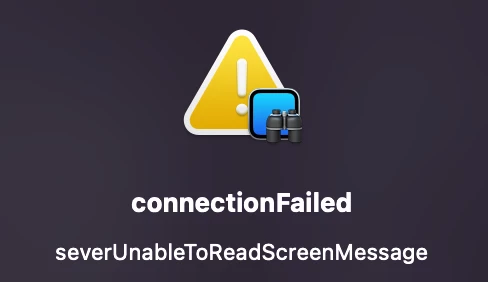
I get the following error when I try to connect via Apple Remote Desktop or the built in VNC…


connectionFailed

serverUnableToReadScreenMessage


Forum|alt.badge.img+15
  • Contributor
  • June 8, 2022

This is my script to enable ARD/screen sharing on Monterey/M1


#!/bin/bash jamf_User="$4" jamf_Pass="$5" # Get the Jamf instance URL from the computer jss_Url=$( /usr/bin/defaults read /Library/Preferences/com.jamfsoftware.jamf.plist jss_url ) #Kick start command KICK_START_BINARY="/System/Library/CoreServices/RemoteManagement/ARDAgent.app/Contents/Resources/kickstart" echo "Enabling ARD..." # generate base64 ecnrypted password encoded_creds=$(printf "$jamf_User:$jamf_Pass" | iconv -t ISO-8859-1 | base64 -i -) # generate an auth token. tr truncates and removes all line feeds authToken=$( /usr/bin/curl -s "${jss_Url}api/v1/auth/token" -H "authorization: Basic ${encoded_creds}" -X POST | tr -d "\\n" ) # parse token, remove expiration date token=$( /usr/bin/osascript -l 'JavaScript' -e "JSON.parse(\\`$authToken\\`).token" ) # Get Mac serial number mac_serial=`system_profiler SPHardwareDataType | awk '/Serial/ {print $4}'` echo "Mac serial: $mac_serial" # Get ID of the Mac from Jamf JAMF_ID=$(curl --header "Authorization: Bearer $token" "${jss_Url}JSSResource/computers/serialnumber/${mac_serial}" -X GET | xmllint --xpath '/computer/general/id/text()' -) #echo "Jamf ID: $JAMF_ID" #Send MDM command to enable remote desktop for this mac /usr/bin/curl --header "Authorization: Bearer $token" "${jss_Url}JSSResource/computercommands/command/EnableRemoteDesktop/id/${JAMF_ID}" -X POST ## Enable ARD options using the kickstart command $KICK_START_BINARY -activate -configure -access -on -restart -agent -privs -all -allowAccessFor -allUsers # expire the auth token /usr/bin/curl "${jss_Url}uapi/auth/invalidateToken" --silent --request POST --header "Authorization: Bearer $token" exit 0


Thank you very much for this. This resolved the ARD screenshare error on the Intel/Monterey devices we have. Will also use this for the M1/Monterey.


junjishimazaki
Forum|alt.badge.img+10

I get the following error when I try to connect via Apple Remote Desktop or the built in VNC…


connectionFailed

serverUnableToReadScreenMessage


But, what error message do you get when you run the policy from Jamf?


kwoodard
Forum|alt.badge.img+12
  • Valued Contributor
  • June 8, 2022

But, what error message do you get when you run the policy from Jamf?


I don't get any error in Jamf. As far as Jamf thinks, it installed correctly. In use, I get that popup message from any computer trying to connect to any Intel Mac, using ARD. It's perplexing to be sure.


junjishimazaki
Forum|alt.badge.img+10

I don't get any error in Jamf. As far as Jamf thinks, it installed correctly. In use, I get that popup message from any computer trying to connect to any Intel Mac, using ARD. It's perplexing to be sure.


Have you tried running the script locally on the mac?


kwoodard
Forum|alt.badge.img+12
  • Valued Contributor
  • June 8, 2022

Have you tried running the script locally on the mac?


I have, I get the same error when trying to connect from a different Mac using ARD. Again, only affecting the Intel Mac's.


junjishimazaki
Forum|alt.badge.img+10

I have, I get the same error when trying to connect from a different Mac using ARD. Again, only affecting the Intel Mac's.


Do you have any Config profiles deployed that would affect this? 


kwoodard
Forum|alt.badge.img+12
  • Valued Contributor
  • June 8, 2022

Do you have any Config profiles deployed that would affect this? 


Nope, sure don't.


route1337
Forum|alt.badge.img+1
  • New Contributor
  • June 8, 2022

Do you have any Config profiles deployed that would affect this? 


Is the kickstart PPPC no longer required if you use the API to enable?

FWIW this applies to a mix of T2s and Apple Silicon for us.


junjishimazaki
Forum|alt.badge.img+10

Is the kickstart PPPC no longer required if you use the API to enable?

FWIW this applies to a mix of T2s and Apple Silicon for us.


My script doesn't require the kickstart PPPC since the script handles it anyway.  


junjishimazaki
Forum|alt.badge.img+10

Nope, sure don't.


Trully bizarre. Do you have the firewall enabled on the mac?


kwoodard
Forum|alt.badge.img+12
  • Valued Contributor
  • June 8, 2022

Trully bizarre. Do you have the firewall enabled on the mac?


Nope, this is affecting every Intel Mac on macOS 12...unless I had manually flipped on Remote Management.


Forum|alt.badge.img+2
  • New Contributor
  • June 8, 2022

My script doesn't require the kickstart PPPC since the script handles it anyway.  


Hello all.  I'm just now finally getting back on this.  Here's an update...

  1. Enable Remote Desktop from the Jamf Pro Computer Management:
    • So far, the workaround of manually Enable Remote Desktop from the Jamf Pro Computer Management works except for one thing, that's all it is.  I can remote to the workstation, however I can initiate a restart, a reboot, etc. from ARD tools.  After investigating, I found that the options for the Enable Remote Desktop from the Jamf Pro Computer Management is just an "Observe" and "Control" only.  -Plus for "All Users", not for the "Only these users."  
  2.   Junjishimazaki's Script Test: Failed Unable to Connect
    1. I removed an Intel machine and an M1, both with Monterey from my ARD script.
    2. I disabled Remote Desktop from the Jamf Pro Computer Management for each workstation.
    3. I created another policy with your script and scoped it out.
    4. It looked promising.  It enabled it, however when I try to establish an ARD session, I get this on both machines:
      • Thoughts?

  3. I noticed that your script allowed "All users" with all options.
    1. "

      ## Enable ARD options using the kickstart command

      $KICK_START_BINARY -activate -configure -access -on -restart -agent -privs -all -allowAccessFor -allUsers

      "
    2. I tried to do this below to specify a user that is created during enrollment... Unfortunately it didn't work.
      1. "

        ## Enable ARD options using the kickstart command

        $KICK_START_BINARY -activate -configure -access -on -restart -agent -privs -all -allowAccessFor -specifiedUsers -users [user1,user2]

        "

Any suggestions?


Bol
Forum|alt.badge.img+11
  • Contributor
  • June 9, 2022

Hello all.  I'm just now finally getting back on this.  Here's an update...

  1. Enable Remote Desktop from the Jamf Pro Computer Management:
    • So far, the workaround of manually Enable Remote Desktop from the Jamf Pro Computer Management works except for one thing, that's all it is.  I can remote to the workstation, however I can initiate a restart, a reboot, etc. from ARD tools.  After investigating, I found that the options for the Enable Remote Desktop from the Jamf Pro Computer Management is just an "Observe" and "Control" only.  -Plus for "All Users", not for the "Only these users."  
  2.   Junjishimazaki's Script Test: Failed Unable to Connect
    1. I removed an Intel machine and an M1, both with Monterey from my ARD script.
    2. I disabled Remote Desktop from the Jamf Pro Computer Management for each workstation.
    3. I created another policy with your script and scoped it out.
    4. It looked promising.  It enabled it, however when I try to establish an ARD session, I get this on both machines:
      • Thoughts?

  3. I noticed that your script allowed "All users" with all options.
    1. "

      ## Enable ARD options using the kickstart command

      $KICK_START_BINARY -activate -configure -access -on -restart -agent -privs -all -allowAccessFor -allUsers

      "
    2. I tried to do this below to specify a user that is created during enrollment... Unfortunately it didn't work.
      1. "

        ## Enable ARD options using the kickstart command

        $KICK_START_BINARY -activate -configure -access -on -restart -agent -privs -all -allowAccessFor -specifiedUsers -users [user1,user2]

        "

Any suggestions?


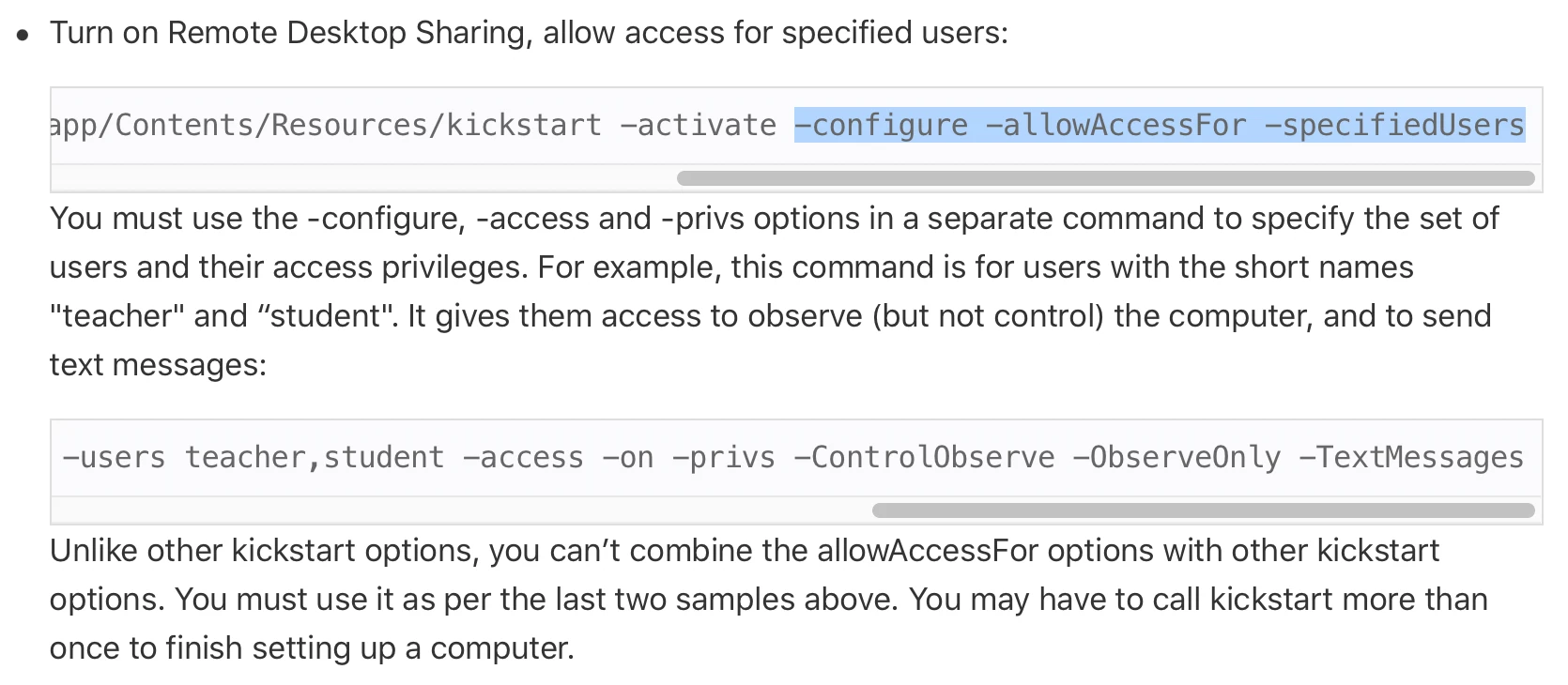
See here in Apple's old docs;

Try setting up like this;

$kickstart -targetdisk / -verbose -uninstall -settings -prefs
$kickstart -targetdisk / -verbose -configure -allowAccessFor -specifiedUsers
$kickstart -targetdisk / -activate -configure -access -on -users "$localUserName" -privs "$privs" -clientopts -setmenuextra -menuextra no -restart -agent -console -menu

Forum|alt.badge.img+2
  • New Contributor
  • June 9, 2022

See here in Apple's old docs;

Try setting up like this;

$kickstart -targetdisk / -verbose -uninstall -settings -prefs
$kickstart -targetdisk / -verbose -configure -allowAccessFor -specifiedUsers
$kickstart -targetdisk / -activate -configure -access -on -users "$localUserName" -privs "$privs" -clientopts -setmenuextra -menuextra no -restart -agent -console -menu

Yeah Bol.  The first two line above is exactly on my original script.  Now I'm just updating that to fit in Junjishimazaki's script.  Thanks for the $kickstart lines.  I'll give it a shot.  

Oh... This is for all local user accounts. Yes?  

-users "$localUserName"

So for specific users, should it look like this?

-users "USER1" "USER2"

  Or without quotes?

-users USER1,USER2   


kwoodard
Forum|alt.badge.img+12
  • Valued Contributor
  • June 9, 2022

Anyone know where the settings for Remote Management reside? I think that on the computers where I am seeing this weird error in ARD, something in the remote computer is completely messed up and toggling the check-box for Remote Management isn't enough to clear out the issue. I would like to avoid reinstalling the OS if possible.