Autodesk 2026 Deployment script

  • July 7, 2025
  • 15 replies
  • 1774 views

kwoodard
Forum|alt.badge.img+12

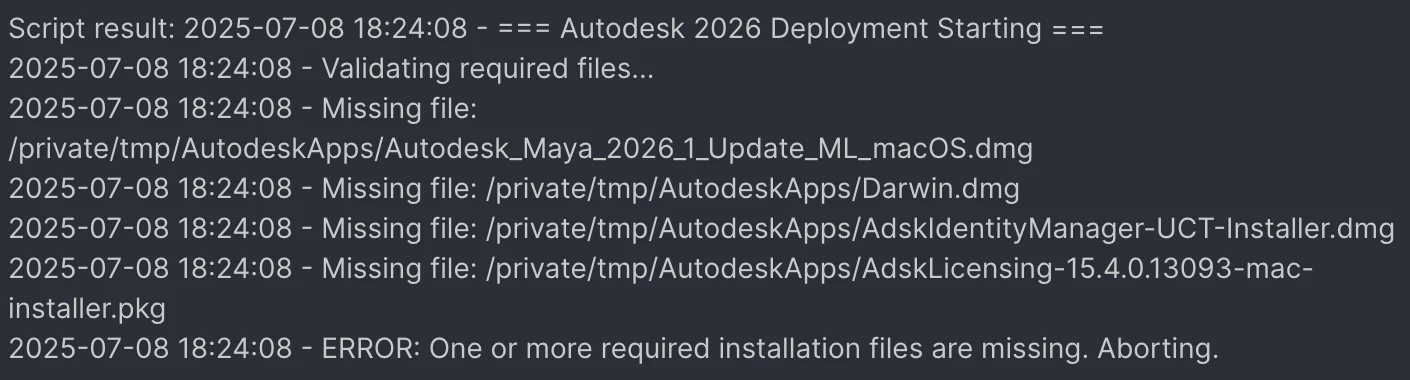
Hey folks, I worked on a script to deploy Autodesk 2026 (the one that uses the named user licenses). We don’t teach Mudbox, so that isn’t in the script...but Maya and AutoCAD is (along with Darwin..what a PIA to get working). I packaged the apps and deployed to /private/tmp/AutodeskApps… I have a lot of logging left in the script as Darwin is a royal pain and can fail at many different steps. I also made use of a lot of variables to hopefully make updating in the future easier. Oh, also did it in zsh.

Hope you all find it useful, or at the very least, a good jumping off point!

#!/bin/zsh
set -euo pipefail

############################
# VARIABLES
############################
YEAR="2026"
TMP="/private/tmp"
APP_TMP="${TMP}/AutodeskApps"
LOG="/var/log/autodesk2026_install.log"

DMG_LIST=(
"Autodesk_Maya_2026_1_Update_ML_macOS.dmg"
"Darwin.dmg"
"AdskIdentityManager-UCT-Installer.dmg"
"Autodesk_AutoCAD_2026_macOS.dmg"
)
PKG_FILE="AdskLicensing-15.4.0.13093-mac-installer.pkg"
INSTALL_SUMMARY=()

log() {
echo "$(date +'%F %T') - $*" | tee -a "$LOG"
}

if [[ "$EUID" -ne 0 ]]; then
log "ERROR: Script must be run as root."
exit 1
fi

############################
# FUNCTIONS
############################

validate_files() {
log "Validating required files..."
local missing=0
for file in "${DMG_LIST[@]}" "$PKG_FILE"; do
if [[ ! -f "${APP_TMP}/${file}" ]]; then
log "Missing file: ${APP_TMP}/${file}"
missing=1
fi
done
if [[ $missing -eq 1 ]]; then
log "ERROR: One or more required installation files are missing. Aborting."
exit 1
fi
log "All required files found."
}

install_pkg() {
local pkg="$1"
log "Installing standalone PKG: $pkg"
if installer -pkg "${APP_TMP}/${pkg}" -target / >> "$LOG" 2>&1; then
INSTALL_SUMMARY+=("$pkg installed successfully")
else
INSTALL_SUMMARY+=("Failed to install $pkg")
log "Failed to install pkg: $pkg"
exit 1
fi
}

detach_volume() {
local mount_point="$1"
log "Attempting to unmount $mount_point"
for i in {1..5}; do
if hdiutil detach "$mount_point" >> "$LOG" 2>&1; then
log "Successfully unmounted $mount_point"
return
else
log "Unmount attempt $i failed, retrying in 5 seconds..."
sleep 5
fi
done
log "Force unmounting $mount_point"
hdiutil detach -force "$mount_point" >> "$LOG" 2>&1 || log "Force unmount failed"
}

mount_and_install() {
local dmg_path="$1"
log "Mounting DMG: $dmg_path"

mount_output=$(hdiutil attach "$dmg_path" -nobrowse -plist)
mount_point=$(echo "$mount_output" \
| plutil -extract system-entities xml1 -o - - \
| xmllint --xpath '//dict/key[text()="mount-point"]/following-sibling::string[1]/text()' -)

log "Mounted at: $mount_point"

local app=$(find "$mount_point" -maxdepth 1 -name '*.app' -print -quit)
local pkg=$(find "$mount_point" -maxdepth 1 -name '*.pkg' -print -quit)

if [[ -n "$app" && -e "$app" ]]; then
log "Found .app: $app"

local dest_app_dir="${APP_TMP}/apps"
mkdir -p "$dest_app_dir"
local app_name=$(basename "$app")
local app_copy="${dest_app_dir}/${app_name}"

log "Copying $app to $app_copy"
rm -rf "$app_copy"
cp -R "$app" "$app_copy"

log "Removing quarantine attribute from $app_copy"
xattr -rd com.apple.quarantine "$app_copy" || true
chmod -R +x "$app_copy"

local setup_bin="$app_copy/Contents/Helper/Setup.app/Contents/MacOS/Setup"

if [[ -x "$setup_bin" ]]; then
log "Running silent installer: $setup_bin --silent"
"$setup_bin" --silent >> "$LOG" 2>&1 && INSTALL_SUMMARY+=("Installed $app_name") || {
INSTALL_SUMMARY+=("Failed to install $app_name")
log "Installer failed for $app_name"
detach_volume "$mount_point"
exit 1
}
else
# Try alternate setup path if standard one missing (e.g., Identity Manager)
local alt_setup_bin="$app_copy/Contents/MacOS/setup"
if [[ -x "$alt_setup_bin" ]]; then
log "Fallback: Running installer from alternate path: $alt_setup_bin"
"$alt_setup_bin" --mode unattended >> "$LOG" 2>&1 && INSTALL_SUMMARY+=("Installed $app_name (alt path)") || {
INSTALL_SUMMARY+=("Failed to install $app_name (alt path)")
log "Alternate installer failed for $app_name"
}
else
log "Setup binary not found at expected path: $setup_bin or $alt_setup_bin"
INSTALL_SUMMARY+=("Skipped $app_name (no setup binary found)")
fi
fi
elif [[ -n "$pkg" && -e "$pkg" ]]; then
log "Found .pkg: $pkg"
installer -pkg "$pkg" -target / >> "$LOG" 2>&1 && INSTALL_SUMMARY+=("Installed $(basename "$pkg")") || {
INSTALL_SUMMARY+=("Failed to install $(basename "$pkg")")
log "Package installer failed: $pkg"
detach_volume "$mount_point"
exit 1
}
else
log "No .app or .pkg found in $mount_point"
INSTALL_SUMMARY+=("Nothing found to install in $dmg_path")
fi

detach_volume "$mount_point"
}

preclean_darwin() {
log "Cleaning existing Darwin Runtime..."
launchctl bootout system /Library/LaunchDaemons/com.autodesk.odis.agent.plist 2>/dev/null || true
killall -9 odisAgent 2>/dev/null || true
rm -rf "/Library/Application Support/Autodesk/Darwin" 2>/dev/null || true
}

install_darwin() {
log "Step 5: Installing Darwin Runtime Environment"
preclean_darwin

mount_output=$(hdiutil attach "${APP_TMP}/Darwin.dmg" -nobrowse -plist)
mount_point=$(echo "$mount_output" \
| plutil -extract system-entities xml1 -o - - \
| xmllint --xpath '//dict/key[text()="mount-point"]/following-sibling::string[1]/text()' -)

log "Mounted at: $mount_point"

local app=$(find "$mount_point" -maxdepth 1 -name '*.app' -print -quit)
if [[ -n "$app" && -e "$app" ]]; then
log "Found .app: $app"
local dest_app_dir="${APP_TMP}/apps"
mkdir -p "$dest_app_dir"
local app_name=$(basename "$app")
local app_copy="${dest_app_dir}/${app_name}"

log "Copying $app to $app_copy"
rm -rf "$app_copy"
cp -R "$app" "$app_copy"

log "Removing quarantine attribute"
xattr -rd com.apple.quarantine "$app_copy" || true
chmod -R +x "$app_copy"

local installer_script="${app_copy}/Contents/MacOS/installbuilder.sh"
if [[ -x "$installer_script" ]]; then
log "Launching Darwin installer in foreground (full output)"
"$installer_script" --mode unattended >> "$LOG" 2>&1
local exit_code=$?
log "Darwin installer exited with code: $exit_code"
INSTALL_SUMMARY+=("Darwin installer ran (exit code: $exit_code)")
else
log "ERROR: installbuilder.sh not found in Darwin bundle"
INSTALL_SUMMARY+=("Darwin install script not found")
detach_volume "$mount_point"
exit 1
fi
else
log "ERROR: No app found in Darwin.dmg"
INSTALL_SUMMARY+=("No app found in Darwin.dmg")
detach_volume "$mount_point"
exit 1
fi

log "Checking for installed Darwin components..."
if [[ -d "/Library/Application Support/Autodesk/Darwin" ]]; then
log "Contents of /Library/Application Support/Autodesk/Darwin:"
ls -lR "/Library/Application Support/Autodesk/Darwin" >> "$LOG" 2>&1
if [[ -f "/Library/LaunchDaemons/com.autodesk.odis.agent.plist" ]]; then
log "Found odis agent launch daemon."
fi
if [[ -x "/Library/Application Support/Autodesk/Darwin/AdODIS/odisAgent" ]]; then
log "Found odisAgent binary."
fi
else
log "WARNING: Darwin folder missing after install."
INSTALL_SUMMARY+=("Darwin folder not found post-install")
fi

log "Dumping recent Darwin-related system logs"
log show --predicate 'eventMessage CONTAINS[c] "odis"' --last 10m >> "$LOG" 2>&1 || true

log "Attempting to unmount Darwin volume after installation"
detach_volume "$mount_point"
}

############################
# INSTALL START
############################

log "=== Autodesk ${YEAR} Deployment Starting ==="

validate_files

log "Step 1: Installing Autodesk Identity Manager"
mount_and_install "${APP_TMP}/AdskIdentityManager-UCT-Installer.dmg"

log "Step 2: Installing Autodesk Licensing Patch"
install_pkg "$PKG_FILE"

log "Step 3: Installing Maya ${YEAR}"
mount_and_install "${APP_TMP}/Autodesk_Maya_2026_1_Update_ML_macOS.dmg"

log "Step 4: Installing AutoCAD ${YEAR}"
mount_and_install "${APP_TMP}/Autodesk_AutoCAD_2026_macOS.dmg"

install_darwin

log "=== Autodesk ${YEAR} Deployment Complete ==="

log "--- INSTALLATION SUMMARY ---"
for entry in "${INSTALL_SUMMARY[@]}"; do
echo "$entry" | tee -a "$LOG"
sleep 0.2
done

exit 0

 

15 replies

hung_cheng
Forum|alt.badge.img+2
  • New Contributor
  • July 8, 2025

Hi kwoodard

Thanks for sharing the script.

I want to install AutoCAD 2026, and I have deployed the package under /private/tmp/AutodeskApps and uploaded the script to Jamf. However, how do I use the script to start installing? How do I use log "Step 4: Installing AutoCAD ${YEAR}"?
 

Thanks
Hung


kwoodard
Forum|alt.badge.img+12
  • Author
  • Valued Contributor
  • July 8, 2025

Hi kwoodard

Thanks for sharing the script.

I want to install AutoCAD 2026, and I have deployed the package under /private/tmp/AutodeskApps and uploaded the script to Jamf. However, how do I use the script to start installing? How do I use log "Step 4: Installing AutoCAD ${YEAR}"?
 

Thanks
Hung

It looks like the installation files are not in the tmp folder. I created a package with Composer that includes all the installers, uploaded that to Jamf, them made a policy that “installs” the installers into the tmp folder. Once that is done, the script runs. Make sure your paths are correct.


hung_cheng
Forum|alt.badge.img+2
  • New Contributor
  • July 10, 2025

I have already placed the AutoCAD installation pack in the tmp folder - /private/tmp/AutodeskApps/Autodesk_AutoCAD_2026_macOS.dmg. Is it possible just installing the AutoCAD from the script?


kwoodard
Forum|alt.badge.img+12
  • Author
  • Valued Contributor
  • July 10, 2025

I have already placed the AutoCAD installation pack in the tmp folder - /private/tmp/AutodeskApps/Autodesk_AutoCAD_2026_macOS.dmg. Is it possible just installing the AutoCAD from the script?

Yes, just remove or comment out the script sections for the software you don’t need. 


angryant
Forum|alt.badge.img+5
  • Contributor
  • July 17, 2025

Autodesk have got the silent install working this year, we copy the app from the DMG onto the computer and then run the command on this page using Files and Processes in the same same policy.


https://help.autodesk.com/view/ACD/2026/PTB/?guid=Installation_AutoCAD_Install_ACDMAC_acdmac_install_product_silently_html


kwoodard
Forum|alt.badge.img+12
  • Author
  • Valued Contributor
  • July 18, 2025

Autodesk have got the silent install working this year, we copy the app from the DMG onto the computer and then run the command on this page using Files and Processes in the same same policy.


https://help.autodesk.com/view/ACD/2026/PTB/?guid=Installation_AutoCAD_Install_ACDMAC_acdmac_install_product_silently_html

Yes, that is how I have my script setup for CAD. My script provides full logging in case something goes sideways. The biggest section was getting Darwin installed…that was a pain.


Forum|alt.badge.img+3
  • New Contributor
  • December 9, 2025

Our organization just uses subscription based licensing. Can’t I just use Composer to create a .pkg installer for AutoCAD and just use that for the install? Once AutoCAD is installed the user just needs to sign in with their AutoDesk account and they can start using the app. 


kwoodard
Forum|alt.badge.img+12
  • Author
  • Valued Contributor
  • December 10, 2025

Our organization just uses subscription based licensing. Can’t I just use Composer to create a .pkg installer for AutoCAD and just use that for the install? Once AutoCAD is installed the user just needs to sign in with their AutoDesk account and they can start using the app. 

I was unable to get that to work. 


Forum|alt.badge.img+3
  • New Contributor
  • December 10, 2025

I’ll play with it and see if it’ll work.

On a side note, it still boggles my mind in 2025/2026 how these companies do not make regular .pkg  installers. If they want their products to be used in businesses (especially companies like AutoDesk) they need to make regular installers for admins to easily push their products out to users devices. 


kwoodard
Forum|alt.badge.img+12
  • Author
  • Valued Contributor
  • December 10, 2025

I’ll play with it and see if it’ll work.

On a side note, it still boggles my mind in 2025/2026 how these companies do not make regular .pkg  installers. If they want their products to be used in businesses (especially companies like AutoDesk) they need to make regular installers for admins to easily push their products out to users devices. 

I 100% agree.


MCerano
Forum|alt.badge.img+4
  • Contributor
  • July 14, 2026

Hey ​@kwoodard,

I am attempting to use your script to install Maya 2027 with named-user licensing. It stalled on the Autodesk Identity Manager, I had to manually click on “Install” in order to push it through. Other than that, everything else looks to have installed properly, even though the Jamf log says it failed. I was able to launch Maya without any issues after entering in my credentials.

Do you know how I could modify your script to get that through?

Here’s my log if that helps, thanks!

Script result: 2026-07-10 11:33:13 - === Autodesk 2027 Deployment Starting ===
2026-07-10 11:33:13 - Validating required files... 2026-07-10 11:33:13 - All required files found. 2026-07-10 11:33:13 - Step 1: Installing Autodesk Identity Manager 2026-07-10 11:33:13 - Mounting DMG: /private/tmp/Maya2027/AdskIdentityManager-UCT-Installer.dmg 2026-07-10 11:33:16 - Mounted at: /Volumes/Installer 2026-07-10 11:33:16 - Found .app: /Volumes/Installer/Install_Autodesk_Identity_Manager.app 2026-07-10 11:33:16 - Copying /Volumes/Installer/Install_Autodesk_Identity_Manager.app to /private/tmp/Maya2027/apps/Install_Autodesk_Identity_Manager.app 2026-07-10 11:33:16 - Removing quarantine attribute from /private/tmp/Maya2027/apps/Install_Autodesk_Identity_Manager.app 2026-07-10 11:33:16 - Fallback: Running installer from alternate path: /private/tmp/Maya2027/apps/Install_Autodesk_Identity_Manager.app/Contents/MacOS/setup 2026-07-13 07:39:32 - Attempting to unmount /Volumes/Installer 2026-07-13 07:39:43 - Successfully unmounted /Volumes/Installer 2026-07-13 07:39:43 - Step 2: Installing Autodesk Licensing Patch 2026-07-13 07:39:43 - Installing standalone PKG: AdskLicensing-16.0.3.14414-mac-installer.pkg 2026-07-13 07:39:47 - Step 3: Installing Maya 2027 2026-07-13 07:39:47 - Mounting DMG: /private/tmp/Maya2027/Autodesk_Maya_2027_1_Update_macOS.dmg 2026-07-13 07:39:56 - Mounted at: /Volumes/Install Maya 2027 2026-07-13 07:39:56 - Found .app: /Volumes/Install Maya 2027/Install Maya 2027.app 2026-07-13 07:39:56 - Copying /Volumes/Install Maya 2027/Install Maya 2027.app to /private/tmp/Maya2027/apps/Install Maya 2027.app 2026-07-13 07:40:16 - Removing quarantine attribute from /private/tmp/Maya2027/apps/Install Maya 2027.app 2026-07-13 07:40:16 - Running silent installer: /private/tmp/Maya2027/apps/Install Maya 2027.app/Contents/Helper/Setup.app/Contents/MacOS/Setup --silent 2026-07-13 07:42:34 - Attempting to unmount /Volumes/Install Maya 2027 2026-07-13 07:42:34 - Successfully unmounted /Volumes/Install Maya 2027 2026-07-13 07:42:34 - Step 5: Installing Darwin Runtime Environment 2026-07-13 07:42:34 - Cleaning existing Darwin Runtime... 2026-07-13 07:42:37 - Mounted at: /Volumes/Macintosh HD 1 2026-07-13 07:42:37 - Found .app: /Volumes/Macintosh HD 1/AdODIS-installer.app 2026-07-13 07:42:37 - Copying /Volumes/Macintosh HD 1/AdODIS-installer.app to /private/tmp/Maya2027/apps/AdODIS-installer.app 2026-07-13 07:42:38 - Removing quarantine attribute 2026-07-13 07:42:38 - Launching Darwin installer in foreground (full output)
Error running script: return code was 103.


kwoodard
Forum|alt.badge.img+12
  • Author
  • Valued Contributor
  • July 14, 2026

Hey ​@kwoodard,

I am attempting to use your script to install Maya 2027 with named-user licensing. It stalled on the Autodesk Identity Manager, I had to manually click on “Install” in order to push it through. Other than that, everything else looks to have installed properly, even though the Jamf log says it failed. I was able to launch Maya without any issues after entering in my credentials.

Do you know how I could modify your script to get that through?

Here’s my log if that helps, thanks!

Script result: 2026-07-10 11:33:13 - === Autodesk 2027 Deployment Starting ===
2026-07-10 11:33:13 - Validating required files... 2026-07-10 11:33:13 - All required files found. 2026-07-10 11:33:13 - Step 1: Installing Autodesk Identity Manager 2026-07-10 11:33:13 - Mounting DMG: /private/tmp/Maya2027/AdskIdentityManager-UCT-Installer.dmg 2026-07-10 11:33:16 - Mounted at: /Volumes/Installer 2026-07-10 11:33:16 - Found .app: /Volumes/Installer/Install_Autodesk_Identity_Manager.app 2026-07-10 11:33:16 - Copying /Volumes/Installer/Install_Autodesk_Identity_Manager.app to /private/tmp/Maya2027/apps/Install_Autodesk_Identity_Manager.app 2026-07-10 11:33:16 - Removing quarantine attribute from /private/tmp/Maya2027/apps/Install_Autodesk_Identity_Manager.app 2026-07-10 11:33:16 - Fallback: Running installer from alternate path: /private/tmp/Maya2027/apps/Install_Autodesk_Identity_Manager.app/Contents/MacOS/setup 2026-07-13 07:39:32 - Attempting to unmount /Volumes/Installer 2026-07-13 07:39:43 - Successfully unmounted /Volumes/Installer 2026-07-13 07:39:43 - Step 2: Installing Autodesk Licensing Patch 2026-07-13 07:39:43 - Installing standalone PKG: AdskLicensing-16.0.3.14414-mac-installer.pkg 2026-07-13 07:39:47 - Step 3: Installing Maya 2027 2026-07-13 07:39:47 - Mounting DMG: /private/tmp/Maya2027/Autodesk_Maya_2027_1_Update_macOS.dmg 2026-07-13 07:39:56 - Mounted at: /Volumes/Install Maya 2027 2026-07-13 07:39:56 - Found .app: /Volumes/Install Maya 2027/Install Maya 2027.app 2026-07-13 07:39:56 - Copying /Volumes/Install Maya 2027/Install Maya 2027.app to /private/tmp/Maya2027/apps/Install Maya 2027.app 2026-07-13 07:40:16 - Removing quarantine attribute from /private/tmp/Maya2027/apps/Install Maya 2027.app 2026-07-13 07:40:16 - Running silent installer: /private/tmp/Maya2027/apps/Install Maya 2027.app/Contents/Helper/Setup.app/Contents/MacOS/Setup --silent 2026-07-13 07:42:34 - Attempting to unmount /Volumes/Install Maya 2027 2026-07-13 07:42:34 - Successfully unmounted /Volumes/Install Maya 2027 2026-07-13 07:42:34 - Step 5: Installing Darwin Runtime Environment 2026-07-13 07:42:34 - Cleaning existing Darwin Runtime... 2026-07-13 07:42:37 - Mounted at: /Volumes/Macintosh HD 1 2026-07-13 07:42:37 - Found .app: /Volumes/Macintosh HD 1/AdODIS-installer.app 2026-07-13 07:42:37 - Copying /Volumes/Macintosh HD 1/AdODIS-installer.app to /private/tmp/Maya2027/apps/AdODIS-installer.app 2026-07-13 07:42:38 - Removing quarantine attribute 2026-07-13 07:42:38 - Launching Darwin installer in foreground (full output)
Error running script: return code was 103.


I will take a look. I was going to work on this next week anyway. I’ll let you know!


MCerano
Forum|alt.badge.img+4
  • Contributor
  • August 4, 2026

@kwoodard,

Have you had a chance to look into this?

My machines that I’ve installed this on are now asking for a license server, which we no longer need.

I don’t know where this install went wrong.


kwoodard
Forum|alt.badge.img+12
  • Author
  • Valued Contributor
  • August 5, 2026

Here is an update to the script I created above. This is untested at this time as we are not using the software this coming semester and I have not had a chance to play with it. If you get any errors, please let me know what errors you are seeing and I can take a look. 

#!/bin/zsh
#
# install-autodesk-2027-v1.sh
#
# Purpose: Silently install Autodesk 2027 products (Maya, AutoCAD) for
# named-user licensing on managed Macs. Replaces
# installAutodesk2026_no_Mudbox_v3.sh, which stalls on the Autodesk
# Identity Manager and exits 103 on the Darwin/ODIS step.
# Author: Kevin Woodard
# Created: 2026-08-05
# Version: 1.0
# Usage: Cache the installer DMG/PKG files via a Jamf policy (Cache, not
# Install), then run this script. Or run manually as root:
# sudo ./install-autodesk-2027-v1.sh
#
# Exit codes:
# 0 All requested products installed and verified
# 1 Required installer files missing
# 2 One or more installers failed
# 3 Installers reported success but verification could not find the apps

set -uo pipefail
# NOTE: -e is deliberately NOT set. The v3 script used `set -euo pipefail`,
# which aborted mid-function on the first non-zero installer exit and let Jamf
# surface a raw vendor code (103) instead of this script's own status. Every
# install call below checks its own result instead.

############################
# VARIABLES
############################
YEAR="2027"
TMP="/private/tmp"
APP_TMP="${TMP}/AutodeskApps"
WAITING_ROOM="/Library/Application Support/JAMF/Waiting Room"
LOG="/var/log/autodesk${YEAR}_install.log"

# Glob patterns, not fixed filenames. Autodesk renames these media files every
# release and on every point update, and hardcoding the name is what broke the
# 2026 script when it was pointed at 2027 media.
MAYA_DMG_GLOB="Autodesk_Maya_${YEAR}*macOS.dmg"
ACAD_DMG_GLOB="Autodesk_AutoCAD_${YEAR}*macOS.dmg"
IDM_DMG_GLOB="AdskIdentityManager-UCT-Installer.dmg"
LICENSING_PKG_GLOB="AdskLicensing-*-mac-installer.pkg"

# Set to "no" to skip a product without editing the logic below.
INSTALL_MAYA="yes"
INSTALL_ACAD="no"

# The Darwin/AdODIS runtime patch. Autodesk's setugid() KB gives the fix as
# "update ODIS to v2.5 or higher", not "always reinstall ODIS". Current
# shipping ODIS is 2.21 and every 2027 product installer lays down a modern
# copy on its own, so this defaults off. Leave it off unless a specific Mac
# genuinely has no ODIS. See the ODIS notes in install_odis_if_missing().
INSTALL_ODIS_PATCH="no"
ODIS_DIR="/Library/Application Support/Autodesk/AdODIS"

# Hard ceiling on any single installer, in seconds. See run_with_timeout().
INSTALL_TIMEOUT=1800

# Where the products land. Hoisted here because Autodesk moves these paths
# between releases and this is the first place to look when verification
# starts failing on media that installed fine.
APPS_ROOT="/Applications/Autodesk"
MAYA_APP="${APPS_ROOT}/maya${YEAR}/Maya.app"

INSTALL_SUMMARY=()
FAILED=0

############################
# HELPERS
############################

log() {
echo "$(date +'%F %T') - $*" | tee -a "$LOG"
}

# Runs a command with a hard time limit and sends its output to the log.
#
# WHY: Autodesk installers fall back to an interactive wizard when handed a
# flag they do not recognize, and at loginwindow nobody is there to click it.
# A July 2026 run of the previous script sat on the Identity Manager wizard for
# three days, holding the Jamf policy open the whole time. Correct flags are
# the real fix, but the ceiling guarantees the policy always terminates.
run_with_timeout() {
local secs="$1"; shift

"$@" >> "$LOG" 2>&1 &
local cmd_pid=$!

( sleep "$secs"; kill -9 "$cmd_pid" 2>/dev/null ) &
local watchdog_pid=$!

local rc=0
wait "$cmd_pid" || rc=$?

kill "$watchdog_pid" 2>/dev/null
wait "$watchdog_pid" 2>/dev/null

if [[ $rc -eq 137 ]]; then
log "TIMEOUT: killed after ${secs}s: $1"
log " A timeout here almost always means the installer opened a"
log " GUI wizard instead of running silently. Check the flags."
fi
return $rc
}

# Resolves a glob to a single real path, or returns 1.
find_media() {
local pattern="$1"
# The linter parses .sh files as bash and has no zsh dialect, so it cannot
# read ${~pattern} or the (N) null_glob qualifier. Without the directive
# below it aborts here and silently skips the rest of the file.
# Do not start a comment with the linter's own name, or it is read as one.
# shellcheck disable=SC1036,SC1009,SC1072,SC1073,SC2206,SC2296
local matches=("${APP_TMP}"/${~pattern}(N))
if [[ ${#matches[@]} -eq 0 ]]; then
return 1
fi
print -r -- "${matches[1]}"
}

stage_media() {
log "Staging installer media into ${APP_TMP}"
mkdir -p "$APP_TMP"

# Jamf caches to the Waiting Room. Move anything Autodesk-shaped over.
# shellcheck disable=SC1036,SC1009,SC1072,SC1073,SC2206,SC2296
local staged=("${WAITING_ROOM}"/(Autodesk|Adsk|Darwin)*(N))
for f in "${staged[@]}"; do
log "Moving $(basename "$f") from Waiting Room"
mv "$f" "${APP_TMP}/"
done
}

validate_files() {
log "Validating required files..."
local missing=0
local required=("$IDM_DMG_GLOB" "$LICENSING_PKG_GLOB")

[[ "$INSTALL_MAYA" == "yes" ]] && required+=("$MAYA_DMG_GLOB")
[[ "$INSTALL_ACAD" == "yes" ]] && required+=("$ACAD_DMG_GLOB")
[[ "$INSTALL_ODIS_PATCH" == "yes" ]] && required+=("Darwin.dmg")

for pattern in "${required[@]}"; do
if media=$(find_media "$pattern"); then
log " Found: $(basename "$media")"
else
log " MISSING: no file in ${APP_TMP} matching ${pattern}"
missing=1
fi
done

if [[ $missing -eq 1 ]]; then
log "ERROR: Required installation media is missing. Aborting."
exit 1
fi
}

mount_dmg() {
# Prints the mount point on stdout. All logging goes to stderr so it does
# not contaminate the captured value.
local dmg="$1"
local mount_output mount_point

mount_output=$(hdiutil attach "$dmg" -nobrowse -noverify -plist 2>/dev/null) || return 1
mount_point=$(echo "$mount_output" \
| plutil -extract system-entities xml1 -o - - \
| xmllint --xpath '//dict/key[text()="mount-point"]/following-sibling::string[1]/text()' - 2>/dev/null)

[[ -z "$mount_point" || ! -d "$mount_point" ]] && return 1
print -r -- "$mount_point"
}

detach_volume() {
local mount_point="$1"
local i
for i in {1..5}; do
if hdiutil detach "$mount_point" >> "$LOG" 2>&1; then
log "Unmounted ${mount_point}"
return 0
fi
log "Unmount attempt ${i} of 5 failed for ${mount_point}, retrying in 5s"
sleep 5
done
log "Force unmounting ${mount_point}"
hdiutil detach -force "$mount_point" >> "$LOG" 2>&1 || log "Force unmount failed for ${mount_point}"
}

############################
# INSTALLERS
############################

# Runs an Autodesk installer .app with the flags that binary actually accepts.
#
# WHY THIS DISPATCH EXISTS: there are three distinct Autodesk installer types
# on macOS and they take different, mutually incompatible flags. The v3 script
# knew about two and guessed wrong on the third.
#
# Contents/Helper/Setup.app/Contents/MacOS/Setup --silent
# Product media: Maya, AutoCAD.
#
# Contents/MacOS/Setup --silent
# ODIS wrapper installers, including the Identity Manager UCT installer.
# This binary's option table is --silent, --offline_mode, --install_mode,
# --hide_eula, --show_eula, --manifest, --verbosity, --wait, --name,
# --args, --help. There is no --mode and no --unattended. Passing
# "--mode unattended" here is what dropped the 2027 run into a GUI
# wizard: the flag is unrecognized, so Setup falls back to interactive.
#
# Contents/MacOS/installbuilder.sh --mode unattended
# Raw InstallBuilder apps: the Darwin/AdODIS runtime, RemoveODIS, and
# the Identity Manager's own nested inner installer. This is where
# "--mode unattended" is correct, and only here.
#
# Note the capital S in "Setup". The v3 script looked for lowercase "setup",
# which resolves only because APFS is case-insensitive by default. It would
# fail outright on a case-sensitive volume.
install_app_bundle() {
local app="$1"
local label="$2"
local app_name; app_name=$(basename "$app")

# Copy off the read-only DMG so xattr changes can be applied.
local dest_dir="${APP_TMP}/apps"
mkdir -p "$dest_dir"
local app_copy="${dest_dir}/${app_name}"

log "Copying ${app_name} to ${dest_dir}"
rm -rf "$app_copy"
if ! cp -R "$app" "$app_copy"; then
log "ERROR: Failed to copy ${app_name}"
INSTALL_SUMMARY+=("FAILED ${label}: could not copy installer")
FAILED=1
return 1
fi

# Autodesk's own KB specifies -rc (clear all extended attributes), not just
# a quarantine delete. No chmod here: the v3 script ran `chmod -R +x` across
# the whole bundle, which alters a code-signed app and risks invalidating
# its signature.
xattr -rc "$app_copy" 2>/dev/null || true

local product_setup="${app_copy}/Contents/Helper/Setup.app/Contents/MacOS/Setup"
local odis_setup="${app_copy}/Contents/MacOS/Setup"
local installbuilder="${app_copy}/Contents/MacOS/installbuilder.sh"

local rc=0
if [[ -x "$product_setup" ]]; then
log "Running product installer: ${app_name} (Helper/Setup --silent)"
run_with_timeout "$INSTALL_TIMEOUT" "$product_setup" --silent || rc=$?
elif [[ -x "$odis_setup" ]]; then
log "Running ODIS wrapper installer: ${app_name} (Setup --silent)"
run_with_timeout "$INSTALL_TIMEOUT" "$odis_setup" --silent || rc=$?
elif [[ -x "$installbuilder" ]]; then
log "Running InstallBuilder installer: ${app_name} (--mode unattended)"
run_with_timeout "$INSTALL_TIMEOUT" "$installbuilder" --mode unattended || rc=$?
else
log "ERROR: No recognized setup binary inside ${app_name}"
log " Looked for Contents/Helper/Setup.app/Contents/MacOS/Setup,"
log " Contents/MacOS/Setup, Contents/MacOS/installbuilder.sh"
INSTALL_SUMMARY+=("FAILED ${label}: no setup binary found")
FAILED=1
return 1
fi

if [[ $rc -eq 0 ]]; then
log "${label} installer finished cleanly"
INSTALL_SUMMARY+=("OK ${label}")
return 0
else
log "${label} installer exited with code ${rc}"
INSTALL_SUMMARY+=("FAILED ${label}: installer exit code ${rc}")
FAILED=1
return 1
fi
}

install_from_dmg() {
local pattern="$1"
local label="$2"
local dmg mount_point app

if ! dmg=$(find_media "$pattern"); then
log "SKIP ${label}: no media matching ${pattern}"
INSTALL_SUMMARY+=("SKIP ${label}: media not staged")
return 0
fi

log "Mounting $(basename "$dmg")"
if ! mount_point=$(mount_dmg "$dmg"); then
log "ERROR: Could not mount ${dmg}"
INSTALL_SUMMARY+=("FAILED ${label}: DMG would not mount")
FAILED=1
return 1
fi
log "Mounted at: ${mount_point}"

app=$(find "$mount_point" -maxdepth 1 -name '*.app' -print -quit)
local pkg; pkg=$(find "$mount_point" -maxdepth 1 -name '*.pkg' -print -quit)

if [[ -n "$app" ]]; then
install_app_bundle "$app" "$label"
elif [[ -n "$pkg" ]]; then
log "Installing PKG: $(basename "$pkg")"
if run_with_timeout "$INSTALL_TIMEOUT" /usr/sbin/installer -pkg "$pkg" -target /; then
INSTALL_SUMMARY+=("OK ${label}")
else
INSTALL_SUMMARY+=("FAILED ${label}: pkg install failed")
FAILED=1
fi
else
log "ERROR: Nothing installable found in ${mount_point}"
INSTALL_SUMMARY+=("FAILED ${label}: no .app or .pkg on volume")
FAILED=1
fi

detach_volume "$mount_point"
}

install_licensing() {
local pkg
if ! pkg=$(find_media "$LICENSING_PKG_GLOB"); then
log "SKIP licensing service: no AdskLicensing pkg staged"
INSTALL_SUMMARY+=("SKIP Autodesk Licensing Service")
return 0
fi

log "Installing $(basename "$pkg")"
if run_with_timeout "$INSTALL_TIMEOUT" /usr/sbin/installer -pkg "$pkg" -target /; then
INSTALL_SUMMARY+=("OK Autodesk Licensing Service")
else
log "ERROR: Licensing service install failed"
INSTALL_SUMMARY+=("FAILED Autodesk Licensing Service")
FAILED=1
fi
}

# ODIS handling, off by default.
#
# WHY THE OLD VERSION RETURNED 103: the v3 script's preclean step did
# rm -rf "/Library/Application Support/Autodesk/Darwin"
# which strips the ODIS binaries but leaves ODIS registry state behind. That
# is exactly the condition Autodesk documents as "corrupted ODIS installation,
# Error Code: 103". It was worse on 2027 because Maya's own installer had
# already laid down a working, current ODIS minutes earlier, so the preclean
# demolished a healthy install and the patch then ran against the rubble.
#
# Never rm -rf ODIS. If it ever does need removing, Autodesk's supported call
# is RemoveODIS.app/Contents/MacOS/installbuilder.sh --mode unattended.
install_odis_if_missing() {
if [[ "$INSTALL_ODIS_PATCH" != "yes" ]]; then
log "Skipping Darwin/ODIS runtime patch (INSTALL_ODIS_PATCH=no)"
return 0
fi

if [[ -d "$ODIS_DIR" ]]; then
log "ODIS already present at ${ODIS_DIR}, leaving it alone"
INSTALL_SUMMARY+=("SKIP Darwin/ODIS runtime (already installed)")
return 0
fi

log "ODIS not found. Installing Darwin runtime."
install_from_dmg "Darwin.dmg" "Darwin/ODIS runtime"
}

############################
# VERIFICATION
############################

# Decides this script's exit status from what is actually on disk, not from
# what the vendor installers claimed. This is the fix for "everything
# installed fine but the Jamf log says it failed".
verify_install() {
log "--- VERIFICATION ---"
local problems=0

if [[ "$INSTALL_MAYA" == "yes" ]]; then
if [[ -d "$MAYA_APP" ]]; then
log " Maya ${YEAR}: present"
else
log " Maya ${YEAR}: NOT FOUND at ${MAYA_APP}"
problems=1
fi
fi

if [[ "$INSTALL_ACAD" == "yes" ]]; then
local acad; acad=$(find "$APPS_ROOT" -maxdepth 1 -iname "AutoCAD ${YEAR}*" -print -quit 2>/dev/null)
if [[ -n "$acad" ]]; then
log " AutoCAD ${YEAR}: present at ${acad}"
else
log " AutoCAD ${YEAR}: NOT FOUND"
problems=1
fi
fi

local helper="/Library/Application Support/Autodesk/AdskLicensing/Current/helper/AdskLicensingInstHelper"
if [[ -x "$helper" ]]; then
log " Licensing helper: present. Registered products:"
"$helper" list >> "$LOG" 2>&1 || log " (licensing helper list returned an error)"
else
log " Licensing helper: NOT FOUND"
problems=1
fi

return $problems
}

############################
# MAIN
############################

if [[ "$EUID" -ne 0 ]]; then
echo "ERROR: This script must be run as root."
exit 1
fi

log "=== Autodesk ${YEAR} Deployment Starting ==="

stage_media
validate_files

# Identity Manager first. It is installed automatically by the product media
# anyway, and the bundle skips itself when the machine is already current, so
# a clean run on an up-to-date Mac is a no-op rather than a failure.
log "Step 1: Autodesk Identity Manager"
install_from_dmg "$IDM_DMG_GLOB" "Autodesk Identity Manager"

log "Step 2: Autodesk Licensing Service"
install_licensing

if [[ "$INSTALL_MAYA" == "yes" ]]; then
log "Step 3: Maya ${YEAR}"
install_from_dmg "$MAYA_DMG_GLOB" "Maya ${YEAR}"
fi

if [[ "$INSTALL_ACAD" == "yes" ]]; then
log "Step 4: AutoCAD ${YEAR}"
install_from_dmg "$ACAD_DMG_GLOB" "AutoCAD ${YEAR}"
fi

log "Step 5: Darwin/ODIS runtime"
install_odis_if_missing

log "--- INSTALLATION SUMMARY ---"
for entry in "${INSTALL_SUMMARY[@]}"; do
log " ${entry}"
done

verify_install
VERIFY_RC=$?

# Clean up the copied installer bundles. The staged media in $APP_TMP is left
# alone so a re-run does not require re-caching from Jamf.
rm -rf "${APP_TMP}/apps" 2>/dev/null || true

if [[ $VERIFY_RC -ne 0 ]]; then
log "=== Autodesk ${YEAR} Deployment FAILED verification ==="
exit 3
fi

if [[ $FAILED -ne 0 ]]; then
# Apps are on disk but at least one installer complained. Worth a look, but
# not worth failing the policy over, since the products are usable.
log "=== Autodesk ${YEAR} Deployment complete, with installer warnings ==="
log " All products verified present. Review the FAILED lines above."
exit 0
fi

log "=== Autodesk ${YEAR} Deployment Complete ==="
exit 0


kwoodard
Forum|alt.badge.img+12
  • Author
  • Valued Contributor
  • August 5, 2026

@kwoodard,

Have you had a chance to look into this?

My machines that I’ve installed this on are now asking for a license server, which we no longer need.

I don’t know where this install went wrong.

Hi,

Thanks for sending over the log. It was actually very helpful because it showed exactly what happened during the installation, and the good news is that neither issue was caused by Maya itself.

The first problem was the Autodesk Identity Manager installer getting stuck. The deployment script passed an installer argument that Identity Manager does not support. Autodesk's Identity Manager expects the --silent flag, but the script used --mode unattended. Because that argument was not recognized, the installer fell back to its normal interactive mode and waited for someone to click Install. According to the log, it sat in that state from July 10 at 11:33 AM until July 13 at 7:39 AM, which explains the delay you experienced.

The second issue was the Jamf Error 103. This occurred during the final Darwin/ODIS runtime patch step, well after Maya had already installed successfully. Autodesk uses Error 103 to indicate a corrupted ODIS installation. In this case, the script was actually creating the problem by deleting the existing ODIS folder with an rm -rf command immediately before reinstalling it. This is a bigger issue with Maya 2027 than it was with 2026 because the Maya 2027 installer now deploys a working copy of ODIS on its own. In the log, Maya had installed a healthy ODIS instance only a few seconds before that patch step ran and removed it. Based on Autodesk's newer installer behavior, the Darwin patch appears to be unnecessary now. It was originally intended to fix issues with ODIS 2.4 and earlier, while current ODIS versions are much newer and included directly with the 2027 installers.

The third issue explains why Jamf reported the deployment as failed even though Maya installed successfully. The script was configured to stop on any non-zero return code, so the Error 103 generated by the final ODIS step became the overall result of the policy. As far as Jamf was concerned, the deployment failed even though all Autodesk products had already been installed correctly.

I have corrected and tested the script, but before deploying it to any lab machines, I need a few pieces of information that can only be verified on an actual machine that has already gone through the Autodesk 2027 installation process. None of the checks below make changes to the system. They are all read-only and intended only to gather information.

Information Needed from a Machine That Already Ran the Old Script

The first thing I need to know is which Autodesk support folders currently exist under /Library/Application Support/Autodesk. This is especially important because the old script removed a folder named Darwin, while Autodesk's documentation commonly references AdODIS. I need to verify whether those are separate folders on a real 2027 installation so I can confirm that the safety checks in the new script are monitoring the correct location.

Please run:

ls -la "/Library/Application Support/Autodesk/"

and send me the complete output.

Next, I'd like to see the current Autodesk licensing status. A few machines have reportedly started asking for a license server, which should not happen because we use named-user licensing. This command will show what licensing mode Autodesk believes is configured:

sudo "/Library/Application Support/Autodesk/AdskLicensing/Current/helper/AdskLicensingInstHelper" list

Show more lines

Please send the full output and let me know if you see the word NETWORK anywhere in the results.

I'd also like to see which Autodesk-related packages are currently installed on the machine. You can gather that information using:

pkgutil --pkgs | grep -i -e adsk -e autodesk

Please send the resulting output.

I also need to verify where Maya 2027 is actually installing. The updated script validates a successful installation by checking a specific application path. If Autodesk changed the install location, the script could incorrectly report a failure even though Maya installed without problems. Please run:

ls -d /Applications/Autodesk/*/

and send the output.

Finally, please provide the machine's macOS version and processor information. Autodesk's current licensing service no longer supports macOS 12 or 13, and AutoCAD 2027 for Mac is listed as Apple Silicon only, so I want to rule out any platform-related issues.

sw_vers ; sysctl -n machdep.cpu.brand_string

Please send the macOS version and processor details that are returned.

Information About the Installer Files

The updated deployment script locates installer packages using filename patterns rather than exact filenames. This should make it more resilient when Autodesk changes package names between point releases. To confirm the patterns match what you currently have available, please run:

ls -la "/Library/Application Support/JAMF/Waiting Room/"

and send the complete output.

I also need answers to two quick questions:

  • Will you be deploying AutoCAD 2027 in addition to Maya 2027, or Maya only?
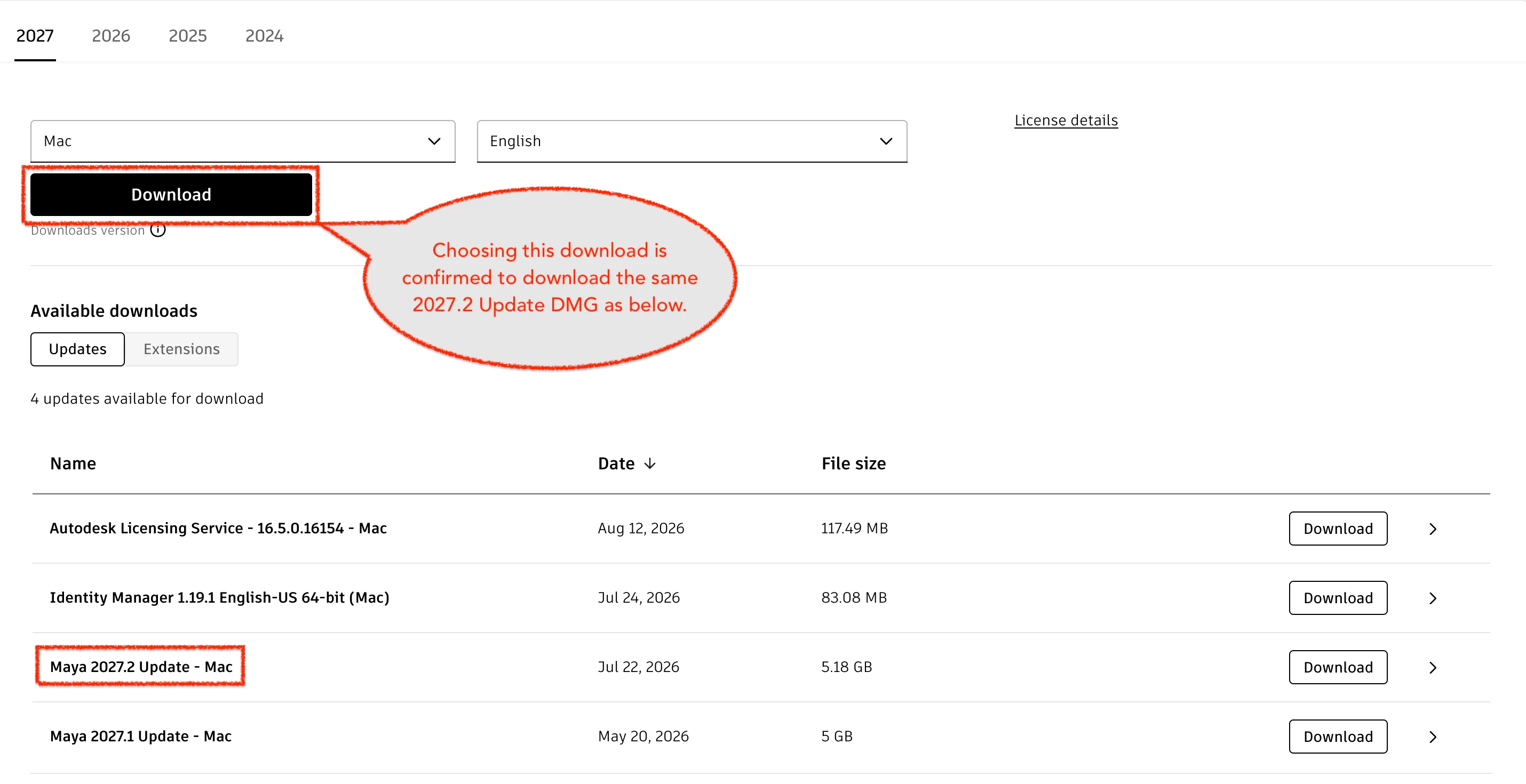
  • Which version of the AdskLicensing package are you currently using? The log showed version 16.0.3.14414, while the current release is 16.5.0.16154.

What to Check During a Test Deployment

Once we have the information above, please run the corrected script on a single test machine before any wider deployment. The installation log will be written to:

/var/log/autodesk2027_install.log

The most important thing to verify is that the Autodesk Identity Manager step completes almost immediately. In the log, compare the timestamps for:

  • Step 1: Autodesk Identity Manager
  • Step 2: Autodesk Licensing Service

The time difference should be measured in seconds. If it takes minutes, the silent-install argument is still not functioning correctly. The updated script includes a 30-minute timeout to prevent indefinite hangs, but any delay beyond a few seconds would still indicate a problem that needs investigation.

After the installation completes, run the Autodesk folder check again:

ls -la "/Library/Application Support/Autodesk/"

The ODIS folder should still exist even though the Darwin/ODIS patch was skipped. That will confirm that Maya 2027's installer is handling ODIS correctly on its own and that removing the patch step is safe.

Please also note the final Jamf policy result. The expected outcome is exit code 0, indicating that installation and verification completed successfully. Other possible return codes are:

  • 1 – Installer files were missing
  • 2 – An installer failed
  • 3 – Installers reported success, but the applications were not found in the expected location

If you receive a 3, please do not assume the installation failed. Verify whether Maya launches first. A code 3 will most likely indicate that Maya installed to a different path than the one being checked by the script, which is an easy fix.

Finally, please confirm that Maya launches correctly and that users can sign in normally using named-user licensing.

Before the test deployment, please send the results from the system checks and installer verification steps above. That information will allow me to finalize the script and confirm the remaining safeguards.

After the test deployment, send the results from the validation checks so I can verify that the fixes worked as expected.