Question

AutoPkgr Error 404 on CDP

  • January 21, 2019
  • 5 replies
  • 7 views

Cayde-6
Forum|alt.badge.img+22

Is anybody else getting 404 errors with AutoPkgr and a Cloud DP?

I've tried using multiple versions of JSSImporter 0.51, 1.0, 1.0.1b2, 1.0.1.b3 & 1.0.2.b4

Bizarrely this is affecting our Premium Cloud instance but not our standard cloud instance

5 replies

emily
Forum|alt.badge.img+26
  • Hall of Fame
  • January 21, 2019

Yes! We are having the exact same issue. Our jamfcloud prod instance (premium) gives the 404, but our dedicated QA instance does not and works with autopkg+jssimporter just fine. We have a case open with Jamf to determine what the configuration differences are between the premium and qa instances but I haven't heard anything back yet.


Forum|alt.badge.img+9
  • New Contributor
  • April 25, 2019

@Cayde-6 Any chance you've found a fix for this?


Cayde-6
Forum|alt.badge.img+22
  • Author
  • Honored Contributor
  • April 26, 2019

I have yes, had to inject a sleep 60 after it posts the items into Jamf. I’ll add the code here next week


Cayde-6
Forum|alt.badge.img+22
  • Author
  • Honored Contributor
  • April 29, 2019

@patgmac

So at the moment I am running the following versions of software
AutoPkg: 1.0.4
AutoPkgr: 1.4.2
JSSImporter: 1.0.1b2

Firstly I would close down any sessions of AutoPkgr before proceeding below

Now I have modified the following file
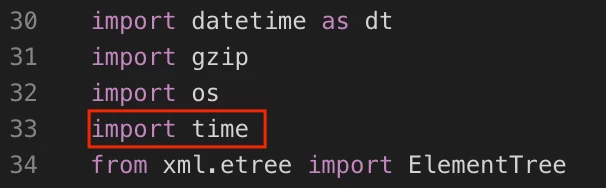
/Library/Application Support/JSSImporter/jss/jssobject.py

On
Line 33 "import time" See the below screenshot, i've highlighted the code in a red box

Line 548 "time.sleep(60)" See the below screenshot, i've highlighted the code in a red box

Save those changes to jssobject.py and finally remove /Library/Application Support/JSSImporter/jss/jssobject.pyc

Let me know how it goes.


Forum|alt.badge.img+9
  • New Contributor
  • May 1, 2019

Thanks @Cayde-6 , this definitely seems to be working now. Now just got to get our autopkg-conductor setup to try a full run but it's looking good so far. Thanks!