Question

Best methods to search for the existence of a file

  • November 8, 2022
  • 8 replies
  • 92 views

bravestface
Forum|alt.badge.img+5

Good morning,

I am wondering if anyone has any tried and true method for searching for the existence of a file on a specified scope of machines? We are being asked to look for a specific file that would determine if a certain add-on pack is installed for Virtualbox. Any tried and true methods for running a process on a specific list of machines and determining if a file exists?

Thanks
D

 

8 replies

karthikeyan_mac
Forum|alt.badge.img+18
  • Honored Contributor
  • November 8, 2022

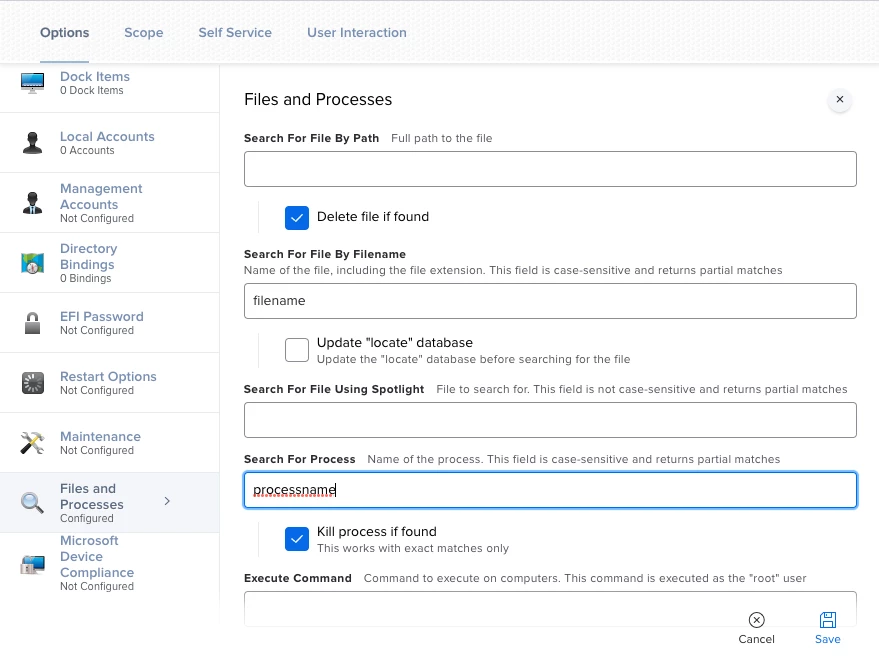
You can try "Files and Process" payload of policies.


Forum|alt.badge.img+5
  • New Contributor
  • November 8, 2022

I would probably make an extension attribute and use the builtin "find" command to test for the presence of that file and then any other tests you would want to do. 

find Man Page - macOS - SS64.com


donmontalvo
Forum|alt.badge.img+36
  • Hall of Fame
  • November 8, 2022

Have you tried an EA?

#!/bin/sh if [ -f /path/to/file ] then echo "<result>Exists</result>" else echo "<result>DoesNotExist</result>" fi

The_Burg
Forum|alt.badge.img
  • New Contributor
  • November 8, 2022

Have you tried an EA?

#!/bin/sh if [ -f /path/to/file ] then echo "<result>Exists</result>" else echo "<result>DoesNotExist</result>" fi

@bravestface ditto what @donmontalvo  is saying, then create a smart group based on the criteria derived from the extension attribute.


Forum|alt.badge.img+8
  • Contributor
  • November 8, 2022

I used the following with a Smart Group. If you're in higher ed, it's probably student machines.


#!/bin/bash LicenseFilePath="/Applications/VirtualBox.app/Contents/MacOS/ExtensionPacks/Oracle_VM_VirtualBox_ Extension_Pack/ExtPack-license.html" if [[ -e "${LicenseFilePath}" ]]; then EA_RESULT="Installed" else EA_RESULT="Not installed" fi echo "<result>${EA_RESULT}</result>"


bravestface
Forum|alt.badge.img+5
  • Author
  • New Contributor
  • November 11, 2022

I used the following with a Smart Group. If you're in higher ed, it's probably student machines.


#!/bin/bash LicenseFilePath="/Applications/VirtualBox.app/Contents/MacOS/ExtensionPacks/Oracle_VM_VirtualBox_ Extension_Pack/ExtPack-license.html" if [[ -e "${LicenseFilePath}" ]]; then EA_RESULT="Installed" else EA_RESULT="Not installed" fi echo "<result>${EA_RESULT}</result>"


Thank you for all the great ideas. I'll reach back out if I have additional questions!


-D


SuperMacMan
Forum|alt.badge.img+1
  • New Contributor
  • February 16, 2023

You can try "Files and Process" payload of policies.


I want to make a Smart Group based on if a file is found on a device, but how do I use a policy that searches all computers for a file to do that? It seems the only results produced are in the Log -> details of the policy.


SuperMacMan
Forum|alt.badge.img+1
  • New Contributor
  • March 8, 2023

Have you tried an EA?

#!/bin/sh if [ -f /path/to/file ] then echo "<result>Exists</result>" else echo "<result>DoesNotExist</result>" fi

I have tried this script to find if Install macOS Monterey.app is in the Applications folder, but for the life of me I can't get it to work. I have tried " and \\ but nothing. 

I tried it using a testfile.rtf placed in applications and that worked fine. Why won't it work with a macOS installer .app file?