Question

Best way to deploy a Google Chrome Extension via a policy?

  • January 23, 2017
  • 12 replies
  • 69 views

Forum|alt.badge.img+5

Pretty self explanatory. I'm looking for a clear cut explanation of deploying a .pkg Chrome extension via a policy. Any insights?

I was told to point the policy toward the /Users/$loggedInUser/Library/Application Support/Google/Chrome/Default/Extensions/ path but I am still having an issue.

12 replies

rqomsiya
Forum|alt.badge.img+12
  • Honored Contributor
  • January 23, 2017

Are you looking to manage the extension, or just install it? I manage our WebEx Chrome extension which prohibits users from removing. I do it via a config profile.


Forum|alt.badge.img+10
  • Contributor
  • January 24, 2017

Use Composer to create a .dmg of the extension, then a policy to deploy it.

Since it's going into the users home folder, ensure you check the FUT and FEU checkboxes in Casper Admin.


Forum|alt.badge.img+5
  • Author
  • New Contributor
  • January 24, 2017

Gotcha. Thanks guys

I am not managing it btw. Just doing a favor for one of our depts. by making it readily available in Self Service.


Forum|alt.badge.img
  • New Contributor
  • May 19, 2017

@stevevalle Thanks for the advice! I made the .dmg, made sure FUT and FEU are checked and indexed. When the policy runs via self-service, it downloads and installs but I don't actually get the extension in Chrome. Spotted the files are certainly there. Any thoughts?


rqomsiya
Forum|alt.badge.img+12
  • Honored Contributor
  • May 20, 2017

Is there a requirement for the extenstion to be managed by an administrator? If so you can easily deploy with a config profile.

Let me know and I can share the config profile and show you the line item to edit for your specific extension.


Forum|alt.badge.img
  • New Contributor
  • June 9, 2017

@edruiz I seem to be having the same issue, doesn't show up. Did you manage to get it to install correctly?


Forum|alt.badge.img+3
  • New Contributor
  • August 4, 2017


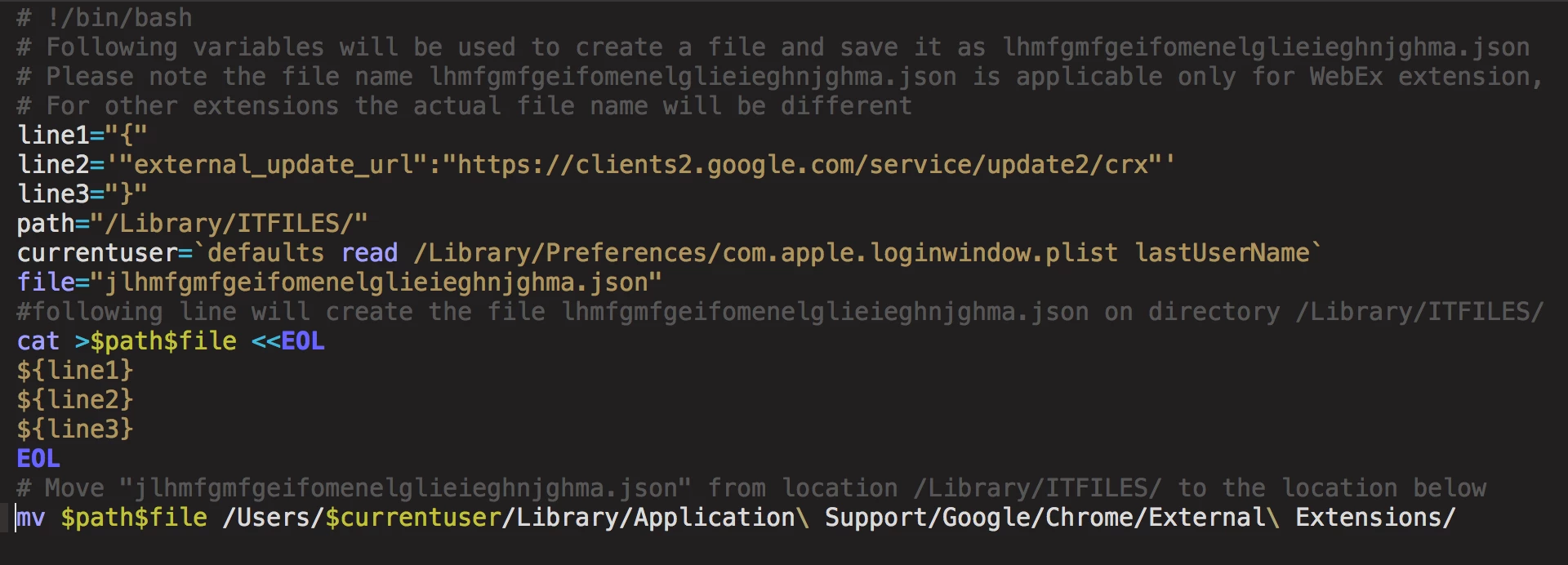
I used the below script in a policy to deploy WebEx Extension for Google Chrome


Forum|alt.badge.img+4
  • Contributor
  • September 8, 2017

@Ferrard Are you creating the external extensions folder before hand? This folder doesnt exist in my google/chrome folder.
Perhaps they've changed how they're storing extensions now?


Forum|alt.badge.img+8
  • Valued Contributor
  • September 9, 2018

@rqomsiya I'm currently looking into deploying Chrome extensions using config profiles. Would it be possible to share your config profile?


Forum|alt.badge.img+5
  • New Contributor
  • September 10, 2018

@a.simmons Have a look at the Chromium guide for Administrators here.

I've deployed Chrome extensions via a plist

For Example:

<?xml version="1.0" encoding="UTF-8"?>
<!DOCTYPE plist PUBLIC "-//Apple//DTD PLIST 1.0//EN" "http://www.apple.com/DTDs/PropertyList-1.0.dtd">
<plist version="1.0">
<dict>

    <key>ExtensionInstallBlacklist</key>
        <array>
            <string>*</string>
        </array>

    <key>ExtensionInstallForcelist</key>
        <array>
            <string>EXTENSIONID</string>
        </array>

        </array>
</dict>
</plist>

This will disable all extensions but the ones you specify in this plist.


mark_mahabir
Forum|alt.badge.img+15
  • Jamf Heroes
  • September 10, 2018

I do this via a configuration profile and consulted this thread before knocking it up.


Forum|alt.badge.img+8
  • Valued Contributor
  • September 10, 2018

Thanks @crskerman and @mark.mahabir I got it working using a configuration profile.