Solved

Block Migration Assistant

  • January 12, 2019
  • 8 replies
  • 193 views

Forum|alt.badge.img+9

We are just rolling out new computers to our staff, the currently have MBPs with local accounts, on the new computers, we are adding them to the AD domain to ease with logins and password across our district.

If we let them use Migration Assistant, they will create new users on the computer with their settings and files and not use the new account that we are trying to get them to use.

We will assist them in moving their files, bookmarks,images and music over, but don't want them to use Migration Assistant.

I have tried to rename / remove the app, I tried to restrict the app, nothing works.

Any ideas?
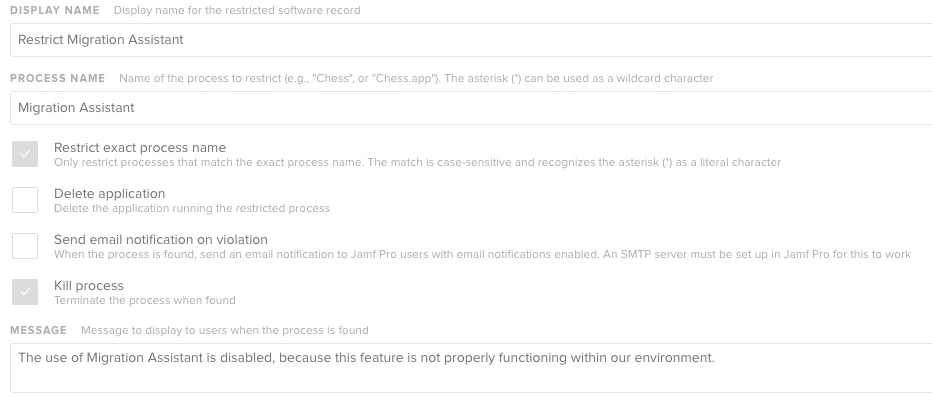
Best answer by ThijsX

Hi @jcalvert

See attached screenshot, via Restricted Software we have restricted the Migration Assistent.

8 replies

rickgmac
Forum|alt.badge.img+9
  • Valued Contributor
  • January 13, 2019

Use NoMAD login and NoMAD to continue to allow local accounts. As it is a far better experience than trying to use AD mobile accounts.

If not you could just disable "Transfer Information." in your pre-stage profile if you're using DEP deployment.

or Possibly try restricted software


ThijsX
Forum|alt.badge.img+19
  • Employee
  • Answer
  • January 14, 2019

Hi @jcalvert

See attached screenshot, via Restricted Software we have restricted the Migration Assistent.


Forum|alt.badge.img+7
  • Contributor
  • January 14, 2019

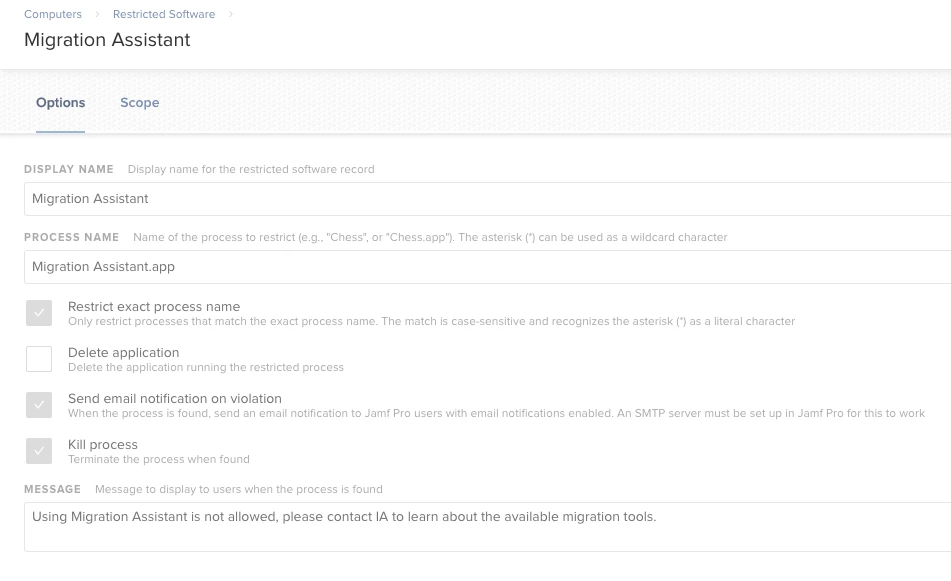
@txhaflaire Our setup is like this:

Yours is most likely not working because you have "Restrict exact process name" checked, the process is named "Migration Assistant.app".
If you add the .app, or remove the checkbox it will most likely work!


ThijsX
Forum|alt.badge.img+19
  • Employee
  • January 14, 2019

@remyb We have no issues with our Restriction :) all is working fine, just posted it for @jcalvert


Forum|alt.badge.img+7
  • Contributor
  • January 14, 2019

Arrgh, I need more coffee, sorry :-)


ThijsX
Forum|alt.badge.img+19
  • Employee
  • January 14, 2019

@remyb Haha no worries, thanks for helping out in this discussion!


Forum|alt.badge.img+9
  • Author
  • Contributor
  • January 17, 2019

Thank you everybody for your responses, very much appreciated.


rorlando
Forum|alt.badge.img+3
  • New Contributor
  • January 2, 2024

I have disabled "Transfer Information" AND restricted Migration Assistant

BUT it is still showing up as an option and allowing end users to do this.

????