Solved

Blocking High Sierra downloads from Apple Notification

  • November 21, 2017
  • 13 replies
  • 46 views

roiegat
Forum|alt.badge.img+16
  • Valued Contributor
  • 412 replies

So I have a restricted software to stop users from actually installing High Sierra. But when they are at home and on their own networks, they get the notification that High Sierra is out and if they want to download it. Some of our users have been downloading it, and trying to install it. Thankfully we've blocked the installer.

Is there a way to stop the notifications from Apple telling them about High Sierra. I vaguely remember there was something to stop Sierra ones when they came out.

Best answer by Nix4Life

From slack:
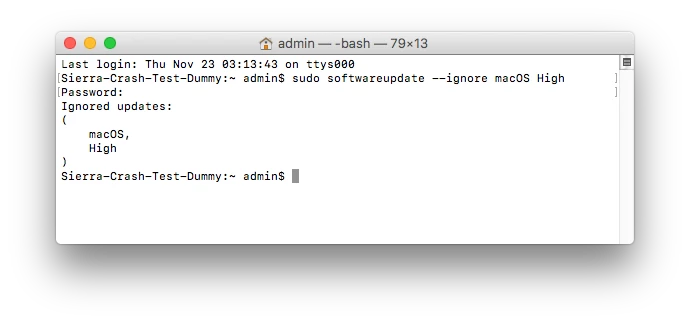
in macOS 10.12.6, can you stop the “upgrade to high sierra” notifications with this sudo softwareupdate --ignore macOS High

have not tested

L

13 replies

Forum|alt.badge.img+13
  • Honored Contributor
  • 550 replies
  • Answer
  • November 22, 2017

From slack:
in macOS 10.12.6, can you stop the “upgrade to high sierra” notifications with this sudo softwareupdate --ignore macOS High

have not tested

L


Forum|alt.badge.img+3
  • New Contributor
  • 58 replies
  • November 22, 2017

And when it's approved

sudo softwareupdate  --reset-ignored

Clears the per-machine list of ignored updates.


gskibum
Forum|alt.badge.img+13
  • Valued Contributor
  • 288 replies
  • November 23, 2017

Is this the expected return?


Forum|alt.badge.img+6
  • Contributor
  • 103 replies
  • November 27, 2017

Pretty sure you have to do it like this:

softwareupdate --ignore "macOS High"

dpertschi
Forum|alt.badge.img+19
  • Contributor
  • 459 replies
  • November 28, 2017

@Nix4Life which slack channel was that discussed, I'd like to see the whole thread.

Are we saying that running the --ignore command will prevent the installer from coming down AND suppress the notification center nag to upgrade?


daniel_ross
Forum|alt.badge.img+18
  • Jamf Heroes
  • 204 replies
  • December 20, 2017

Did this work for anyone?


Chris_Hafner
Forum|alt.badge.img+25
  • Jamf Heroes
  • 1754 replies
  • December 21, 2017

Well... I tried: softwareupdate --ignore "macOS High" with no success and now I've added the original, unquoted line sudo softwareupdate --ignore macOS High. I'll get back on here the next time I see, or don't see a pop up!


Forum|alt.badge.img+11
  • Valued Contributor
  • 183 replies
  • January 24, 2018

I think that command has been cut off, this is currently working for me

softwareupdate --ignore 'macOS High Sierra 10.13'

Forum|alt.badge.img+10
  • Contributor
  • 126 replies
  • January 25, 2018

Does this actually stop the user from downloading it in the App Store though? Shouldn't you also create a Restricted Software Record to keep the installer from running when they do figure out how to download it?


Chris_Hafner
Forum|alt.badge.img+25
  • Jamf Heroes
  • 1754 replies
  • January 25, 2018

I've got to admit, I've tried the:

softwareupdate --ignore 'macOS High Sierra 10.13'

with no success. I'm wondering if I've got something else keeping this from functioning if it works for others.

@ammonsc You still need to block the process. No matter what you do to the notification, it will still show up in the App Store.


Forum|alt.badge.img+19
  • Valued Contributor
  • 62 replies
  • January 25, 2018

I have these running and thy seem to work fine.

softwareupdate --ignore 'Security Update 2018-001-10.12.6'

siftwareupdate --ignore 'macOS High Sierra 10.13.3 Update'


Forum|alt.badge.img+10
  • Contributor
  • 126 replies
  • January 25, 2018

@PeterG Just out of my own curiosity. With all the news/fear/response to Spectre and Meltdown why are you blocking the updates? Is it just to finish testing? App compatibility? And instead of blocking the updates would it not be best to use a NetSUS and manage them upfront?


Forum|alt.badge.img+19
  • Valued Contributor
  • 62 replies
  • January 25, 2018

@ammonsc

Yeah, we are blocking on most computers until internal testing is complete on a specific target group.
Then i will carefly release th block to a wider group and ultimately release to the entire company.