Question

Cannot get new computer to see/authorize with DEP/Jamf

  • January 5, 2017
  • 7 replies
  • 41 views

Forum|alt.badge.img+2

Hello! We just bought two of the new MacBook Pro (15-inch, Late 2016) computers and we cannot get them to connect/see DEP/JAMF. I've confirmed that the serial numbers are registered in deploy.apple.com and the serial numbers show up on our JAMF PreStage DEP Enrollment but when we power the computers on they do not show the DEP/JAMF splash screen. Is there an easy solution for this and/or is there a good way to troubleshoot to see where the disconnect is? Any information or help would be appreciated.

We bought a couple of new computers at the same time that are not the new touchbar macs and they setup with no perceived issues.

7 replies

Forum|alt.badge.img+6
  • Contributor
  • January 5, 2017

You could update your token for your DEP site. Some of our sites were having problems communicating to the Apple DEP site. Once we updated their tokens, they were able to enroll/image with the DEP workflow.


Forum|alt.badge.img+2
  • Author
  • New Contributor
  • January 5, 2017

We can try that but our JAMF server already has the serial numbers for all the new computers. Everything on the JAMF side looks normal and ready but the computer's don't setup properly.


Forum|alt.badge.img+6
  • Contributor
  • January 5, 2017

I'm seeing DEP issues today as well. Computer is assigned to a pre-stage, but not hitting DEP during Setup Assitant.


Forum|alt.badge.img+10
  • Contributor
  • January 5, 2017

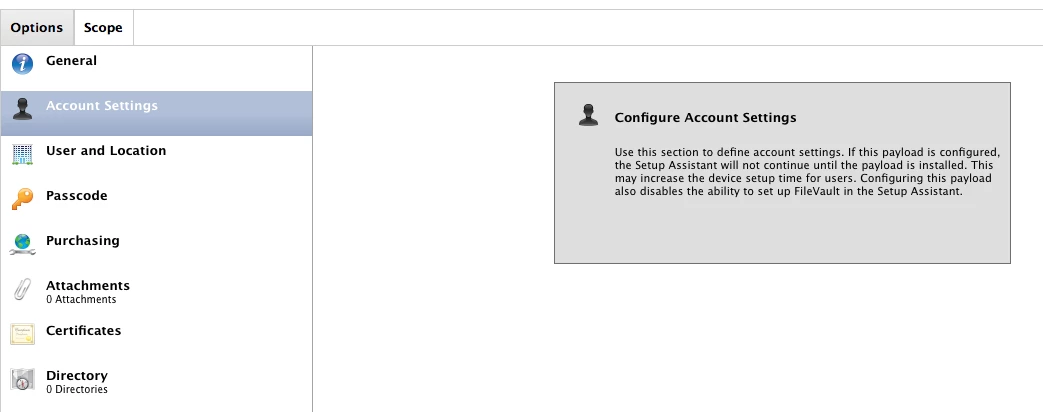
When the Accounts payload is configured within a DEP PreStage Enrollment Profile scoped to a Mac, in some cases the jamf binary does not install on the Mac. Which is required to enforce the full jamf management framework.
In your prestage enrollment, remove the account settings payload.
I had the same issue. Once the account settings payload was removed, I was able to do the DEP/JAMF splash screen and the policies were pushed.

This is a known issue, under PI-002847.


Forum|alt.badge.img+4
  • New Contributor
  • January 6, 2017

Thanks @isradame . This worked for me.


DBrowning
Forum|alt.badge.img+24
  • Esteemed Contributor
  • January 25, 2017

Removing the Account Settings payload didn't work for me... any other work arounds?


Forum|alt.badge.img+6
  • Contributor
  • November 21, 2017
Removing the Account Settings payload didn't work for me... any other work arounds?

Any solution found for this?