Solved

Carbon Black Respons

  • August 24, 2017
  • 6 replies
  • 27 views

Forum|alt.badge.img+2


Has anyone been able to install CB Response via self service.

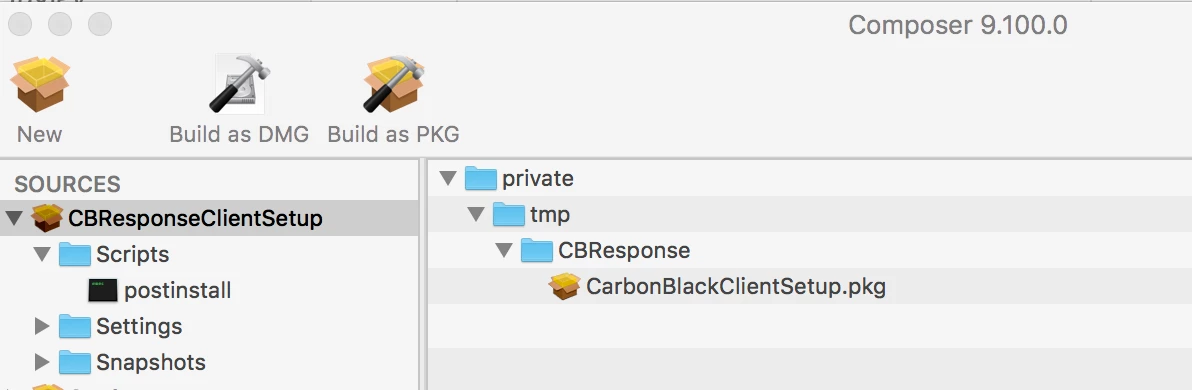
I created a package with the following steps in composer:

  • private mpCBResponsefilename.pkg

post install script:

#!/bin/sh
## postinstall

sudo installer -pkg "/private/tmp/CBResponse/CBResponseClientSetup.pkg" -target /

delay 60

sudo rm -r /private/tmp/CBResponse


exit 0      ## Success
exit 1      ## Failure

Self service reports a successful installation but the computer doesn't show up as a sensor.

If I run the pkg on a computer and go through the prompts it installs just fine.

Best answer by prbsparx

Hi victor,

You can create an easily deployable pkg by creating a .pkg.zip file for Casper Suite similar to the Adobe Production Premium CS6 method. The easiest way to do this is by running the following command:

cd /Path/to/CB/folder/
zip -r -X ~/Desktop/CarbonBlack.pkg.zip *
This will create a ZIP file that contains all of the files that were in the folder.
Casper Suite can deploy this format natively.

You have to have the sensor settings.ini file in the same folder as the original PKG.

6 replies

Forum|alt.badge.img+8
  • Valued Contributor
  • Answer
  • August 24, 2017

Hi victor,

You can create an easily deployable pkg by creating a .pkg.zip file for Casper Suite similar to the Adobe Production Premium CS6 method. The easiest way to do this is by running the following command:

cd /Path/to/CB/folder/
zip -r -X ~/Desktop/CarbonBlack.pkg.zip *
This will create a ZIP file that contains all of the files that were in the folder.
Casper Suite can deploy this format natively.

You have to have the sensor settings.ini file in the same folder as the original PKG.


Forum|alt.badge.img+2
  • Author
  • New Contributor
  • August 25, 2017

Awesome! I was able to created the .pkg.zip and the installer worked perfectly. I can see the computer as a sensor now.


Forum|alt.badge.img+7
  • Valued Contributor
  • February 14, 2018

@victor.pena After creating the .zip file with the necessary files inside, how did you deploy it using jamf pro?

thank you for your help.


Forum|alt.badge.img+7
  • Valued Contributor
  • February 14, 2018

@victor.pena Nevermind I got it...thank you anyways!


jconte
Forum|alt.badge.img+12
  • Valued Contributor
  • February 14, 2018

@osxadmin I just create a package using composer that puts the files in a specific folder, then run a script to install.

#!/bin/bash

This script installs the Carbon Black 6.1.3 client and will uninstall the old client when applicable

This will uninstall any previously installed McAfee agents, remove comment when ready

/Applications/CarbonBlack/sensoruninst.sh

This will install the Carbon Black client for Mac's

/usr/sbin/installer -package /Library/CorpFiles/Packages/Carbon Black_6_1_3/CarbonBlackClientSetup_6_1_3_71222.pkg -target / sleep 10 chflags hidden /Applications/CarbonBlack exit 0

This allows me to do it all in one policy.


Forum|alt.badge.img+7
  • Valued Contributor
  • February 14, 2018

@jconte thank you!