Question

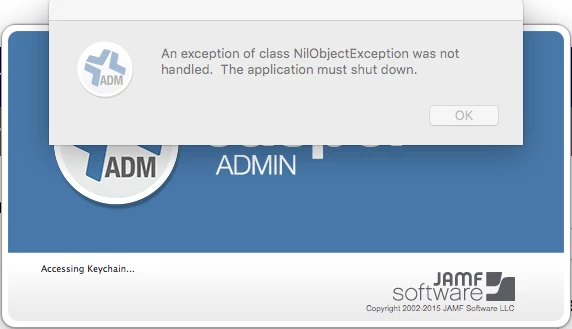
Casper Admin 9.73 in El Capitan "An exception of class NilObjectException

  • October 6, 2015
  • 13 replies
  • 55 views

Forum|alt.badge.img+12


Why are we getting "An exception of class NilObjectException was not handled. The Application must shut down." When opening Casper Admin 9.73 in Mac OS X El Capitan? Casper Admin working fine from other versions of Mac OS.

13 replies

bpavlov
Forum|alt.badge.img+18
  • Esteemed Contributor
  • 1206 replies
  • October 6, 2015

You need Casper 9.81 for OS X 10.11 support.


Forum|alt.badge.img+12
  • Author
  • Contributor
  • 25 replies
  • October 6, 2015

I'm not supporting OS X 10.11 yet, nor have I installed 9.8 JSS yet. I am simply trying to open Casper Admin from my MBAir and MacPro that I have updated to El Capitan.


Forum|alt.badge.img+7
  • Contributor
  • 69 replies
  • October 6, 2015

You still need 9.81 for that I believe.


Forum|alt.badge.img+12
  • Author
  • Contributor
  • 25 replies
  • October 6, 2015


And apparently to run Casper Admin 9.8 from El Capitan you need to have 9.8 JSS installed. So I will have to go back to one of my other computers still running Lion thru Mavericks with 9.73 Casper Admin to manage 9.73 JSS and clients until we move to JSS 9.8 and move all clients to 9.8. Not glad I updated to El Capitan on my laptop and MacPro at this point.


Forum|alt.badge.img+4
  • Contributor
  • 13 replies
  • October 7, 2015

You just need to get Casper Admin for 9.8.1 and it works fine. You don't have to upgrade the JSS.


mpermann
Forum|alt.badge.img+22
  • Valued Contributor
  • 690 replies
  • October 7, 2015

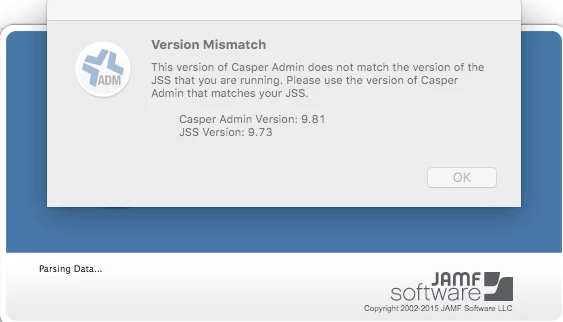
@rcarey912 how are you able to get Casper Admin 9.81 to startup when the JSS is on version 9.73? I'm seeing the same splash screen as posted by @rfreeborn and it just exits the program after you click Ok. It would be great to be able to access Casper Admin from my test El Capitan system.


Forum|alt.badge.img+4
  • Contributor
  • 13 replies
  • October 7, 2015

It works for me...


mpermann
Forum|alt.badge.img+22
  • Valued Contributor
  • 690 replies
  • October 7, 2015

hmm, that's interesting. I wonder what could be preventing it from starting up on my system. Very odd. @rfreeborn are you able to get the Casper Admin 9.81 to startup on a El Capitan system with your JSS version at 9.73?


Forum|alt.badge.img+12
  • Author
  • Contributor
  • 25 replies
  • October 7, 2015

Nope I am still getting the Version Mismatch error.


mm2270
Forum|alt.badge.img+24
  • Legendary Contributor
  • 7886 replies
  • October 7, 2015

Just to add some confirmation, I can also get the Version mismatch error here running Casper Admin 9.81 on a 10.11 Mac trying to connect to our production 9.73 JSS. It does not work. I don't know how @rcarey912 is getting it to work, assuming it actually is, but it doesn't seem to work generally speaking.
Not that I'm surprised. I believe its always been this way. You need to have the same version of server and apps.


Forum|alt.badge.img+12
  • Author
  • Contributor
  • 25 replies
  • October 7, 2015

Just to clarify, We have been running Casper Admin 9.73 on Yosemite, Mavericks, Mt. Lion and Lion computers managing our 9.73 JSS for some time. It has only now become issue running Casper Admin 9.73 or 9.81 Casper Admin on the computers we have installed El Capitan on.


Forum|alt.badge.img
  • New Contributor
  • 1 reply
  • October 7, 2015

@rcarey912 that does not work. I get the same thing as @mpermann and @rfreeborn


Forum|alt.badge.img+5
  • Contributor
  • 88 replies
  • October 21, 2015

I had this problem with 10.11 despite being on Casper 9.81. Overwriting the tools with updated versions gave the same. What fixed it for me was rebooting, deleting the casper suite from /Applications, then copy again from the latest suite DMG.