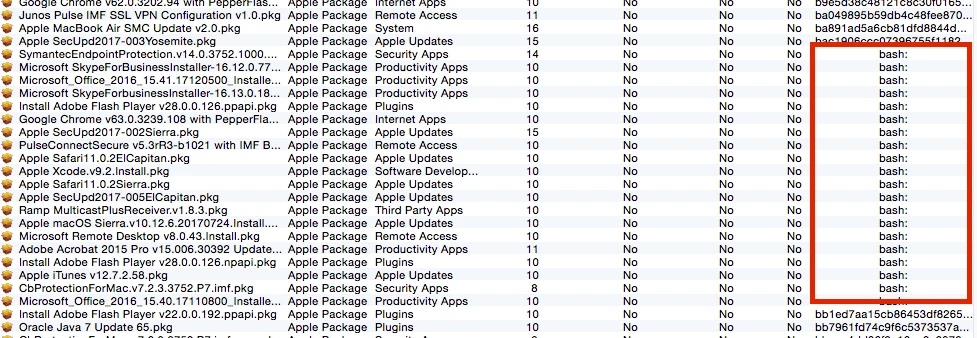
Fixed. It was a file permissions issue.
It seems Casper Admin chooses one of /sbin/md5 or /usr/bin/shasum to calculate checksums.
Checking the executable immediately identified the problem:
$ ls -l /usr/bin/shasum
-rw-rw-rw- 37 root wheel 811 Sep 9 2014 /usr/bin/shasum
$
The fix was to restore execute permissions to this ... um... executable:
$ sudo chmod 755 /usr/bin/shasum
Password:
$ ls -l /usr/bin/shasum
-rwxr-xr-x 37 root wheel 811 Sep 9 2014 /usr/bin/shasum
$
Voila! A quick test in Casper Admin shows the checksums are once again being computed and stored, but with a twist: Checksums are now SHA-512 hashes, not MD5 or SHA-1 or whatever was being used before.
Unresolved: Why did /usr/bin/shasum on my Mac admin machine a) lose its execute permissions and b) become world writable?
Possible answer: The /usr/bin/shasum "executable" is actually a perl script, and its file permissions may have been inadvertently modified when I downloaded and installed some perl libraries.
Curious: What logic does Casper Admin use to choose whether to compute checksums using MD5, SHA1, or SHA512 hashes?
Possible answer: I'm guessing it's related at least in part to the JAMF Pro and macOS versions (I'm running v9.101.0 on Yosemite), but that may not be the full story.
Anyway, thanks to all to read or responded. Happy holidays!