Question

Catalina - Cannot Update App (VPP)

  • March 27, 2020
  • 19 replies
  • 98 views

Forum|alt.badge.img+4

With macOS Catalina, it looks like VPP deployed apps now show up in the App Store under the Updates tab.

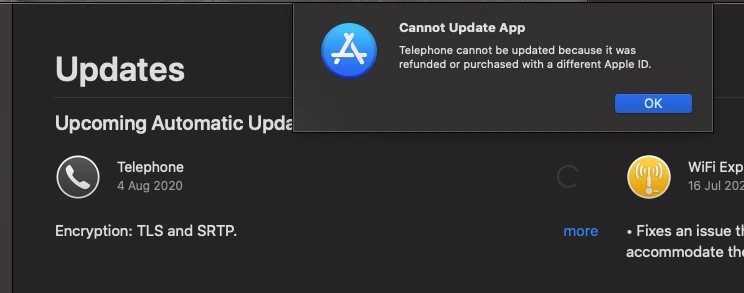
When I try to update an app, I get an error message "Cannot Update App".

"App_Name cannot be updated because it was refunded or purchased with a different Apple ID."

Obviously this is because it was deployed through VPP. I already have the app set to auto-update, but due to other issues (https://www.jamf.com/jamf-nation/discussions/31057/vpp-redownload-call-timed-out-mdmclienterror-72) that isn't working so great right now.

Is there anyway to allow end users to update VPP deployed apps on macOS?

19 replies

jzarate
Forum|alt.badge.img+4
  • New Contributor
  • April 22, 2020

I'm running into the same issue. Have you had any luck figuring this out, @mnickels ?


Forum|alt.badge.img+12
  • Valued Contributor
  • April 22, 2020

@jzarate unfortunately you have to use a big hammer to let the user update MAS apps with their own AppleiD. For free apps, they can delete the app from /Applications then they will be able to ‘Get’ the app from the App Store client.

The VPP account is embedded in the receipt file under the _MASReceipt folder in the app bundle, which is how the App Store client won’t allow a non-VPP user to update it. Of course, you can delete the receipt file but the app will then become disassociated which means it is no longer under the purview of MAS. For Office apps, this is the way we convert MAS installs back to CDN and have them updated with MIcrosoft AutoUpdate.


Forum|alt.badge.img+4
  • Author
  • Contributor
  • April 22, 2020

Thanks guys,

I haven't had any luck. Holding out hope that someday Jamf will implement an "Update" button in the self service portal.


Forum|alt.badge.img
  • New Contributor
  • June 25, 2020

We're also now struggling with this issue. We push VPP MS Office MAS apps from JAMF and have them set to check and install updates automatically. These updates no longer automatically install but appear in the App Store for the Catalina users and when they try to click update, they then get an error stating that the app cannot be updated as it was purchased with a different Apple ID.

Has anyone come across a good solution or workaround for this, other that the delete/reinstall app method?


Forum|alt.badge.img+12
  • Valued Contributor
  • June 26, 2020

@username123 this Apple architectural issue continues to be a big problem. I no longer recommend using VPP to deploy Office for Mac apps. Please use the Microsoft CDN instead.


Forum|alt.badge.img+1
  • New Contributor
  • August 20, 2020

I just wanted to chime in to say that I'm experiencing this issue as well.


n_lecchi
Forum|alt.badge.img+12
  • Contributor
  • August 28, 2020

Same issue with Telephone 7.3 MB App


daniel_ross
Forum|alt.badge.img+18
  • Jamf Heroes
  • September 15, 2020

Anyone find a fix for this yet?


Forum|alt.badge.img+4
  • New Contributor
  • September 18, 2020

Same issue here


Forum|alt.badge.img+5
  • New Contributor
  • September 24, 2020

Same issue here


Forum|alt.badge.img+5
  • New Contributor
  • September 24, 2020

@pbowden Is there any user friendly procedure how to convert from MAS to CDN?


Forum|alt.badge.img+12
  • Valued Contributor
  • September 24, 2020

@Mykolas yeah, I can think of an easy procedure that does this without the user being aware of any changes. Want it in a script or a pkg?


Forum|alt.badge.img+5
  • New Contributor
  • September 28, 2020

@pbowden I think i figured out myself.

Something like this:
rm -r /Applications/Microsoft Word.app/Contents/_MASReceipt

After that i can see that app is under MAU.


Forum|alt.badge.img+12
  • Valued Contributor
  • September 28, 2020

@Mykolas yup, that would work.


danlaw777
Forum|alt.badge.img+17
  • Valued Contributor
  • October 2, 2020

pushing that script out resolves this issue?


Forum|alt.badge.img+9
  • Contributor
  • November 13, 2020

I am having the same issue. My research suggests this issue has been around for a very long time.
I went a head a deleted the _MASReceipt file for each affected App. The updates then come through MS AutoUpdater.
When we do deployments or migrations I will script the removal of the _MASReceipt file. I have a question to Apple about this.
a.


Forum|alt.badge.img+5
  • Contributor
  • November 16, 2020

I was going to write a script that removes the _MASReceipt for Microsoft apps but if anyone else has one already that would be awesome.


Forum|alt.badge.img+3
  • New Contributor
  • April 28, 2021

Does anyone know if this has been fixed? I have BIG SUR and am on Jamf Pro Version 10.28.0 and this is still an issue for me. Please help, I can't get any Mac OS apps to update!!!


Forum|alt.badge.img+6
  • Contributor
  • May 13, 2021

@cgiebel33 Use the rm command posted by @Mykolas and confirmed by @pbowden . I created a policy to remove the MASReceipt folder within Word and was able to confirm the folder was removed.

@pbowden How long does it take to have the app switch to MAU? I have opened MAU multiple times on the test device and Word is not an option for updates. I ran sudo jamf recon and my extension attribute switch from VPP to CDN.