Question

Chrome - Clear History, Cache, Cookies on Restart

  • January 29, 2020
  • 9 replies
  • 109 views

Forum|alt.badge.img+3

Trying to have all users' computers restart every morning;

I have a script that kills all processes and restarts after 1minute. I need a script to also remove the cookies, history, and cache of Chrome on said restart so they essentially start "fresh" each day without losing their extensions.

Tried this but it's not working:

!/bin/sh

Remove Google Chrome Browser Cache Cookies and Extension Logins

sudo rm -Rf ~/Library/Caches/Google/Chrome/Default/Cache/
sudo rm -Rf ~/Library/Application Support/Google/Chrome/Default/Cookies/
sudo rm -Rf ~/Library/Application Support/Google/Chrome/Default/Cookies-journal/
sudo rm -Rf ~/Library/Application Support/Google/Chrome/Default/Extension/
sudo rm -Rf ~/Library/Application Support/Google/Chrome/Default/Extension-journal/
sudo rm -Rf ~/Library/Application Support/Google/Chrome/Default/History/
sudo rm -Rf ~/Library/Application Support/Google/Chrome/Default/History-journal/

Thanks

9 replies

Forum|alt.badge.img+4
  • Contributor
  • June 20, 2020

Did you find something already ?


Forum|alt.badge.img+2
  • New Contributor
  • September 9, 2020

Looking for this exact thing as well.


Forum|alt.badge.img+12
  • Contributor
  • September 9, 2020

Me too, as well as Safari data, but I know there are SIP issues relate to that.


Forum|alt.badge.img+2
  • New Contributor
  • April 2, 2021

This is what I use for Cookies, but could be easily modified to include everything else you need.

#!/bin/bash
## System Variables
USERNAME=`stat -f%Su /dev/console`
COOKIEPATH="/Users/$USERNAME/Library/Application Support/Google/Chrome"

find "$COOKIEPATH" -name Cookies -delete

pkill Google Chrome

ssagola
Forum|alt.badge.img+11
  • Contributor
  • November 3, 2021

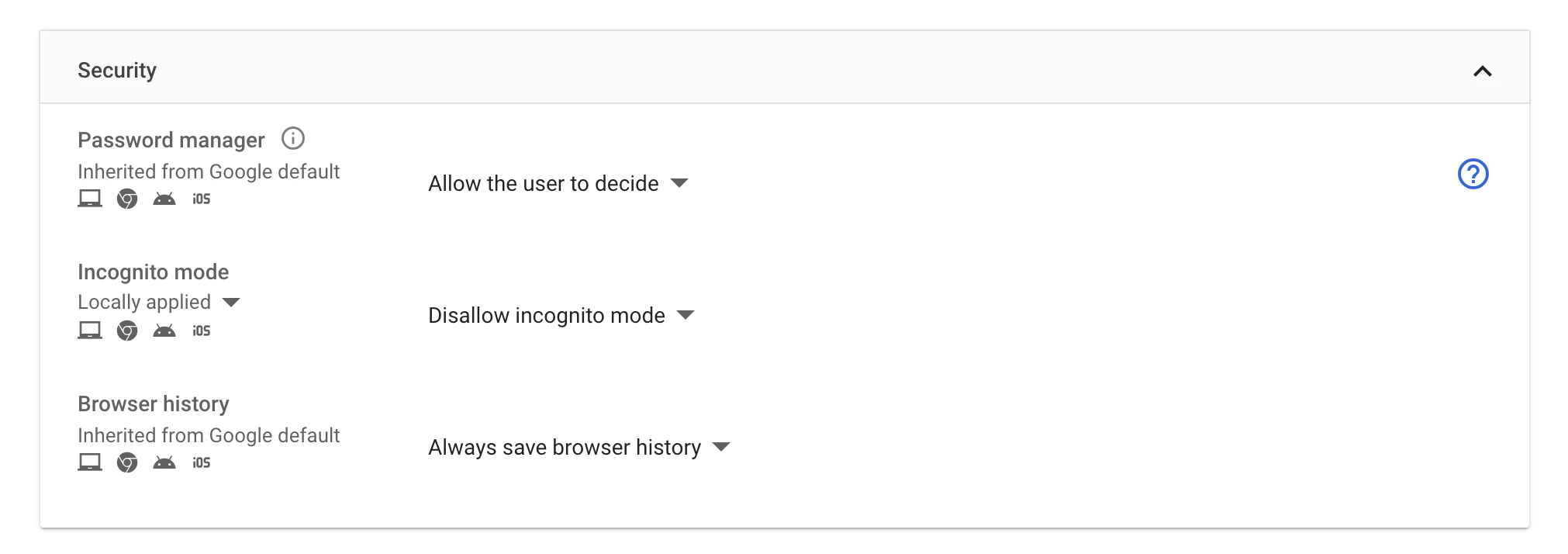
I want to do the exact opposite. I want to keep the students from deleting their browsing history. Is that doable 🙂 is there a script for that?


Forum|alt.badge.img+3
  • New Contributor
  • November 3, 2021

I want to do the exact opposite. I want to keep the students from deleting their browsing history. Is that doable 🙂 is there a script for that?


Check out Chrome Management, there's built-in functionality with JAMF Pro now. which makes enrolling browsers very easy, one of the policies you can set once enrolled is not being able to delete history.

https://www.jamf.com/blog/admin-essentials-simplifying-chrome-deployments-on-macos/ 

https://support.google.com/chrome/a/answer/9923111?hl=en

Have just rolled this out so feel free to shoot through a DM if you have any questions.


ssagola
Forum|alt.badge.img+11
  • Contributor
  • November 3, 2021

Check out Chrome Management, there's built-in functionality with JAMF Pro now. which makes enrolling browsers very easy, one of the policies you can set once enrolled is not being able to delete history.

https://www.jamf.com/blog/admin-essentials-simplifying-chrome-deployments-on-macos/ 

https://support.google.com/chrome/a/answer/9923111?hl=en

Have just rolled this out so feel free to shoot through a DM if you have any questions.


For iPads? IOS


Forum|alt.badge.img+3
  • New Contributor
  • November 3, 2021

For iPads? IOS


I haven't tried it on iOS but from what i've seen its only for MacOS, Windows, Linux and ChromOS


Forum|alt.badge.img+3
  • New Contributor
  • November 3, 2021

I haven't tried it on iOS but from what i've seen its only for MacOS, Windows, Linux and ChromOS


I've just checked it out and looks like there is the ability for iOS devices. unsure on the enrolment process for ipads though.