Question

Chrome Extension

  • September 18, 2019
  • 8 replies
  • 49 views

Forum|alt.badge.img+4

Has anyone worked on chrome extension

I want to user to block installation of chrome extension and existing extension should work without any issue.

8 replies

Forum|alt.badge.img+3
  • New Contributor
  • September 18, 2019

Hi,

I have recently done work on Chrome, blocking extensions. whitelisting and force installing.

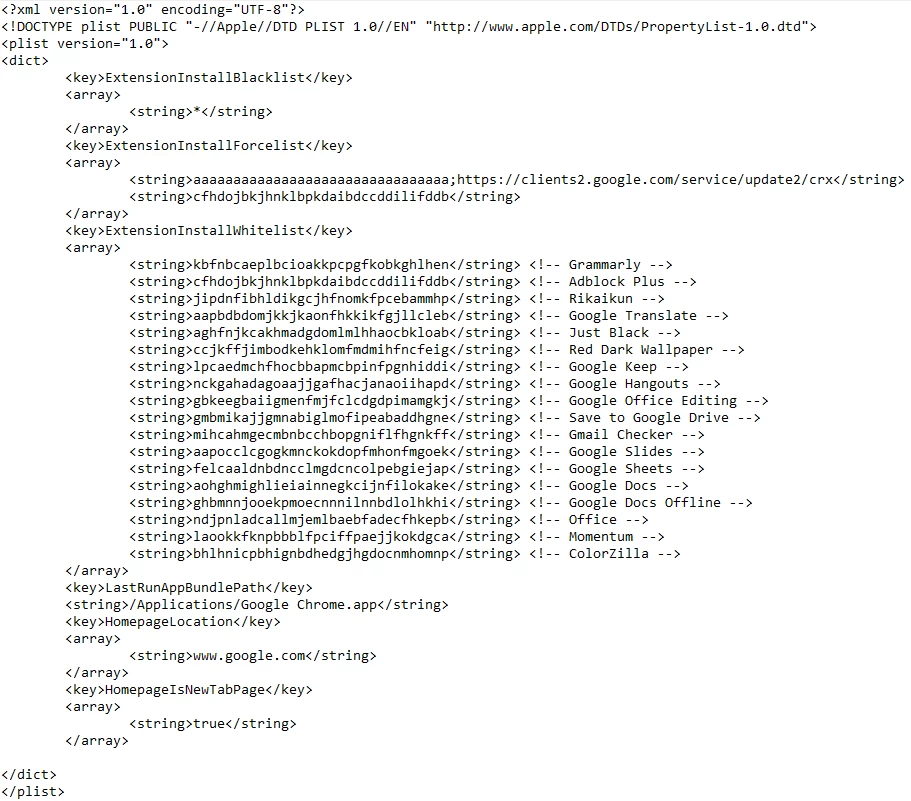
Below is my plist. May be a bit sloppy to some people but it works! (uploaded as a photo as it looks better than copy paste)
Once you have typed it up, save it as com.google.Chrome.plist
Then you have to test it. copy the file and paste it into /Library/Managed Preferences
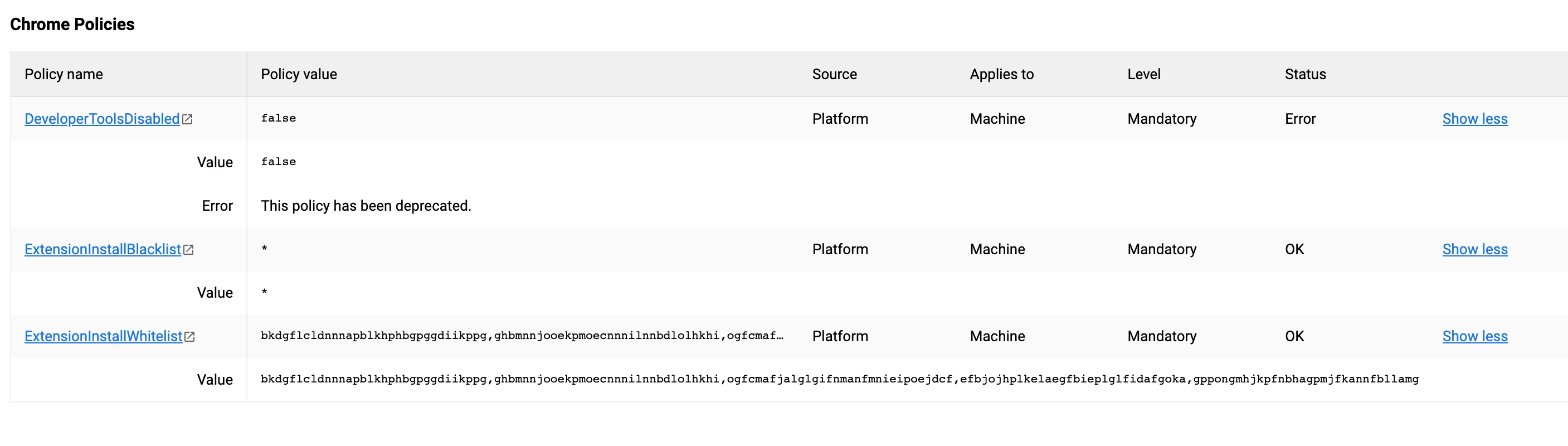
Open Chome and type chrome://policy and you should see the policies applied come up.

Hope this helps. any questions let me know.

Cheers!

Some explanations

  • The string for ExtensionInstallBlacklist. * means it will black list everything in the chrome store.

  • When white listing, you need the Chome extension ID which is found on the URL of the extension in the Chrome Store. I like to add comments after so I remember what is white listed.

  • If you want to force install a extension. you have to put <string>aaaaaaaaaaaaaaaaaaaaaaaaaaaaaaaa;https://clients2.google.com/service/update2/crx</string>
    then in the next string the Chome extension ID which is found on the URL of the extension in the Chrome Store.


Forum|alt.badge.img+4
  • Author
  • Contributor
  • September 18, 2019

Thanks Buddy,

I have the same script like your and its working but i dont want to disturb installed extension, when i am applying this setting its blocking installed extension

Can you please suggest some thing


Forum|alt.badge.img+3
  • New Contributor
  • September 18, 2019

Can you please upload a screenshot of your chrome://policy page?

I might be able to help!


Forum|alt.badge.img+4
  • Author
  • Contributor
  • September 19, 2019


Forum|alt.badge.img+3
  • New Contributor
  • September 19, 2019
but i dont want to disturb installed extension, when i am applying this setting its blocking installed extension

May I ask what exactly you mean by this? I am left a little confused?!

Cheers


Forum|alt.badge.img+4
  • Author
  • Contributor
  • September 19, 2019

Here is the thing,

When i am applying the policy its disabled the existing extension on chrome. So i want the extension should work which is already installed


Forum|alt.badge.img+8
  • Valued Contributor
  • May 19, 2023

Hi,

I have recently done work on Chrome, blocking extensions. whitelisting and force installing.

Below is my plist. May be a bit sloppy to some people but it works! (uploaded as a photo as it looks better than copy paste)
Once you have typed it up, save it as com.google.Chrome.plist
Then you have to test it. copy the file and paste it into /Library/Managed Preferences
Open Chome and type chrome://policy and you should see the policies applied come up.

Hope this helps. any questions let me know.

Cheers!

Some explanations

  • The string for ExtensionInstallBlacklist. * means it will black list everything in the chrome store.

  • When white listing, you need the Chome extension ID which is found on the URL of the extension in the Chrome Store. I like to add comments after so I remember what is white listed.

  • If you want to force install a extension. you have to put <string>aaaaaaaaaaaaaaaaaaaaaaaaaaaaaaaa;https://clients2.google.com/service/update2/crx</string>
    then in the next string the Chome extension ID which is found on the URL of the extension in the Chrome Store.


@JossCurnuck can you please let me know where you get chrome extension ID?


Forum|alt.badge.img+8
  • Valued Contributor
  • May 19, 2023

@JossCurnuck can you please let me know where you get chrome extension ID?


I think I found that, no worries on this.