Question

Cisco AnyConnect 4.4

  • February 28, 2017
  • 40 replies
  • 215 views

Show first post

40 replies

iJake
Forum|alt.badge.img+23
  • Contributor
  • March 16, 2018

@ostrowsp I'd suggest signing up for the jamf 10.3 beta where you can create and test Approved Kernel Extensions Configuration Profiles. The Team ID for Cisco AnyConnect is DE8Y96K9QP


rqomsiya
Forum|alt.badge.img+12
  • Honored Contributor
  • March 16, 2018

@ostrowsp : Take a look at this JN post

https://www.jamf.com/jamf-nation/discussions/26583/kextpocalyse-2-the-remediation-blog-post-by-our-own-franton


Forum|alt.badge.img+5
  • Contributor
  • May 14, 2018

Hey @iJake, I'm trying to follow this process and one additional thing that my admins want me to complete is to add some XML files that reference our 3 different VPN Servers...

How would I include this in the package?


iJake
Forum|alt.badge.img+23
  • Contributor
  • May 14, 2018

@boanes I package our profiles in a separate pkg that places them in either opt/cisco/anyconnect/profile or umbrella depending on what type of profile it is (this is manual just do both kinds in the same package). This profiles package is then part of the larger package that installs AC, Profiles, and some other bits all at once via individual packages.


Forum|alt.badge.img+5
  • Contributor
  • May 15, 2018

Sorry @iJake, I don't quite follow... Can you elaborate a bit more?


Forum|alt.badge.img+5
  • Contributor
  • May 16, 2018

Hey @iJake,
I got now what you're saying about the various profiles...

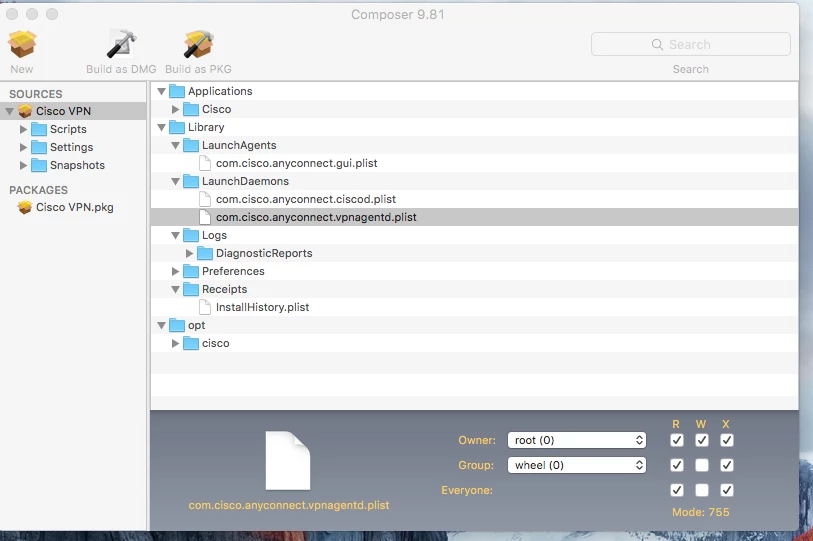
Right now I'm not quite sure how to build part 1 to this package... I've followed your process that you've outlined bak on 3/6/17 and I'm running into issues...

When I build the package then attempt to deploy it, it doesn't install anything... help?


Forum|alt.badge.img+2
  • New Contributor
  • July 19, 2018

@boanes

I am having the same issue as well.
Followed the instructions above and the pkg file does not install on the machine.
Changed the post script to set directory for the pkg file and still no luck.

@iJake, any help would be awesome!


Forum|alt.badge.img+5
  • Contributor
  • July 19, 2018

@saikitjk What's your email address, I've written down some instructions that I'd like you to go over and verify that they're clear...


Forum|alt.badge.img+8
  • Contributor
  • January 14, 2019

Hi all,

Sorry for bumping an old thread, but I was hoping I could get some insight for an issue I've been seeing.

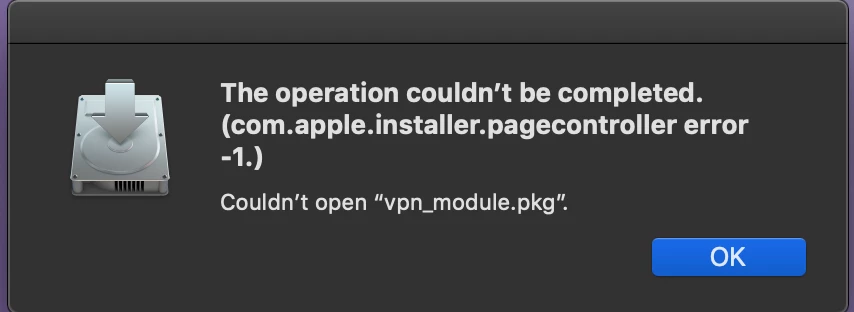
Using @asommerio method, I pulled the VPN and Umbrella components from my pre-deploy DMG, but when I go to install them I get nothing but errors. Self Service reports an error upon install, and if I try to install them by hand, I'm getting this:

Is this related to some new Mojave security policy?


Forum|alt.badge.img+2
  • New Contributor
  • January 22, 2019

@landon_Starr i am getting the same error on Mojave 10.14.2


Forum|alt.badge.img+17
  • Honored Contributor
  • March 19, 2019

@kcadm @landon_Starr how did you work around this error? I'm seeing it on 10.14 and 10.13 so I don't think it's a Mojave issue. I'm trying to extract pkgs from v4.7 dmg.

Edit: choices.xml install (mostly following iJakes instructions above) worked fine.


cbruce
Forum|alt.badge.img+6
  • Contributor
  • September 18, 2019

@boanes I am running into the same thing. I build it and it looks great and run it and there is nothing installed.
@iJake, any help would be great !


stevewood
Forum|alt.badge.img+38
  • Hall of Fame
  • September 18, 2019

@cbruce

Check out this post from this morning. I provide a little detail around how I do this using pkgbuild from the Terminal instead of Packages or Composer.


Forum|alt.badge.img+5
  • Contributor
  • October 1, 2019

Am I missing the part where everyone has said where they're adding their VPN server address? Presumably we're all getting 4.8 ready for Catalina and the above workflows are great! I think we're up to 4 different ways to achieve the same result :D

I can't see anything obvious in /opt/cisco or ~/Library/Preferences/com.cisco. so I'm not sure where it contains the server address, or if we have to use AnyConnect Profile Editor to create it?

Edit: Just in case anyone else comes across this. In order to have your server address pre-fill in to the GUI, you need to install the Profile Editor Tool on to your Windows computer, launch VPN Profile Editor then choose Server List and edit the server address and FQDN. Export this .xml and copy it in to the /Profiles/vpn/ folder that's contained within your AnyConnect_PreDeploy.dmg. Now when you run the installer it'll reference the /profiles folder and basically copy the .xml in to /opt/cisco/anyconnect/profile/ post installation. When the end user launches AnyConnect for the first time, it'll have your server address pre-filled.


Forum|alt.badge.img+7
  • Contributor
  • September 28, 2020

@cbruce, @CasperSally, @kcadm, @landon_Starr

With Cisco AnyConnect 4.9.02028 I am also seeing this error:

The operation couldn't be completed.
(com.apple.installer.pagecontroller error -1.)

I "think" it is related to the extracted sub packages not being signed. The original AnyConnect.pkg shows it is signed by:

Developer ID Installer: Cisco (DE8Y96K9QP) (Developer ID Certification Authority, Apple Root CA)

The extracted sub packages all show a warning "Package does not have a signature"

Try signed the sub packages and see if that works.