Question

Clock app Ipads

  • May 17, 2019
  • 5 replies
  • 17 views

Forum|alt.badge.img+10

Is there a way to block the clock app on Ipads. I have students setting alarms on them.

5 replies

Forum|alt.badge.img+21
  • Valued Contributor
  • May 17, 2019

You can vanish the app, but sadly alarms that have already been set will still beep. This is fun at the end of the year when iPads have been turned in and they all go crazy around 6:30 am.

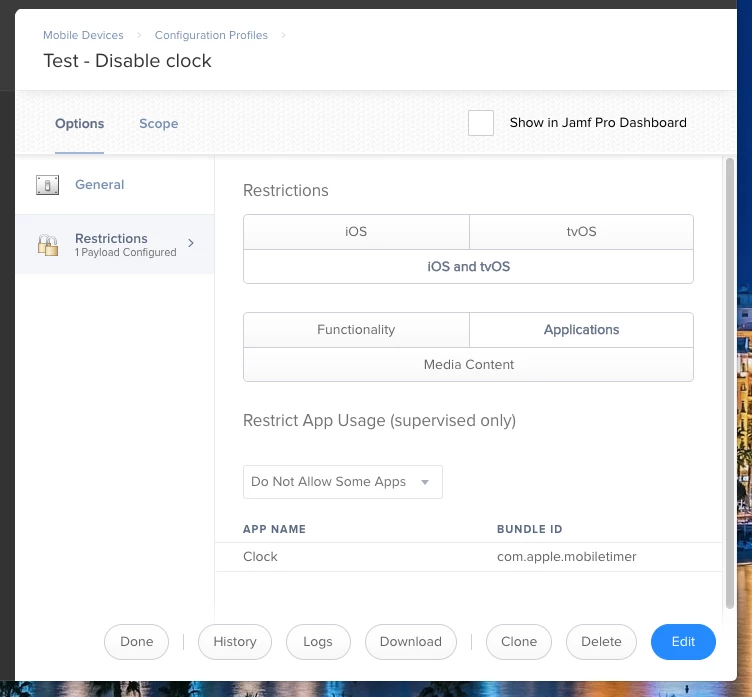
If you want to play around with it, make a new config profile and set up Restrictions > iOS and tvOS > Applications > Do Not Allow Some Apps > com.apple.mobiletimer


Forum|alt.badge.img+10
  • Author
  • Valued Contributor
  • May 17, 2019

@Emmert tried that, do not allow still not working haha


Forum|alt.badge.img+21
  • Valued Contributor
  • May 17, 2019

I just created a profile to test this and the Clock app disappeared from my iPad. Did you scope it to something?


Forum|alt.badge.img+10
  • Author
  • Valued Contributor
  • May 17, 2019

@Emmert How did you make it disappear?


Forum|alt.badge.img+21
  • Valued Contributor
  • May 17, 2019

Here's a screenshot of what my profile looks like: