Solved

Company Port Mac App not showing in Jamf Pro Inventory - Ventura

  • August 9, 2023
  • 3 replies
  • 37 views

Forum|alt.badge.img+5

Hello everyone, I am try to create a smart group that would allow me to identify computers that have company portal on them. It seems like in Ventura, Jamf Pro is not reading installed Mac Apps from the server.

My Situation:

I have deployed company portal as well as MS Remote Desktop from Jamf Pro via Mac Apps. This is going to 2 machines, Ventura and Monterey. On my mac with Monterey, I can see the apps showing as Company Portal.app and Microsoft Remote Desktop.app. However on the Ventura mac neither of these are showing in the Inventory. I can see them on the mac though. I have added the ~/Applications/ folder to the inventory search to no avail. Anyone have any thoughts?

Best answer by JPost

Ended up re-enrolling the device and the company portal app picked up this time. I am not sure why re-enrolling would make a difference but that seemed to solve the issue at least for this device. 

3 replies

jamf-42
Forum|alt.badge.img+17
  • Esteemed Contributor
  • August 9, 2023

I have a smart group:

Application Title IS Company Portal.app 

Seems to work fine.. 

You could use pkg receipts and look for:


com.microsoft.CompanyPortal
com.microsoft.CompanyPortalMac

Forum|alt.badge.img+5
  • Author
  • New Contributor
  • August 9, 2023

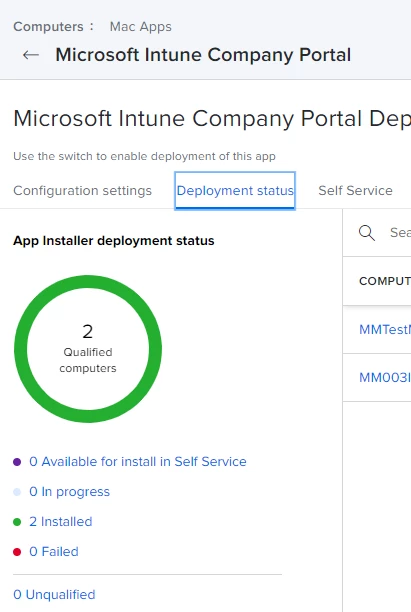
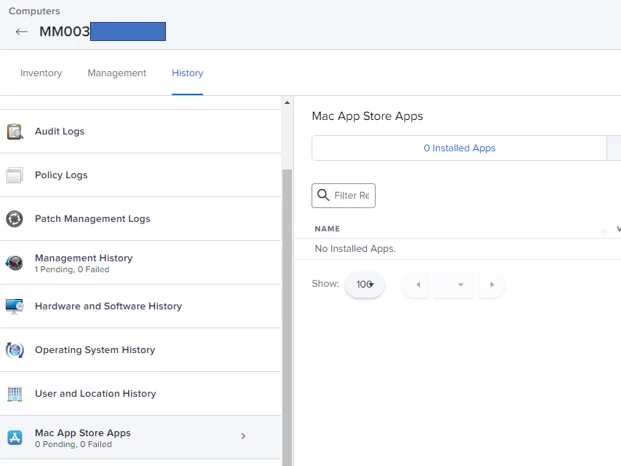
Adjusted the criteria configuration to the below settings you shared but no luck. Still showing only the Monterey. One thing I noticed is that apps are showing in the deployment section of Mac Apps but not on the computers Mac apps inventory. Seems like something isn't talking in Jamf Pro. 


Forum|alt.badge.img+5
  • Author
  • New Contributor
  • Answer
  • August 14, 2023

Ended up re-enrolling the device and the company portal app picked up this time. I am not sure why re-enrolling would make a difference but that seemed to solve the issue at least for this device.