Question

Company Portal Removal Script (Based on Microsoft Support)

  • July 24, 2018
  • 24 replies
  • 125 views

KyleEricson
Forum|alt.badge.img+17

Apple Script format

#Created by Kyle Ericson Date July 24th 2018
#If you want to remove from JAMF uncomment this
#do shell script "sudo jamf removemdmprofile" user name "Administrator" password "superpassword" with administrator privileges
#do shell script "sudo jamf removeFramework" user name "Administrator" password "superpassword" with administrator privileges

#Remove Company Portal Items
do shell script "killall 'JAMF' || True "
do shell script "killall 'Company Portal' || True"
do shell script "sudo rm -R '/Applications/Company Portal.app/'|| True" user name "Administrator" password "superpassword" with administrator privileges
do shell script "sudo rm -rf '/Library/Application Support/com.microsoft.CompanyPortal.usercontext.info'|| True" user name "Administrator" password "superpassword" with administrator privileges
do shell script "sudo rm -rf '/Library/Application Support/com.jamfsoftware.selfservice.mac'|| True" user name "Administrator" password "superpassword" with administrator privileges
do shell script "sudo rm -r '/Library/Saved Application State/com.jamfsoftware.selfservice.mac.savedState' || True" user name "Administrator" password "superpassword" with administrator privileges
do shell script "sudo rm -r 'Library/Saved Application State/com.microsoft.CompanyPortal.savedState' || True" user name "Administrator" password "superpassword" with administrator privileges
do shell script "sudo rm -r '/Library/Preferences/com.microsoft.CompanyPortal.plist' || True" user name "Administrator" password "superpassword" with administrator privileges
do shell script "sudo rm -r 'Library/Preferences/com.jamfsoftware.management.jamfAAD.plist' || True" user name "Administrator" password "superpassword" with administrator privileges
do shell script "sudo rm -r 'Users/$loggedInUser/Library/Cookies/com.microsoft.CompanyPortal.binarycookies' || True" user name "Administrator" password "superpassword" with administrator privileges
do shell script "sudo rm -r '/Users/$loggedInUser/Library/Cookes/com.jamf.management.jamfAAD.binarycookies' || True" user name "Administrator" password "superpassword" with administrator privileges

#Remove Keychain items
do shell script "security delete-generic-password -l 'com.jamf.management.jamfAAD' || True"
do shell script "security delete-generic-password -l 'com.microsoft.CompanyPortal' || True"
do shell script "security delete-generic-password -l 'com.microsoft.CompanyPortal.HockeySDK' || True"
do shell script "security delete-generic-password -l 'enterpriseregistration.windows.net' || True"

do shell script "security delete-generic-password -l 'https://adfs.mydomain.com/adfs/ls' || True"
do shell script "security delete-generic-password -l 'https://adfs.mydomain.com/adfs/ls/' || True"
do shell script "security delete-generic-password -l 'https://device.login.microsoftonline.com' || True"
do shell script "security delete-generic-password -l 'https://device.login.microsoftonline.com/' || True"
do shell script "security delete-generic-password -l 'https://enterpriseregistration.windows.net' || True"
do shell script "security delete-generic-password -l 'https://enterpriseregistration.windows.net/' || True"
do shell script "security delete-generic-password -a 'com.microsoft.workplacejoin.thumbprint' || True"
do shell script "security delete-generic-password -a 'com.microsoft.workplacejoin.registeredUserPrincipalName' || True"
do shell script "sudo security delete-certificate -c 'MS-Organization-Access' || True" user name "Administrator" password "superpassword" with administrator privileges

tell application "Keychain Access" to activate

display dialog "Remove any Keychain Items named <key>, Workplace Join Key, Microsoft Session Transport Key,  and ########-3df9-48a3-####-ba15ca0b2414 issued by MS-Organization-Access" with icon stop

display dialog "Company Portal has been removed. Restart and run Azure Device Registration via JAMF Self Service" with icon stop giving up after 2

Latest code on Github

24 replies

Surajit
Forum|alt.badge.img+7
  • Contributor
  • May 10, 2019


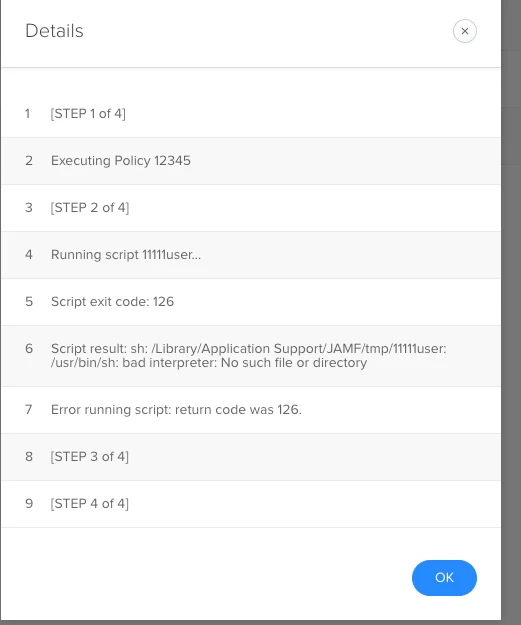
Getting this error. What am I doing wrong?


Forum|alt.badge.img+10
  • Contributor
  • June 12, 2019

Anyone get this working?

Or other tools to reset company portal on the mac to scratch. Having a issue on some clients that where I can launch company portal from self service, but it does not show the addational popup where logging into jamf pro and adding the Jamfaad to keychain. So the device newer is created in azure


KyleEricson
Forum|alt.badge.img+17
  • Author
  • Valued Contributor
  • June 12, 2019

@surajitbapan @jameson See this updated post and script. *Sorry forgot to add the Link


Forum|alt.badge.img+9
  • Contributor
  • June 12, 2019

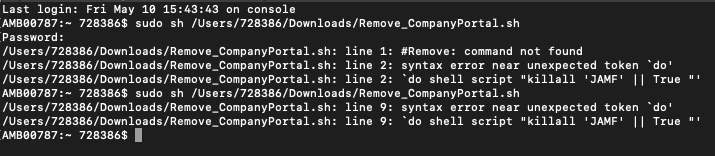
Has there been any changes? just tried to test and If I try it fails on the "do" like surajitbpn screenshots show


KyleEricson
Forum|alt.badge.img+17
  • Author
  • Valued Contributor
  • June 12, 2019

@KRIECCO Just added the link sorry forgot to add it. Looks like this script posted here is Apple Script not sh. The one I just linked is sh on GitHub.


Forum|alt.badge.img+10
  • Contributor
  • June 12, 2019

Great thank you for sharing. I did a copy paste of your script but when running it, it just shows


Surajit
Forum|alt.badge.img+7
  • Contributor
  • June 13, 2019

@jameson Replace "#!/usr/bin/sh"
to:
"#!/bin/bash"
It will work.

@kericson Thanks for sharing. This is exactly what I needed.☺


KyleEricson
Forum|alt.badge.img+17
  • Author
  • Valued Contributor
  • June 13, 2019

@surajitbapan Sorry for that I’ll update the script with bash on github.


KyleEricson
Forum|alt.badge.img+17
  • Author
  • Valued Contributor
  • June 14, 2019

I fixed the file on GitHub.


Forum|alt.badge.img+10
  • Contributor
  • June 25, 2019

Thanks - working great :)


Forum|alt.badge.img+4
  • Contributor
  • March 18, 2020

In the blog post it is stated to remove the Azure device. Microsoft states Jamf enrolled Intune devices can only be removed by deleting the device in Jamf. Are folks removing the devices from Jamf before re-enrolling?


KyleEricson
Forum|alt.badge.img+17
  • Author
  • Valued Contributor
  • March 19, 2020

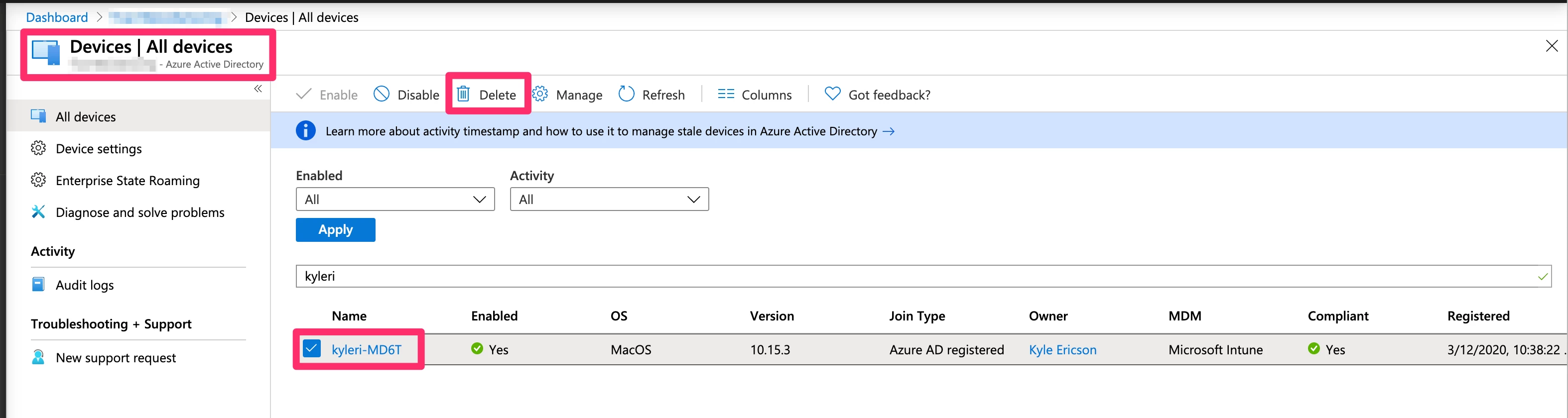
@Gonzalez Run my script then do this Go to your Azure AD--> All Devices -->Find device-->Delete


danlaw777
Forum|alt.badge.img+17
  • Valued Contributor
  • March 31, 2020

@kericson your script wont delete any jamp product correct? it just kills any running processes?


KyleEricson
Forum|alt.badge.img+17
  • Author
  • Valued Contributor
  • April 1, 2020

@danlaw777 Correct nothing Jamf related is removed.


Forum|alt.badge.img+7
  • Valued Contributor
  • August 13, 2021

Does anyone know if this script still works for Big Sur or if there is an updated script for automating removal? The keychain removal is a mission and a half in itself 😭


KyleEricson
Forum|alt.badge.img+17
  • Author
  • Valued Contributor
  • August 14, 2021

@Levi_ What's not removing I know Jamf has a script now based on this workflow? bryce.carlson at Jamf created it.


Forum|alt.badge.img+7
  • Valued Contributor
  • August 18, 2021

@Levi_ What's not removing I know Jamf has a script now based on this workflow? bryce.carlson at Jamf created it.


Thank you Kyle, I will check that out.


KyleEricson
Forum|alt.badge.img+17
  • Author
  • Valued Contributor
  • August 20, 2021

Forum|alt.badge.img+7
  • Valued Contributor
  • August 25, 2021

Forum|alt.badge.img+8

anyone else noticing that you now have to delete the device entry in Intune? Before you could just "clean" the device and re-register. Am I missing something that needs to be removed on the device side besides Company Portal / jamfaad files and keychain entries?


Forum|alt.badge.img+7
  • Contributor
  • December 6, 2021

Is there an updated script for macOS 11 and newer?  When looking at for the file locations of the different files it wants to delete most are not in the locations the scripts are looking.  I can only assume that is because Apple changed the locations in macOS 11 and newer.


Forum|alt.badge.img+8
  • Valued Contributor
  • February 8, 2023

That script not work for macOS Ventura. I tried, please share if anyone able to work that.


Forum|alt.badge.img+8
  • Valued Contributor
  • February 23, 2023

Anyone know what this line is doing

AAD_ID=$(su "$currentuser" -c "security find-certificate -a -Z | grep -B 9 "MS-ORGANIZATION-ACCESS" | awk '/\\"alis\\"<blob>=\\"/ {print $NF}' | sed 's/  \\"alis\\"<blob>=\\"//;s/.$//'")

From my understanding it is trying to get MS-Organizing-Access issued certificate which installed during company portal installed. But looks like it is not working for macOS Ventura. Any one please put some light on this. 


Forum|alt.badge.img+1
  • New Contributor
  • May 23, 2023

Anyone know what this line is doing

AAD_ID=$(su "$currentuser" -c "security find-certificate -a -Z | grep -B 9 "MS-ORGANIZATION-ACCESS" | awk '/\\"alis\\"<blob>=\\"/ {print $NF}' | sed 's/  \\"alis\\"<blob>=\\"//;s/.$//'")

From my understanding it is trying to get MS-Organizing-Access issued certificate which installed during company portal installed. But looks like it is not working for macOS Ventura. Any one please put some light on this. 


It works locally on the system but not from Jamf. I tried with $3 instead of $currentuser still no luck ;(