Solved

Composer 10.30.x issues with macOS 11

  • October 11, 2021
  • 5 replies
  • 44 views

Forum|alt.badge.img+9

I have an .app bundle contained in a .dmg that I am trying to package to deploy to our fleet of machines to the /Applications directory. When I package this via composer utilizing either drag and drop from /Applications to Composer, or via normal snapshot and drag from the .dmg to /Applications I get a usable package that installs fine on 10.15.7 machines. However, when this same package is run(manually or via policy in Jamf Pro) on a macOS 11.x machine the installation to /Applications is literally zero KB and is an unusable "shell" of the .app bundle. The icon is greyed out with a crossed out circle in it(indicating nothing is there).


I'm racking my brain trying to figure out why, has anyone else experienced this/know a fix/workaround?
Best answer by GabePPS

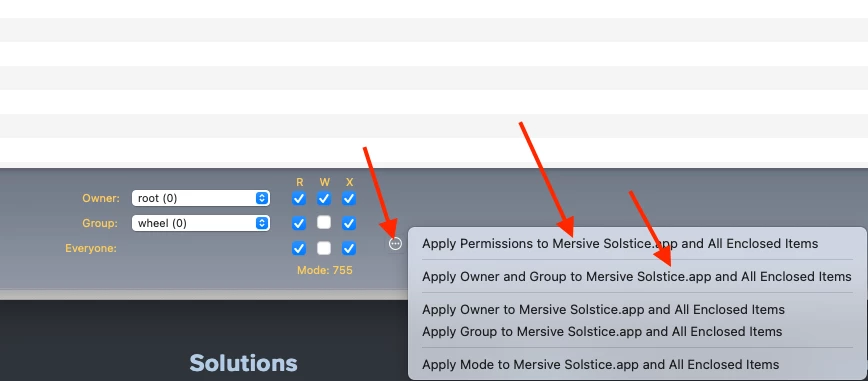
@bmack99 It seems to be working when I create a pkg installer and modify the owner/group to root/wheel and set permissions properly.   I will bet its a permissions issue.  Make sure to set (and click apply to permissions to all enclosed items) and it should work properly.  See below:

5 replies

Forum|alt.badge.img+18
  • Esteemed Contributor
  • October 12, 2021

Whats the app?


Forum|alt.badge.img+9
  • Author
  • Valued Contributor
  • October 12, 2021

Whats the app?


hey @GabePPS it is the Mersive Solstice app, available here: Mersive Solstice App Downloads

www.mersive.com/download/ 


Forum|alt.badge.img+18
  • Esteemed Contributor
  • Answer
  • October 12, 2021

@bmack99 It seems to be working when I create a pkg installer and modify the owner/group to root/wheel and set permissions properly.   I will bet its a permissions issue.  Make sure to set (and click apply to permissions to all enclosed items) and it should work properly.  See below:


Forum|alt.badge.img+18
  • Esteemed Contributor
  • October 12, 2021

@bmack99 

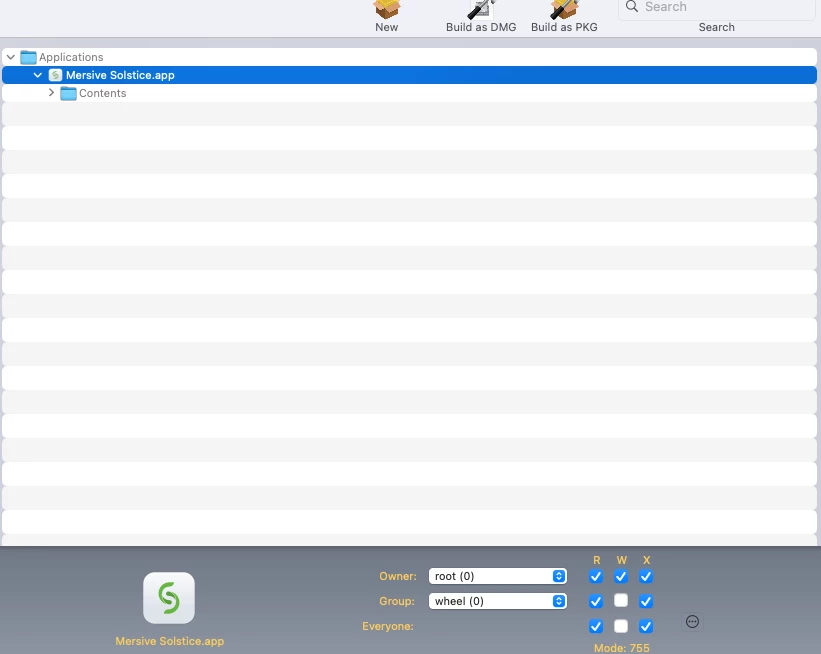
I should probably show you this one as well just in case: 


Forum|alt.badge.img+9
  • Author
  • Valued Contributor
  • October 13, 2021

@bmack99 It seems to be working when I create a pkg installer and modify the owner/group to root/wheel and set permissions properly.   I will bet its a permissions issue.  Make sure to set (and click apply to permissions to all enclosed items) and it should work properly.  See below:


Thanks a bunch Gabe, this did the trick. I honestly never even noticed the option to change permissions, I've packaged quite a few packages through composer too. Thanks again for the help!