
Question

Composer 9.101.0 - No Space Left on Device Error

  • October 24, 2017
  • 8 replies
  • 18 views

Forum|alt.badge.img+13

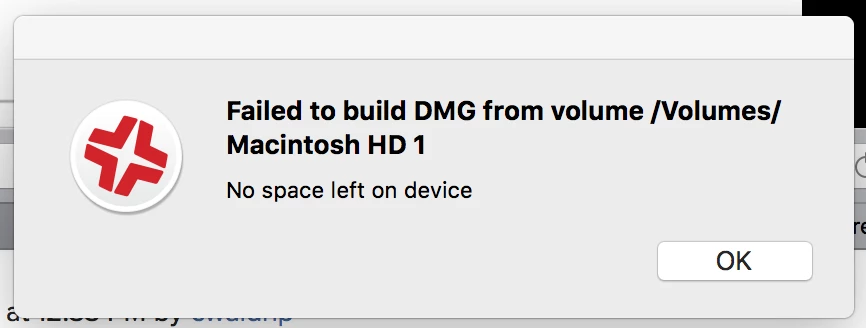
I'm receiving this error in attempting to capture an image through composer, over thunder bolt

I'm running 10.13 and the macbook being captured is running 10.13 but I receive the above error as it attempts to finish the final step of the capture.

I am only capturing the primary Macintosh HD and skipping the restore partition

And my available storage on my macbook is 3x the amount of data that is being captured, and is 30gb more than the total drive space of macbook being captured.

I originally suspected this was a folder rights issue, so I have attempted to capture to my desktop, my documents, to my profile folder and directly to my Macintosh HD, all with the same error.

Any suggestions? I assume 10.13 has been captured so far?

8 replies

donmontalvo
Forum|alt.badge.img+36
  • Hall of Fame
  • October 24, 2017

Just gonna leave this here...

MagerValp | AutoDMG | Releases


Forum|alt.badge.img+13
  • Author
  • Valued Contributor
  • October 29, 2017

Jamf support confirmed, that this expected to be resolved in Jamf pro 10


Forum|alt.badge.img+2

I'm getting the same error using Jamf Pro Composer version 10 and a new MBP running 10.13.1. I opened a ticket with Jamf and they acknowledged an incompatibility issue with APFS. No ETA on the fix.


Forum|alt.badge.img+17
  • Honored Contributor
  • November 13, 2017

Not sure if related, but there's also this prior discussion of composer not being able to capture when using recovery drives.

https://www.jamf.com/jamf-nation/discussions/22871/building-10-12-3-touch-bar-macbook


Forum|alt.badge.img+2
  • New Contributor
  • November 29, 2017

Just wondering if there is any update on the status of this problem? Im trying to capture an APFS drive and failing miserably with the "No Space left on Device" error. (There is lots of space btw)


Forum|alt.badge.img+2
  • New Contributor
  • January 30, 2018

Hi Guys,

are there any updates? I'm with Composer 10.0 and still have the same issue.

Thanks!


Forum|alt.badge.img+13
  • Valued Contributor
  • January 30, 2018

Use something other than Composer.....


Forum|alt.badge.img
  • New Contributor
  • February 16, 2018

I had this issue with Composer 10.0, but has been resolved for me in Composer 10.2.0.

Hope this is true for others!