

Solved

Composer Packages move to another machine

  • July 8, 2020
  • 2 replies
  • 36 views

metalfoot77
Forum|alt.badge.img+11

Tell me if this is silly, but I use one machine (a Mac Pro) as my "master" machine to create packages (pkg and dmg) for use on my labs. This machine is getting a little conjested so I'd like to somehow backup all the items in Composer and move them to either another machine or wipe this machine and reinstall them back down.

Am I crazy for having captured these packages this way or is there a way to "move" them? I'd really not like to have to re-package all of these tiny apps.

Best answer by dan-snelson

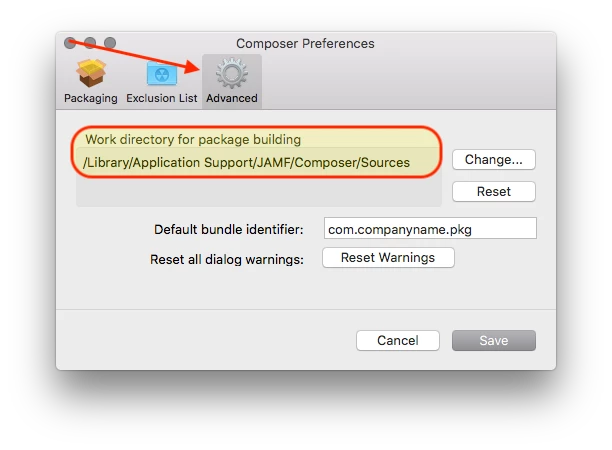
@kricotta Composer > Preferences > Advanced > Work directory for package building will show you where the "guts" of your PKGs and DMGs live, with a default of /Library/Application Support/JAMF/Composer/Sources/.

On your second box, you could rsync the entire Sources directory from your Mac Pro:

sudo rsync --dry-run -v -a -r -u -h -i -E --progress --stats admin@hostname:/source/ /destination
--delete-after # source trumps destination, deleting files on destination which don’t exist on source

2 replies

dan-snelson
Forum|alt.badge.img+30
  • Honored Contributor
  • Answer
  • July 9, 2020

@kricotta Composer > Preferences > Advanced > Work directory for package building will show you where the "guts" of your PKGs and DMGs live, with a default of /Library/Application Support/JAMF/Composer/Sources/.

On your second box, you could rsync the entire Sources directory from your Mac Pro:

sudo rsync --dry-run -v -a -r -u -h -i -E --progress --stats admin@hostname:/source/ /destination
--delete-after # source trumps destination, deleting files on destination which don’t exist on source

metalfoot77
Forum|alt.badge.img+11
  • Author
  • Valued Contributor
  • July 9, 2020

Thank you so much! I know we need to socially distance, but virtual hugs are in order. Again, thanks!