Answer

Configuration Profiles > Password Policy not working on El Capitan

  • November 27, 2015
  • 4 replies
  • 21 views

Forum|alt.badge.img+8

I created a Configuration Profiles > Password Policy

But this doesn't apply on El Capitan (can't regress), I get this error:

The profile “FTIFF - Password Policy (7A3CE275-B25B-4C13-81F9-F2680A0FC930:7A3CE275-B25B-4C13-81F9-F2680A0FC930)” could not be installed due to an unexpected error. <ProfileDomainPluginController:101>

Here's my XML:

<key>PayloadType</key>
<string>com.apple.mobiledevice.passwordpolicy</string>
<key>PayloadOrganization</key>
<string>FTIFF</string>
<key>PayloadIÇQdentifier</key>
<string>3776AE79-8054-449D-94AA-6E94F9343D2E</string>
<key>PayloadDisplayName</key>
<string>Passcode</string>
<key>PayloadDescription</key>
<string/>
<key>PayloadVersion</key>
<integer>1</integer>
<key>PayloadEnabled</key>
<true/>
<key>allowSimple</key>
<false/>
<key>forcePIN</key>
<true/>
<key>maxPINAgeInDays</key>
<integer>90</integer>
<key>minLength</key>
<integer>8</integer>
<key>pinHistory</key>
<integer>12</integer>
<key>requireAlphanumeric</key>
<true/>
<key>maxGracePeriod</key>
<integer>0</integer>
<key>minutesUntilFailedLoginReset</key>
<integer>0</integer>
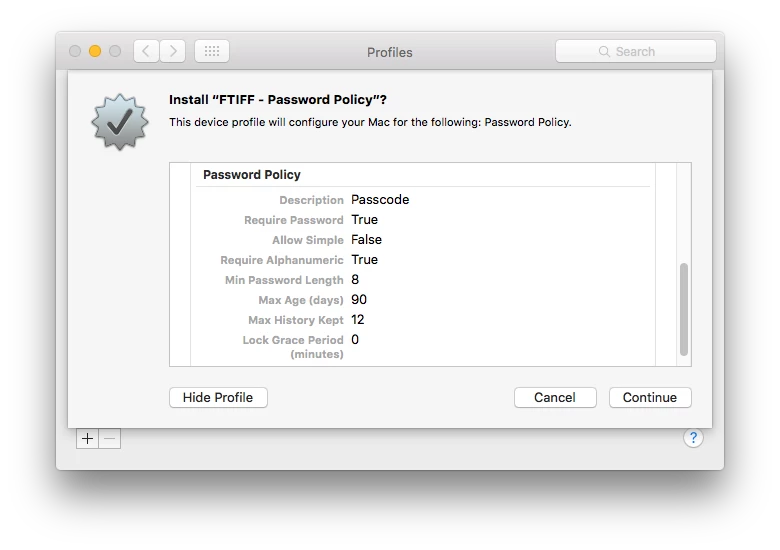
Someone has same issue?

Found this:

https://discussions.apple.com/message/29224711#29224711

Best answer by gachowski

I couldn't find the thread, but I know it's there I posted in it : )

I think in El Capitan you have to have "Delay after failed login attempts" set or the profile will not load...

Sorry I can't help anymore...
C

4 replies

davidacland
Forum|alt.badge.img+18
  • Valued Contributor
  • November 27, 2015

Just tried it, same error on my JSS/Mac.


Forum|alt.badge.img+16
  • Honored Contributor
  • Answer
  • November 27, 2015

I couldn't find the thread, but I know it's there I posted in it : )

I think in El Capitan you have to have "Delay after failed login attempts" set or the profile will not load...

Sorry I can't help anymore...
C


Forum|alt.badge.img+8
  • Author
  • Contributor
  • November 30, 2015

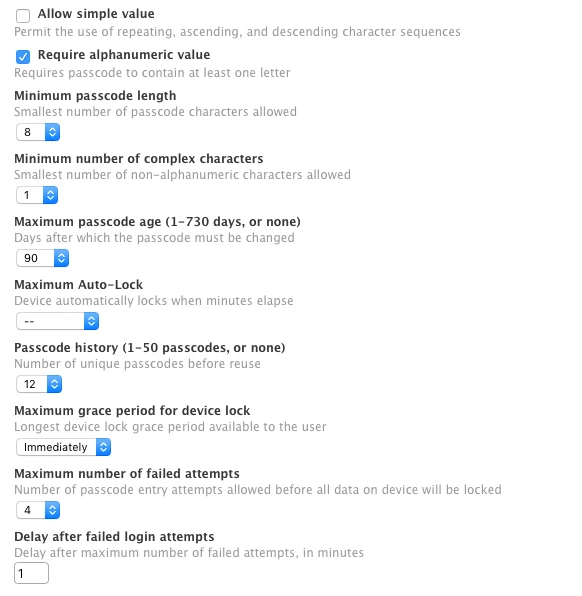
Well done, @gachowski !

You need:
- Maximum number of failed attempts
- Delay after failed login attempts

See screenshot:

Please vote here -> https://jamfnation.jamfsoftware.com/featureRequest.html?id=4209


Forum|alt.badge.img+8
  • Contributor
  • November 30, 2015

I followed these steps and the policy downloaded with no issue on my test laptop. However, whenever I needed to enter my admin password for unlocking the Users Preferences in system preferences, my password was no longer recognized. Is this because my admin password does not meet the criteria I set in the password policy?

As soon as I remove the profile from the test laptop my admin password works again.