Question

Creative Cloud Packager - how to edit existing packages (.ccp)?

  • June 22, 2016
  • 9 replies
  • 75 views

mhasman
Forum|alt.badge.img+22

Hello,

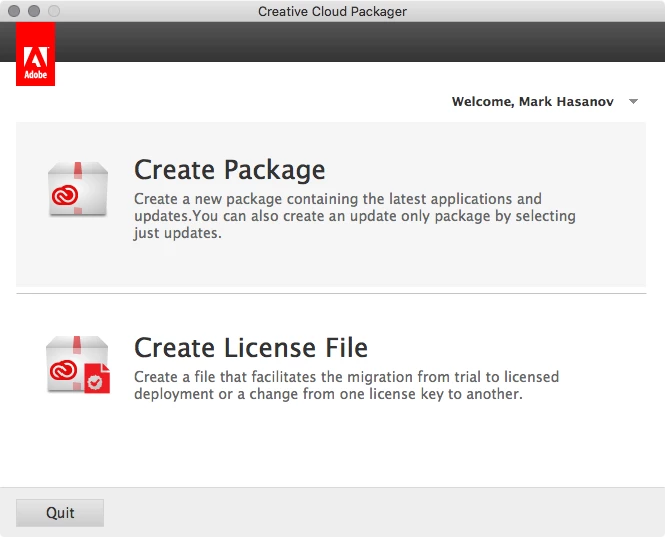
Creative Cloud Packager updated itself, and updated version does not show the option to open and edit existing packages, but only to create the new one. Do you know how to open .ccp file/preset now?

Thanks!

9 replies

mhasman
Forum|alt.badge.img+22
  • Author
  • Valued Contributor
  • June 22, 2016


mhasman
Forum|alt.badge.img+22
  • Author
  • Valued Contributor
  • June 22, 2016

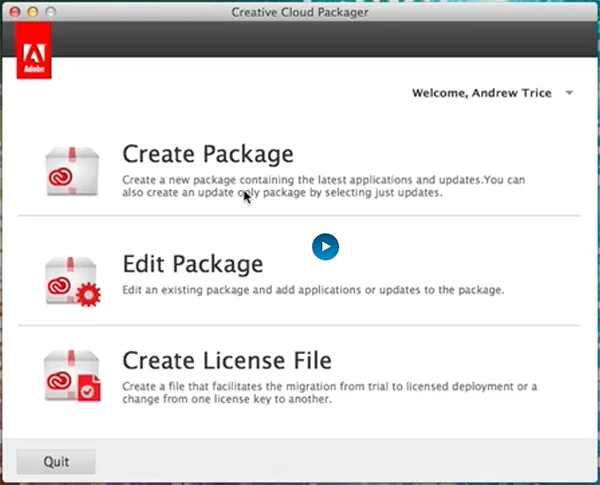
Previesly it has an option "Edit Package"


mhasman
Forum|alt.badge.img+22
  • Author
  • Valued Contributor
  • June 22, 2016

And...
It is still mentioned on Adobe site:
https://helpx.adobe.com/creative-cloud/packager/package-configurations.html


Forum|alt.badge.img+5
  • New Contributor
  • June 22, 2016

Was wondering this myself and found out they removed that support

https://helpx.adobe.com/creative-cloud/packager/creative-cloud-packager-faq.html

Can I edit an existing package?
No. Since Creative Cloud Packager 1.9.5, editing packages is not supported.


mhasman
Forum|alt.badge.img+22
  • Author
  • Valued Contributor
  • June 22, 2016

So, now I have to manually re-create sets every time Adobe updates something? Horrible! Why? Why they did it?!!


Forum|alt.badge.img+13
  • Valued Contributor
  • June 23, 2016

THAT SUCKS!!!]
My goodness, Adobe have really outdone themselves this time..

Back to Quark.. lol


Forum|alt.badge.img+6
  • Contributor
  • June 29, 2016

I am beginning to think that Adobe software programers would not be able to engineer their way out of a wet paper bag.


Forum|alt.badge.img+4
  • New Contributor
  • February 1, 2017

I think this is because the tool now always looks for updates when you create a package. It caches the downloads under Application Support on a Mac (App Data? under PC) and shows an indication whether or not additional items are required based on your choices..

What I think would be interesting is that if you have a custom ETLA package with x apps out of the total available.. would be nice if you can save that recipe,, so.. if anyone knows how to open the .ccp file and move forward.. that would be useful to me.


Forum|alt.badge.img+16
  • Valued Contributor
  • February 1, 2017

I wonder if it was removed because modified packages had some crazy issues. If we built a new package and included all of the available apps and updates under our ETLA, we'd end up with about a 16GB package. If we then reopened that .ccp file, changed nothing, and clicked Build again, the output would be nearly 40GB.

Perhaps it was easier to remove the feature than to fix the bug.