Question

CrowdStrike Configuration Profile | BigSur

  • December 1, 2020
  • 112 replies
  • 651 views

Show first post

112 replies

Forum|alt.badge.img+4
  • Contributor
  • December 23, 2020

@ubcoit Support got back to me saying there is a product issue and they tied my case to it. Any updates from them for you?


Forum|alt.badge.img+6
  • Contributor
  • December 23, 2020

@araney That's the problem I'm having. Either with a signed CS configuration profile uploaded or manually creating it in Jamf, same result.

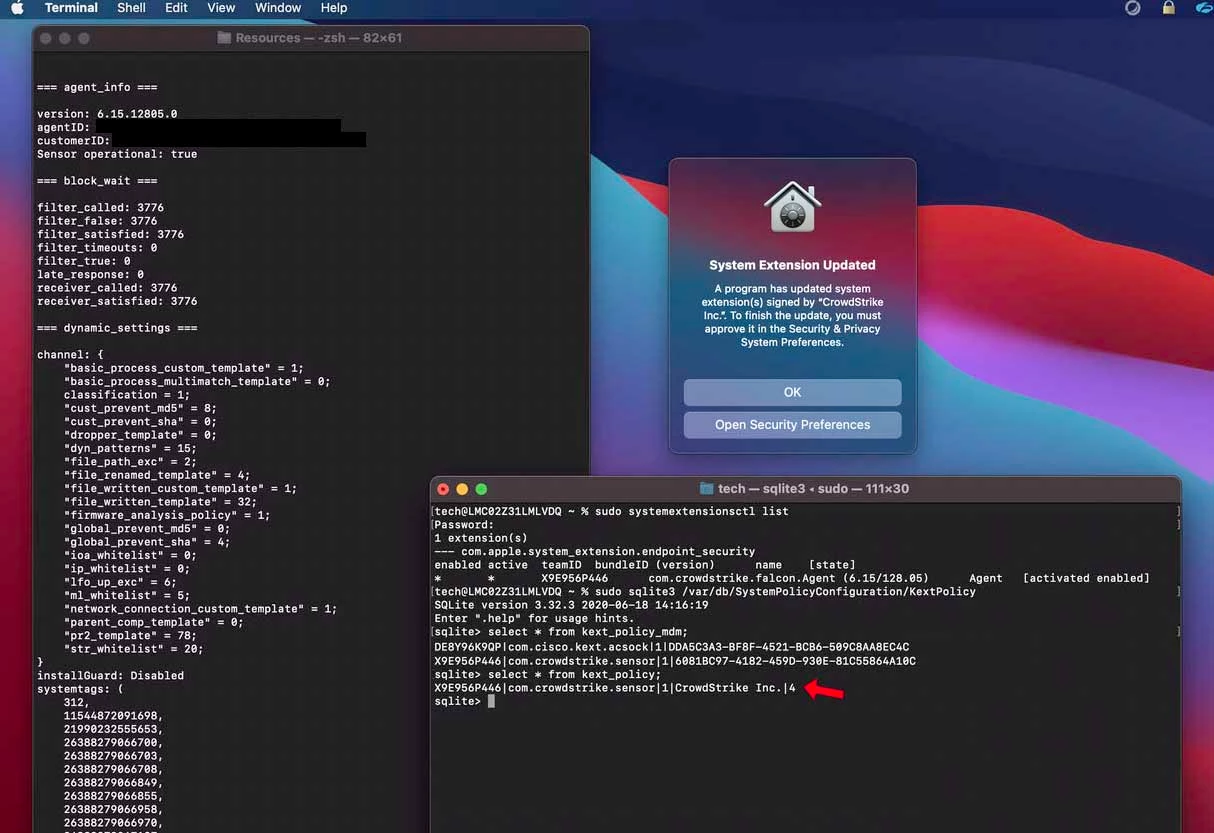
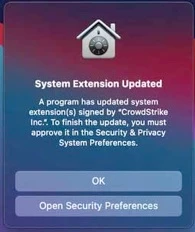
"A program has updated a system extension(s) signed by CrowdStrike..."

If you disconnect network after you install/license Crowdstrike you won't get a prompt. CS is running, no prompts, reboot and let it sit, with no network life is good. Turn network back on and within a few minutes the prompt comes up. Seems to me CS is getting an update from the cloud.

@lukasindre Yes, Jamf confirmed a known product issue (PI) in regards to this. Still working with Jamf and CS support.


Forum|alt.badge.img+1
  • New Contributor
  • December 28, 2020

Apologies for all the spam. I had been trying to post for a while but kept getting a notice that my posts were being moderated until they all showed up at once. Doesn't seem to be a delete button...


Forum|alt.badge.img+1
  • New Contributor
  • December 28, 2020

See above...


Forum|alt.badge.img+1
  • New Contributor
  • December 28, 2020

See above...


Forum|alt.badge.img
  • New Contributor
  • January 7, 2021

@ubcoit Any progress on your cases?


Forum|alt.badge.img+6
  • Contributor
  • January 11, 2021

@CAMarchand Nope, still working (slowly) with support on this.


Forum|alt.badge.img+16
  • Honored Contributor
  • January 11, 2021

my experience FYI.. I am 100% sure that the CS provide profile worked on 11.0.1 and before 12/17.. however it's now stopped working on both 11.01 and 11.1. I agree with @ubcoit CS cloud is pushing an update that is conflicting with the profile..

C


Forum|alt.badge.img+8
  • Contributor
  • January 15, 2021

I'm using the one CS provided (https://falcon.crowdstrike.com/support/documentation/22/falcon-sensor-for-mac#prerequisite:-using-mdm-to-sync-profiles-before-installing-or-upgrading), and I get the following error filling my Jamf console for all devices: "<Exception> -[__NSCFConstantString objectForKeyedSubscript:]: unrecognized selector sent to instance 0x7fff8ad8b0e0"


cris_lehman
Forum|alt.badge.img+5
  • New Contributor
  • January 20, 2021

Just tested this today, seeing the same thing as the rest on this thread.


Forum|alt.badge.img+6
  • Contributor
  • January 20, 2021

I'm still working with Jamf and CrowdStrike support on this. The last go I sent CS wireshark data and logs for them to analyze and with Jamf I've sent them demo videos of the process and my CS installer and activation code in hopes that they attempt the process on their end. It's the back and forth email tag. Tag, their it!


Forum|alt.badge.img+6
  • Contributor
  • January 21, 2021

I'm having the same issue.... but only on machines that start on BigSur. -- Machines that have Catalina installed, then upgrade to BigSur, do not receive the prompt for systemextension update.

I suspect it's related to how BigSur is handling kext_extension trust vs. those inherited via MDM, and how CS 'reconfigures its self'
I also used the demo profile from CS as my template...

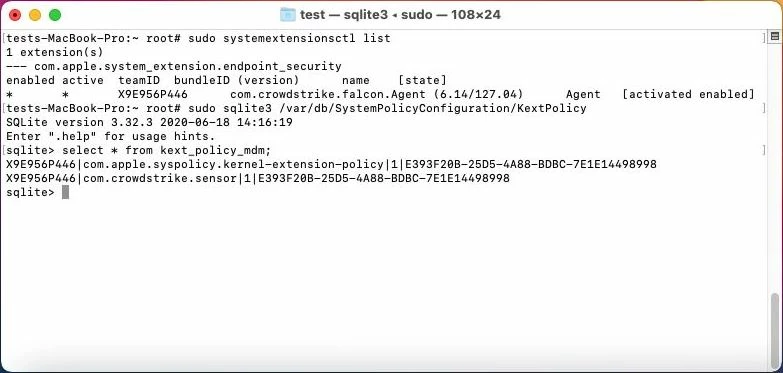
The Catalina -> BigSur machines do not have this pesky little '4' in the kext_policy table, but those that start on BigSur do...

I've definitely been beating my head against the wall on this 'prompt to allow update' nonsense....

@ubcoit -- I'm anxious to hear what JAMF/CS were able to figure out here...

HALP!!!


Forum|alt.badge.img+6
  • Contributor
  • January 21, 2021

@mallen13

Interesting. I haven't testing applying the profile to 10.15 and upgrading. All my testing has been done on Big Sur. I checked mine and I don't have the mystery 4.


Forum|alt.badge.img+6
  • Contributor
  • January 21, 2021

The kext_policy_mdm table doesn't have the mystery '4' -- but the kext_policy table does. ( inherited )

Oddly enough, the upgrade from catalina machines are NOT having any issue as long as they had the config profile ahead of time... it's the ones STARTING on BigSur that do...

There was another post ( https://www.jamf.com/jamf-nation/discussions/37623/falcon-sensor-system-extension-approval )
that suggested completely separating out KEXT from SYSEX from PPPC etc.... which makes perfect sense...

Especially since the M1 machines absolutely HATE LIFE when you have anything legacy in a cfg profile...
I'm going to see if separating out KEXT/SYSEX solves the issue...

If you could share your raw config profile that might be super-helpful as well...
e.g. download .mobileconfig file from JSS, then: security cms -D -i Falcon SYSEX BigSur.mobileconfig

Thanks!


Forum|alt.badge.img+6
  • Contributor
  • January 21, 2021

@mallen13

Yes, I see I missed a command there. I already snapped my VM back so I couldn't run the command. Just running through some more tests.

Q. The sql information output, I'm guessing that is kernel extensions and not system extensions?

I ask because I just removed the kernel extensions from my profile, applied the profile to the system, rebooted. Installed CrowdStrike, within 10 seconds of it installing, I disabled network and let the system idle. Not prompts, Falcon is running. When I checked systemextensionsctl list I see the System Extension. When I run the sql commands, I see nothing listed which if these are kernel extensions, that's expected. Enabled network again, wait, 1-2 minutes usually but sometime longer but eventually the prompt comes up that System Extensions have been updated... Run systemextensionsctl list again, no obvious change from that output. But running the sql commands again I now have entries in there. This last go mine had a 20 at the end, not a 4. So is CrowdStrike still trying to load kernel extensions once it's talks back to the cloud? I'm just guessing here.


Forum|alt.badge.img+6
  • Contributor
  • January 21, 2021

Well... so I guess that is the mystery then...

the dreaded "To finish the update, you must approve it in the Security & Privacy System Preferences" dialog is my arch-enemy at this point. - CS does do an update via it's own client.... but even though it's "trusted" -- it still produces this bleemin' dialog.
( on BigSur only.... Catalina seems to work as designed, and does not prompt... )

When I find a solution, I will certainly share it here... -- this is driving me CRAZY.... :-)
I was hoping you had gotten something back from CS/JAMF....


Forum|alt.badge.img+6
  • Contributor
  • January 21, 2021

@mallen13

I have a video of it but can't upload it here. :( But if in fact the output of sqlite is kernel extension related, isn't the problem with CrowdStrike as on Big Sur, their client should be using System Extensions ONLY and not attempting to do anything with kernel extensions?

To be honest, support from both have been on going but not overly helpful at this point. And to top it off, it's slow. Send email, wait a day, reply, wait a day... or longer. At some point someone needs to call someone and do a remote session. CS support is just pointing the finger at Jamf, not there problem. But if the above findings are correct, it seems to be there is a flaw in the CrowdStrike software if it's trying to use kernel extensions on Big Sur. I'm not a software engineer, I just have to deploy this stuff.


Forum|alt.badge.img+6
  • Contributor
  • January 21, 2021

That is correct. -- BigSur should be using SYSTEMEXTENSIONS only, no longer KEXTs. -- but the CS template they provided covers both SYSEX and KEXT. ( hence my trying to separate them out... )

IKR? I feel you pain. -- the deployment seems to go smooth / quiet, but the 'update' is throwing the flag.

It sounds like you and I are in the same boat... fighting the same dialog box... sigh

Do let me know if you get anywhere... ( and yes, I have similar video I'm sure.... )
likewise, I'll let you know if I find an answer in the meantime. --- you are most likely correct though, CS is probably the party that needs to fix it... I'm sure you will notice that theirs ( and most vendors ) instructions read something like....

"Make sure you tell your end-user to click on the allow/ok button or the software will not function"

whereas clearly, we can NOT rely on end-users to allow something as critical as AV to function.... smh


Forum|alt.badge.img+6
  • Contributor
  • January 21, 2021

@franton sorry to tag you / pull you into this... but is this the behavior you were able to circumvent by splitting out SYSEX / KEXT / PPPC and scoping out separately for Catalina vs. BigSur ?

I am having NO ISSUES on Catalina, but am fighting BigSur to avoid the 'allow update' prompt for CS


Forum|alt.badge.img+4
  • New Contributor
  • January 26, 2021

I too am having difficulty getting the CS provided Profile to install on both Intel Big Sur and M1 Big Sur. I uploaded the Falcon Profile 4 times and trimmed them so I have 1 PPPC profile, 1 Sys Ext, 1 KExt, and 1 web filter profile. Same error as @davidi4 :

<Exception> -[__NSCFConstantString objectForKeyedSubscript:]: unrecognized selector sent to instance 0x7fff80233030


Forum|alt.badge.img+6
  • Contributor
  • January 27, 2021

@nascheid

Sorry, can't say I've seen that error yet. :/ Did you sign and upload the CS profile to your JSS? It needs to be signed first. Having said that, I don't think we need to use it and we can manually create it in JAMF, provided you are running the latest version 10.26.1. I haven't tested M1 yet, getting to it one of these days but it's my understanding it has it's own problems (need to separate profiles - kernel/system specifically) as well as the CS client isn't native.

@mallen13

CS support got back to me with the issue with the "Extensions have been updated prompt" and they believe it's a option called "Firmware analysis" and that it's using a kernel extension. I haven't confirmed this but I'm hoping to test this today with the Team that administrates CrowdStrike (I only install it). Perhaps you can test on your end if you have more access.

If this turns out to be the case, it does make sense, since CS runs fine until it talks back to the cloud to get it's settings. Also makes sense as to why it works for some and not others as it would depend if this feature is enabled or not.


Forum|alt.badge.img+6
  • Contributor
  • January 27, 2021

It sounds like we're in the same boat. - I also just re-created the profile manually ( to separate SYSEX from KEXT )
Everything is working just fine for me on Catalina... -- no prompting, even on upgrade... but kexts/kext-trusts are/were employed.

BigSur is the one being a jerk. ( especially the M1, a.k.a. "crashy-boi" if you feed it any sort of legacy config-profile... )
It does also seem that machines (intel) STARTING on Catalina, with my 'both kext+sysex' config-profiles present BEFORE the BigSur upgrade, don't get angry.... ( still testing this... )

I'll see if I can get the 'Firmware analysis' bit flipped off for me // get my own CS thread going.
I'll let you know when I get somewhere.

It does seem like maybe a bit of progress is being made...
( 6.12 -> 6.14 ; 6.14 -> 6.15 / 6.16.... all seem to behave just a little differently.... )


Forum|alt.badge.img+4
  • New Contributor
  • January 27, 2021

Hi all... I faced a similar issue and I think I've got it resolved (at least on our fleet of Intel MBPs). I had to manually edit the CrowdStrike provided profile to disable the ability to approve system extensions and kernel extensions. I'll put my modified falcon profile below. Feel free to copy and paste into your plaintext editor of your choice, save as a .mobileconfig file and sign it using JAMFs instructions. You WILL have to sign it before uploading it so that JAMF doesn't alter it... JAMF doesn't play nice with the system extension payloads and doesn't translate them into the GUI properly if the profile is unsigned.

<?xml version="1.0" encoding="UTF-8"?>
<!DOCTYPE plist PUBLIC "-//Apple//DTD PLIST 1.0//EN" "http://www.apple.com/DTDs/PropertyList-1.0.dtd">
<plist version="1.0">
<dict>
    <key>PayloadContent</key>
    <array>
        <dict>
            <key>FilterBrowsers</key>
            <false/>
            <key>FilterDataProviderBundleIdentifier</key>
            <string>com.crowdstrike.falcon.Agent</string>
            <key>FilterDataProviderDesignatedRequirement</key>
            <string>identifier "com.crowdstrike.falcon.Agent" and anchor apple generic and certificate 1[field.1.2.840.113635.100.6.2.6] and certificate leaf[field.1.2.840.113635.100.6.1.13] and certificate leaf[subject.OU] = "X9E956P446"</string>
            <key>FilterGrade</key>
            <string>inspector</string>
            <key>FilterPacketProviderBundleIdentifier</key>
            <string>com.crowdstrike.falcon.Agent</string>
            <key>FilterPacketProviderDesignatedRequirement</key>
            <string>identifier "com.crowdstrike.falcon.Agent" and anchor apple generic and certificate 1[field.1.2.840.113635.100.6.2.6] and certificate leaf[field.1.2.840.113635.100.6.1.13] and certificate leaf[subject.OU] = "X9E956P446"</string>
            <key>FilterPackets</key>
            <false/>
            <key>FilterSockets</key>
            <true/>
            <key>FilterType</key>
            <string>Plugin</string>
            <key>Organization</key>
            <string>CrowdStrike Inc.</string>
            <key>PayloadDisplayName</key>
            <string>Web Content Filter</string>
            <key>PayloadIdentifier</key>
            <string>com.apple.webcontent-filter.2C5CBFD0-7CFE-41CB-95BC-A681F4D293B8</string>
            <key>PayloadType</key>
            <string>com.apple.webcontent-filter</string>
            <key>PayloadUUID</key>
            <string>2C5CBFD0-7CFE-41CB-95BC-A681F4D293B8</string>
            <key>PayloadVersion</key>
            <integer>1</integer>
            <key>PluginBundleID</key>
            <string>com.crowdstrike.falcon.App</string>
            <key>UserDefinedName</key>
            <string>Falcon</string>
        </dict>
        <dict>
            <key>AllowedTeamIdentifiers</key>
            <array>
                <string>X9E956P446</string>
            </array>
            <key>PayloadDescription</key>
            <string>Controls the system extension loading/unloading</string>
            <key>PayloadDisplayName</key>
            <string>App System Extension Control</string>
            <key>PayloadIdentifier</key>
            <string>com.apple.system-extensions.admin.E45B5986-74A6-4B6A-A4CA-E179516A7F52</string>
            <key>PayloadOrganization</key>
            <string>CrowdStrike Inc.</string>
            <key>PayloadType</key>
            <string>com.apple.system-extensions.admin</string>
            <key>PayloadUUID</key>
            <string>E45B5986-74A6-4B6A-A4CA-E179516A7F52</string>
        </dict>
        <dict>
            <key>AllowUserOverrides</key>
            <false/>
            <key>AllowedTeamIdentifiers</key>
            <array>
                <string>X9E956P446</string>
            </array>
            <key>PayloadDescription</key>
            <string>Configures Kernel Extension Policy settings</string>
            <key>PayloadDisplayName</key>
            <string>Kernel Extensions</string>
            <key>PayloadIdentifier</key>
            <string>com.apple.syspolicy.kernel-extension-policy.5671B4FB-3B3A-4D93-B12A-E8487BD9B5EE</string>
            <key>PayloadOrganization</key>
            <string>CrowdStrike Inc.</string>
            <key>PayloadType</key>
            <string>com.apple.syspolicy.kernel-extension-policy</string>
            <key>PayloadUUID</key>
            <string>5671B4FB-3B3A-4D93-B12A-E8487BD9B5EE</string>
        </dict>
        <dict>
            <key>PayloadDescription</key>
            <string>Configures Privacy Preferences Policy Control settings</string>
            <key>PayloadDisplayName</key>
            <string>Privacy Preferences</string>
            <key>PayloadIdentifier</key>
            <string>com.apple.TCC.configuration-profile-policy.9A10BE5D-5E46-4C22-89C9-20597A04B616</string>
            <key>PayloadOrganization</key>
            <string>CrowdStrike Inc.</string>
            <key>PayloadType</key>
            <string>com.apple.TCC.configuration-profile-policy</string>
            <key>PayloadUUID</key>
            <string>9A10BE5D-5E46-4C22-89C9-20597A04B616</string>
            <key>Services</key>
            <dict>
                <key>SystemPolicyAllFiles</key>
                <array>
                    <dict>
                        <key>Allowed</key>
                        <true/>
                        <key>CodeRequirement</key>
                        <string>identifier "com.crowdstrike.falcon.Agent" and anchor apple generic and certificate 1[field.1.2.840.113635.100.6.2.6] /* exists */ and certificate leaf[field.1.2.840.113635.100.6.1.13] /* exists */ and certificate leaf[subject.OU] = X9E956P446</string>
                        <key>Comment</key>
                        <string></string>
                        <key>Identifier</key>
                        <string>com.crowdstrike.falcon.Agent</string>
                        <key>IdentifierType</key>
                        <string>bundleID</string>
                        <key>StaticCode</key>
                        <false/>
                    </dict>
                    <dict>
                        <key>Allowed</key>
                        <true/>
                        <key>CodeRequirement</key>
                        <string>identifier "com.crowdstrike.falcon.App" and anchor apple generic and certificate 1[field.1.2.840.113635.100.6.2.6] /* exists */ and certificate leaf[field.1.2.840.113635.100.6.1.13] /* exists */ and certificate leaf[subject.OU] = X9E956P446</string>
                        <key>Comment</key>
                        <string></string>
                        <key>Identifier</key>
                        <string>com.crowdstrike.falcon.App</string>
                        <key>IdentifierType</key>
                        <string>bundleID</string>
                        <key>StaticCode</key>
                        <false/>
                    </dict>
                </array>
            </dict>
        </dict>
        <dict>
            <key>AllowUserOverrides</key>
            <false/>
            <key>AllowedSystemExtensionTypes</key>
            <dict>
                <key>X9E956P446</key>
                <array>
                    <string>EndpointSecurityExtension</string>
                    <string>NetworkExtension</string>
                </array>
            </dict>
            <key>AllowedSystemExtensions</key>
            <dict>
                <key>X9E956P446</key>
                <array>
                    <string>com.crowdstrike.falcon.Agent</string>
                </array>
            </dict>
            <key>PayloadDescription</key>
            <string>Configures System Extensions Policy settings</string>
            <key>PayloadDisplayName</key>
            <string>System Extensions</string>
            <key>PayloadIdentifier</key>
            <string>com.apple.system-extension-policy.20258B06-5866-4424-8893-A3AF1AFAAEDC</string>
            <key>PayloadOrganization</key>
            <string>CrowdStrike Inc.</string>
            <key>PayloadType</key>
            <string>com.apple.system-extension-policy</string>
            <key>PayloadUUID</key>
            <string>20258B06-5866-4424-8893-A3AF1AFAAEDC</string>
        </dict>
    </array>
    <key>PayloadDescription</key>
    <string>Kernel Extensions, System Extensions, and Privacy Preferences</string>
    <key>PayloadDisplayName</key>
    <string>Falcon Profile</string>
    <key>PayloadEnabled</key>
    <true/>
    <key>PayloadIdentifier</key>
    <string>863BE372-D1FA-4082-85B2-3B8FE63797C5</string>
    <key>PayloadOrganization</key>
    <string>CrowdStrike Inc.</string>
    <key>PayloadRemovalDisallowed</key>
    <false/>
    <key>PayloadScope</key>
    <string>System</string>
    <key>PayloadType</key>
    <string>Configuration</string>
    <key>PayloadUUID</key>
    <string>BED12142-1459-41BF-B50B-66A27E702725</string>
    <key>PayloadVersion</key>
    <integer>1</integer>
</dict>
</plist>

Edit: I can't word good.


Forum|alt.badge.img+6
  • Contributor
  • January 27, 2021

I think I've got literally every other key in there except my profile is set true here...

" <key>AllowUserOverrides</key> <false/>
"

Thanks! -- will dig into/try this.


Forum|alt.badge.img+4
  • New Contributor
  • January 27, 2021

That key, in both the System Extensions and Kernel Extensions payload/sections, was the only change I made to CrowdStrike's profile. What's so terrible about this is that pretty much any app you can use to build profiles doesn't recognize the Kernel Extension or System Extension payloads, so you're forced into manually editing and referring to Apple's developer docs to make sure you're not breaking something.