Question

CrowdStrike Configuration Profile | BigSur

  • December 1, 2020
  • 112 replies
  • 651 views

Show first post

112 replies

Forum|alt.badge.img+6
  • Contributor
  • January 27, 2021

I'm going to fresh load another BigSur test machine to be sure... but I think you might have hit the nail on the head...

Hey JAMF.... feature request: change "Allow Users to approve system extensions" to: "Prompt Users to approve system extensions" :-)

and yes, I agree. -- as slick as CS was out of the gate... I'd really love to see them get on top of this kind of thing... ( and an arm64 port... )


Forum|alt.badge.img+6
  • Contributor
  • January 28, 2021

So it was a combination of things...

Removing the check-box for 'Allow Users to approve system extensions' helped... but the final nag was, indeed, the 'BIOS/Firmware Standard Visibility' -- I managed to get our Sr. CS admin to DISABLE this feature in my test group, and now there are no more KEXTs in play. -- no prompts...


Forum|alt.badge.img+6
  • Contributor
  • January 28, 2021

@mallen13

Also confirmed on my end. Disabling the BIOS/Firmware feature has resolved the additional prompt to approve the KEXT. CS support is now aware of the issue but unsure if they can work around it.

I need to spend some time now building out the configuration profiles separately and testing again to confirm.


Forum|alt.badge.img+3
  • New Contributor
  • January 28, 2021

@mallen13

So unchecking the "allow users to approve system extensions" actually worked? I don't have the Firmware / BIOS Standard Visibility enabled, so I'm not hung up on a kext but I still am getting prompts to enable the system extension.

Even running

systemextensionsctl list

shows me that the system extension is "loaded" but waiting on user approval, which I want to avoid.

What version of CS are you running that played nicely for you?


Forum|alt.badge.img+6
  • Contributor
  • January 28, 2021

@KBNet

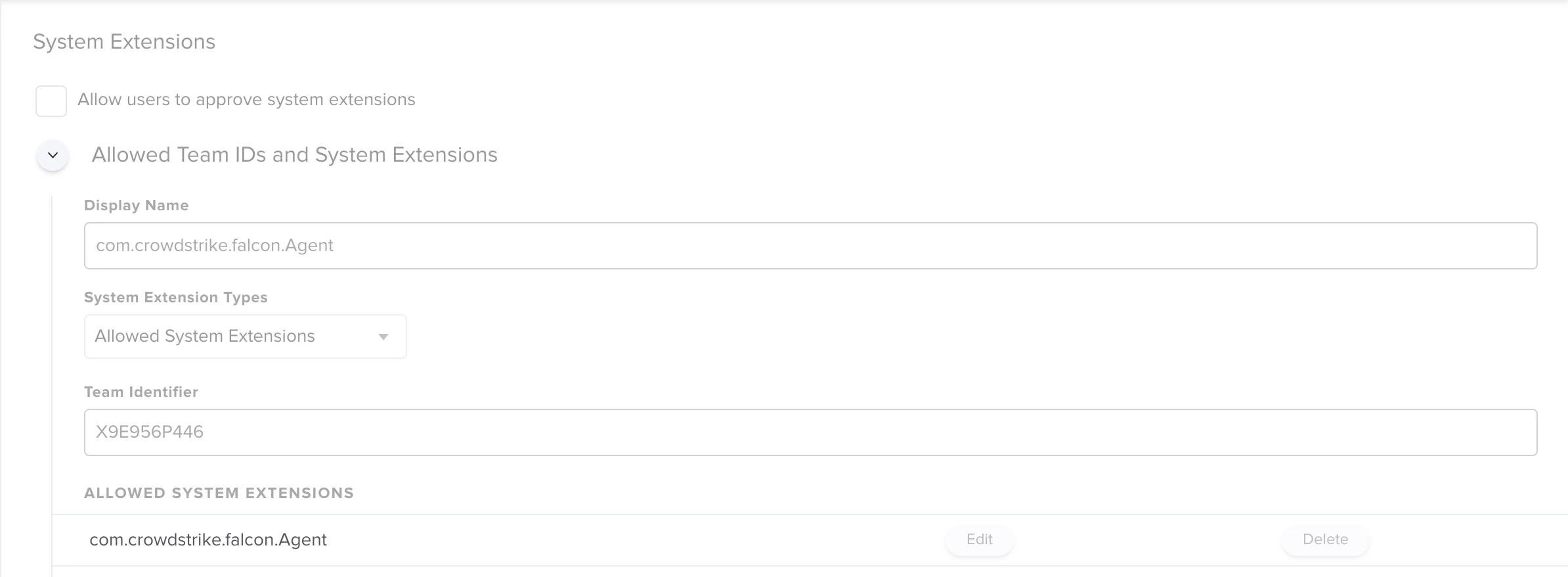
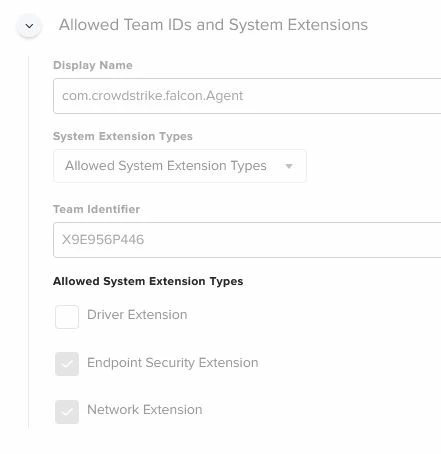
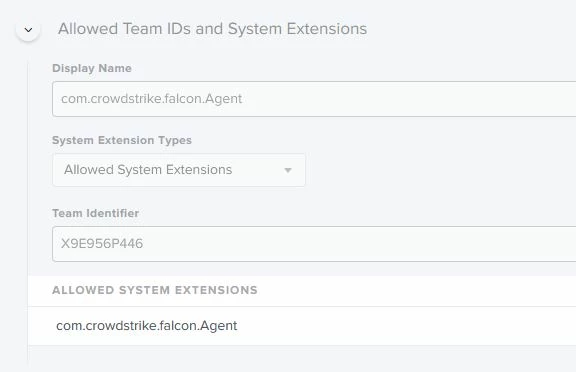
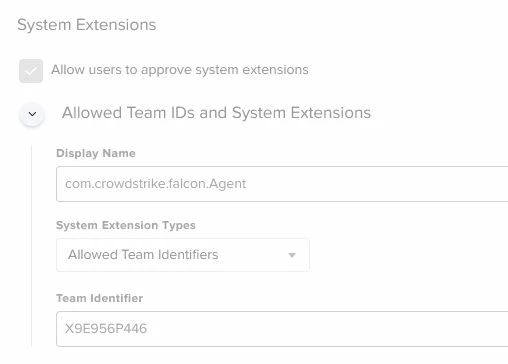
I've been testing with 6.14.12704 at this point. I'm just in the process of moving my profiles from dev to prod to test things again. I'm separating my profiles into each component, PPPC, KEXT, System Ext and Content and will test again. I'm building all my profiles off the CS provided profile, to the best of my knowledge. Having said that, I have successfully applied PPPC, System Ext and Content to a Big Sur 11.1 workstation without reboot. Clean machine, enroll to jamf, on enrollment profiles are applied, install CS, no prompts, everything is happy since Firmware/bios is now disabled. On this test, this is what my System Extension looked like but in prod once I test again I plan all mirroring the settings in the provided CS profile that are available in Jamf. Are they all required, no idea! I'd hope CS knows better than me.


Forum|alt.badge.img+6
  • Contributor
  • January 28, 2021

@KBNet

And just cause I'm all setup for this, I snapped my vm back and retested with "Allow users to approve system extensions" enabled in the above System Extension profile and tested, no prompts again. In the CS provided profile this option is selected.


Forum|alt.badge.img+3
  • New Contributor
  • January 29, 2021

@ubcoit

Thanks for the details. Was this on a fresh install of Big Sur? I am attempting to upgrade machines. specifically from varying versions of macOS (Mojave and Catalina are really the two big ones).

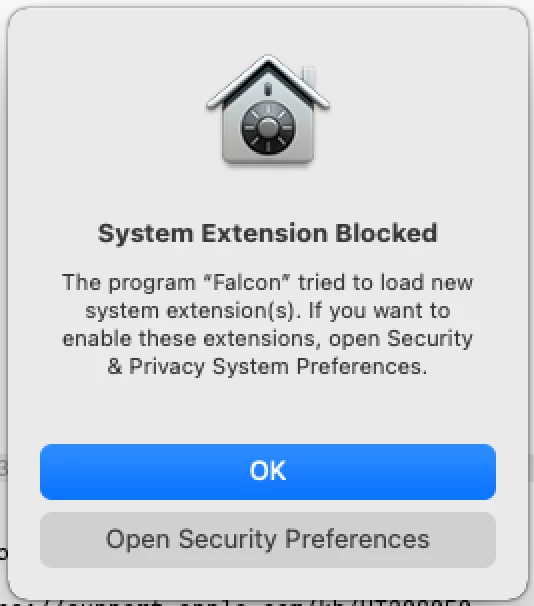
My process is: upgrade CS from 6.15 to 6.16, install the profiles prior to upgrade (no prompts received on old macOS versions), upgrade straight to Big Sur, wait the 30 minutes to only be devastated by the "System Extension Blocked" pop-up after the upgrade.

I feel like I've been through absolutely everything to try to figure this out, and I can't. I just want to confirm, with the profiles you have your users are not seeing a single prompt (i.e. the one above)?

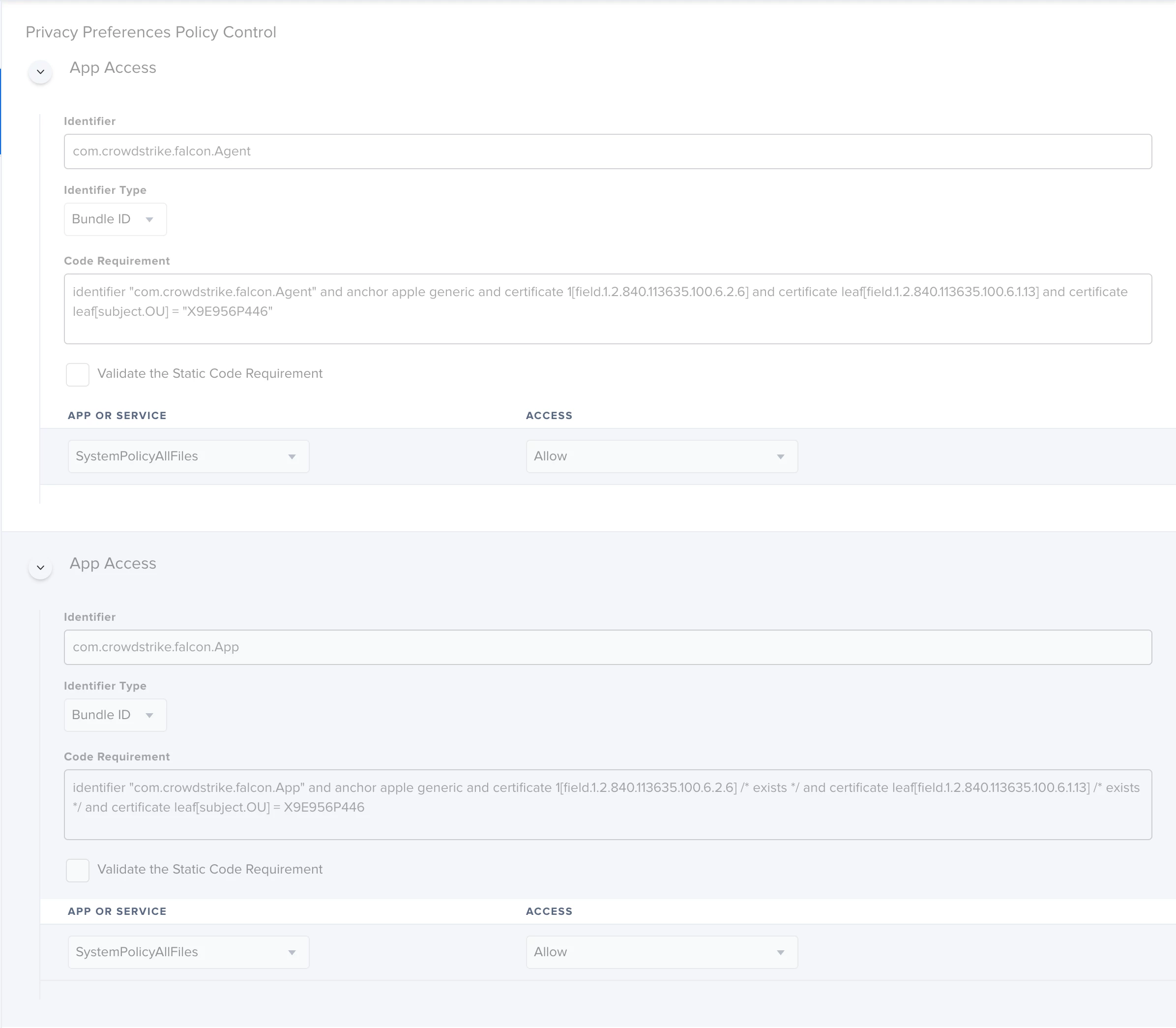
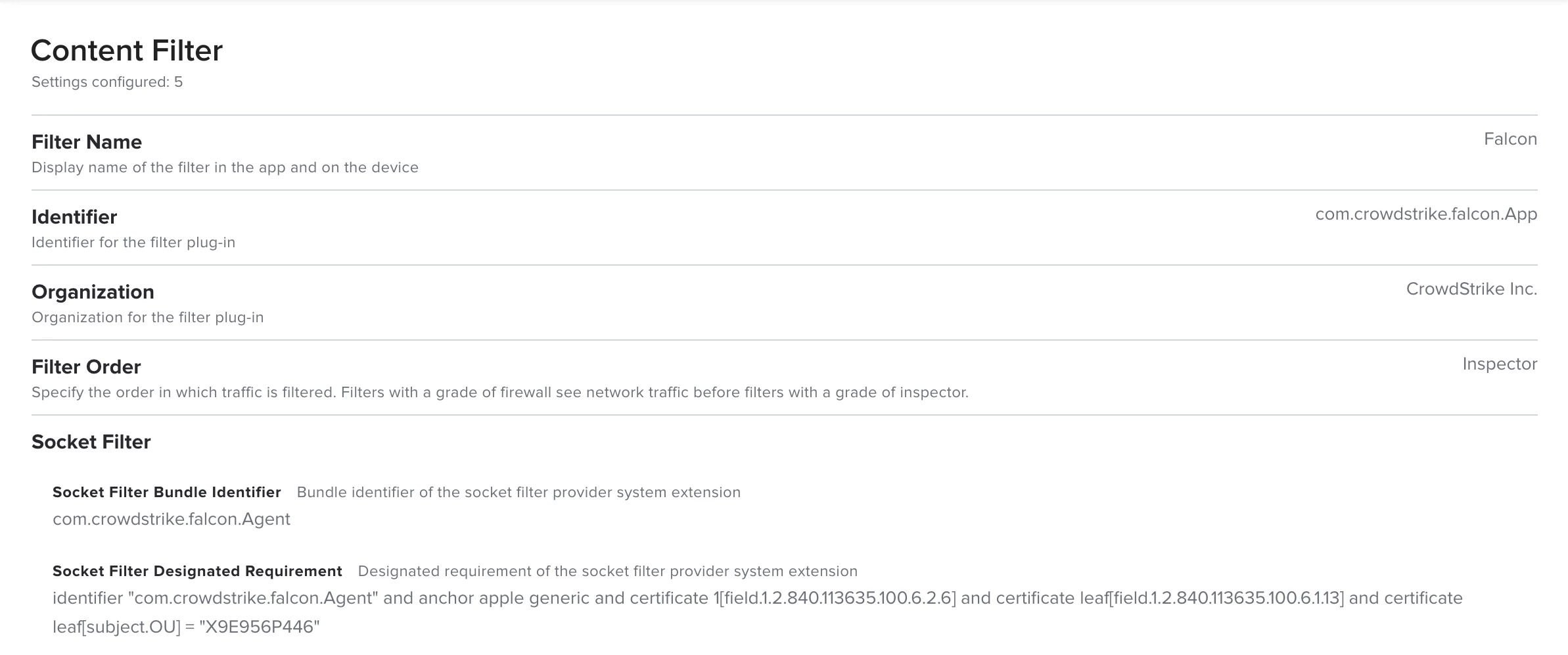
I have also decided to abandon the CS profile and roll my own. The system extension from what I can tell is identical to yours, and I still get the bloody prompts.

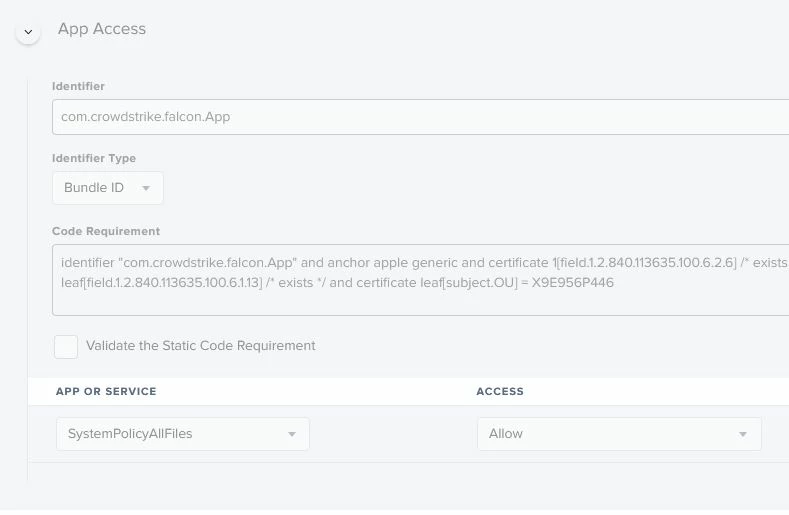
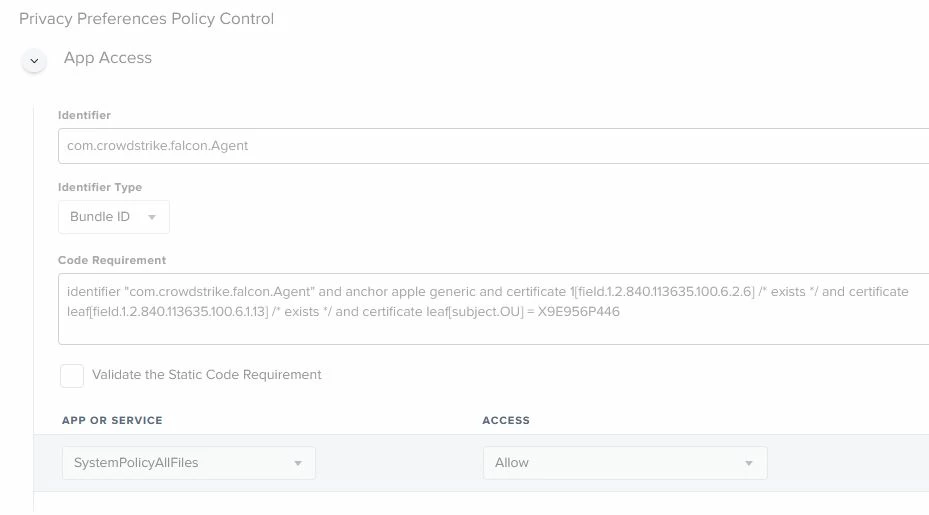
PPPC:

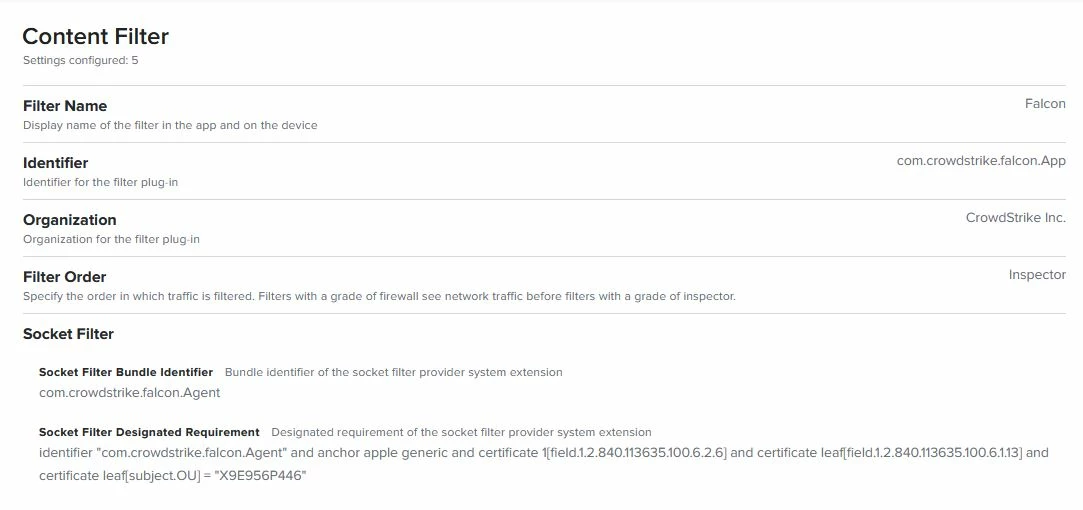
Content Filter:

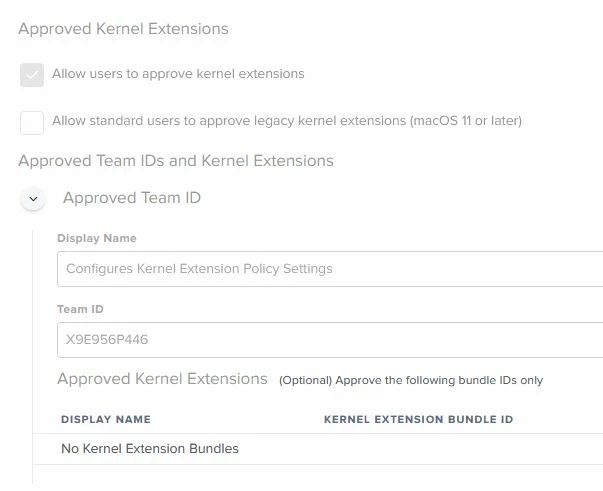
System Extension:

Ultimately, after running the cmd to show the loaded extensions, I see that it is there and activated but for some reason waiting for the user, which I want to avoid.

We don't have firmware analysis on so a kext isn't needed either.

We have a ticket open with CS but I am a little worried that they will push the blame onto Jamf as others have described here.

I feel like my scenario of installing CS then upgrading to BS might be the cause here. I think it might be time I roll up a fresh install of Big Sur and see if that works, rather than an upgrade. If that's the case though, I'm not quite sure how we're going to handle the plethora of machines not running BS.

Have you had an upgrade path work with CS and Big Sur with this profile, where users are not required to approve the system extension?


Forum|alt.badge.img+6
  • Contributor
  • January 29, 2021

@KBNet

I suspect your issue is the upgrade and you are having any number of problems. Notice the prompt is mentioning Falcon instead of CrowdStrike Inc? I believe this is because in 10.15 and earlier the process for CrowdStrike is falcond but in Big Sur the process is called com.crowdstrike.falcon.Agent. It's also possible that even though the profile was installed in 10.15, the system extensions aren't used and therefore aren't installed/linked or whatever happens in the backend. When you upgrade to Big Sur they can't load or something. Perhaps try applying new profiles once you upgrade to Big Sur? But then you'll also have the falcond vs com.crowdstrike.falcon.Agent issue until "something" triggers that switch, 30 minutes later?

Have you checked to see if "falcond" is actually a KEXT and not a System Extension?

sudo sqlite3 /var/db/SystemPolicyConfiguration/KextPolicy
select from kext_policy_mdm;
select
from kext_policy;

TBH, this has certainly been a mess. I'm not sure we'll be able to do much in an upgrade scenario.


Forum|alt.badge.img+3
  • New Contributor
  • January 29, 2021

@ubcoit

I'll have to do some further testing but it seems like you might be right, installing CS once Big Sur is installed seems to work the best, no prompts using the same profiles. I'm still testing though, but initially that seems to be the case.

Just checking though, have you been able to upgrade between OS versions without prompts from CS after the upgrade?


Forum|alt.badge.img+6
  • Contributor
  • January 29, 2021

@KBNet

No, I've only tested on a clean Big Sur. I'm in the process right now of spinning up and updating three VM's, 10.13, 14 and 15 to confirm these profiles work correctly on them (they should). From there, I'll upgrade one or all of them to BS and see what happens. I'm expecting prompts. Even if you create your System Extensions profile and only deploy it to BS when the machine comes back online, CS will load and the profile won't have applied yet since Jamf won't know the machine has upgrade until an inventory runs. Pretty sure we are screwed. :)


Forum|alt.badge.img+3
  • New Contributor
  • January 29, 2021

@ubcoit

Please let me know how your testing goes, I'm curious to see if your results are different to mine. I really hoped that once the system extension profile was deployed the system wouldn't care if CS tried loading before or not, but I fear that is the case.

Maybe BS 11.2 changes that... or more realistically it will make it worse.. :P


Jason33
Forum|alt.badge.img+13
  • Honored Contributor
  • January 30, 2021

@KBNet I have done upgrades from both Mojave and Catalina, and still get prompted that a system extension was blocked from running. I'd not received any prompts or warning messages prior to upgrading to Big Sur.


Forum|alt.badge.img+3
  • New Contributor
  • February 1, 2021

@Jason33

Thanks - did some testing this morning and it looks like if I uninstall CS before the upgrade from Catalina to Big Sur, then upgrade to BS, then reinstall CS the profile works fine. Just seems the upgrade is the cause.

11.2 released today, here's hoping that there are some changes that address this but I'm not holding my breath.


Forum|alt.badge.img+4
  • Contributor
  • February 2, 2021

Just an fyi, if you load the system extension payloads whilst on Mojave and then upgrade to Big Sur the system extension payloads will not be recognised hence the "Falcon" prompts.

You can read more at the macadmins slack community on the crowdstrike_falcon channel


Forum|alt.badge.img+6
  • Contributor
  • February 3, 2021

@KBNet @Jason33 @bilal.habib

I've now completed some macOS upgrades and to my surprise I haven't been prompted after upgrading. ??? This wasn't expected.

My profiles, all are separate scoped to the appropriate version of macOS.

CrowdStrike Content Filter - Scope = macOS 10.15 or later

CrowdStrike Kernel Extensions - Scope = macOS 10.13.2 to macOS 10.15.x

CrowdStrike PPPC - Scope = macOS 10.14 or later


CrowdStrike System Extensions - Scope = macOS 10.15 or later


macOS 10.13.6, CrowdStrike 5.34.11501
Configuration Profile assigned before installation:
- CrowdStrike Kernel Extensions

Process ‘falcond’ runs after installation with no prompts. Waited 5 minutes, rebooted, no prompts, falcond is running.

Upgraded 10.13.6 to Big Sur 11.1. falcond is running, no prompts but when I run falconctl stats, errors out. All communication with the console is lost. Expected since 5.34 isn’t Big Sur compatible.

macOS 10.14.6, CrowdStrike 6.12.125.05
Configuration Profile assigned before installation:
- CrowdStrike Kernel Extensions
- CrowdStrike PPPC

Process ‘falcond’ runs after installation with no prompts. Waited 5 minutes, rebooted, no prompts, falcond is running.

Did not upgrade macOS.

macOS 10.14.6, CrowdStrike 6.16.129.03
Configuration Profile assigned before installation:
- CrowdStrike Kernel Extensions
- CrowdStrike PPPC

Process ‘falcond’ runs after installation with no prompts. Waited 5 minutes, rebooted, no prompts, falcond is running.

Did not upgrade macOS.

macOS 10.15.7, CrowdStrike 6.12.125.05
Configuration Profile assigned before installation:
- CrowdStrike Content Filter
- CrowdStrike Kernel Extensions
- CrowdStrike PPPC
- CrowdStrike System Extension

Process ‘falcond’ runs after installation with no prompts. Waited 5 minutes, rebooted, no prompts, falcond is running.

Upgraded 10.15.7 to Big Sur 11.2. falcond is running, no prompts (rebooted multiple times) client is still communicating with the Crowdstrike console. Sent an upgrade to the client (6.17) from the console and it updated and the process changed from falcond, to com.crowdstrike.falcon.Agent, no prompts came up. Rebooted the system, no prompts.

macOS 10.15.7, CrowdStrike 6.16.129.03
Configuration Profile assigned before installation:
- CrowdStrike Content Filter
- CrowdStrike Kernel Extensions
- CrowdStrike PPPC
- CrowdStrike System Extension

Process ‘falcond’ runs after installation with no prompts. Waited 5 minutes, rebooted, no prompts, falcond is running.

macOS 11.1, CrowdStrike 6.14.12704
Configuration Profile assigned before installation:
- CrowdStrike Content Filter
- CrowdStrike PPPC
- CrowdStrike System Extension

Process com.crowdstrike.falcon.Agent runs after installation with no prompts. Waited 5 minutes, rebooted, no prompts, com.crowdstrike.falcon.Agent is running.

macOS 11.1, CrowdStrike 6.16.129.03
Configuration Profile assigned before installation:
- CrowdStrike Content Filter
- CrowdStrike PPPC
- CrowdStrike System Extension

Process com.crowdstrike.falcon.Agent runs after installation with no prompts. Waited 5 minutes, rebooted, no prompts, com.crowdstrike.falcon.Agent is running.


Forum|alt.badge.img+9
  • Valued Contributor
  • February 4, 2021

Has anyone been able to get the PPPC portion of the profile to work? I'm not getting any prompts for the system extension surprisingly. But i'm unsure if the PPC is actually working. When running:

sudo sqlite3 /Library/Application Support/com.apple.TCC/TCC.db 'select * from access'

the com.crowdstrike.falcon.agent nor the com.crowdstrike.falcon.app are showing up as been given access.


Forum|alt.badge.img+3
  • New Contributor
  • February 4, 2021

@ubcoit

This is pure gold, and I think you may have determined my problem. I just went through an upgrade on CS 6.15.12805 from Catalina 10.15.7 to Big Sur 11.2 where the profiles were not previously installed on Catalina, and it worked. I scoped the profiles to only install once the machine hits Big Sur, and not a single prompt and we're communicating with CS.

I was assuming that the profile should be installed prior to the upgrade, but I'm now wondering if that's causing my issues. More testing tomorrow, that's for sure!


Forum|alt.badge.img+6
  • Contributor
  • February 4, 2021

This has gone of the rails a bit ( understandably )
Hopefully with the info in this thread, most everybody has figured out the essential elements for each...

Catalina ( PPPC / KEXT / SysEx )
BigSur ( PPPC / SysEx, no-kext )

@ubcoit I'm not having issues at all in the following scenarios (**as long as 'Firmware / BIOS Standard Visibility' is disabled.... )

Catalina FreshLoad - CS5.x through 6.16
Catalina -> BigSur Self-Service Upgrade - CS6.14 through CS6.16
BigSur FreshLoad - CS6.14 through 6.16

Has anybody had any luck with 'Firmware / BIOS Standard Visibility' enabled for BigSur FreshLoad ?
it apparently still utilizes a KEXT when enabled...

My support case with CS essentially ended with something to the order of.... "yeah, we're workin on it...."


Forum|alt.badge.img+6
  • Contributor
  • February 4, 2021

@LovelessinSEA

I get no prompts for anything including PPPC as per my config/settings above in any OS now. I have not tested Big Sur on M1.


Forum|alt.badge.img+6
  • Contributor
  • February 4, 2021

@KBNet

On the upgrade from macOS 10.15 to Big Sur I had already applied the System Extensions to 10.15 prior, as 10.15 is compatible with System Extensions is/was my understanding. Everything is now working without prompts.


Forum|alt.badge.img+9
  • Valued Contributor
  • February 4, 2021

@ubcoit Yeah i'm not getting any prompts at all, but i'm unsure if the PPPC policy is actually working. Anyone know how to test FullDiskAccess for crowdstike? we just opened a ticket with them, hopefully we can get them on the phone soon to figure out what the expected experience should be.


Forum|alt.badge.img+6
  • Contributor
  • February 4, 2021

@mallen13

Good summary. Yes, no problems for me either once the bios/firmware feature was disabled.

I'm sure CrowdStrike will fix this at some point, now that they are aware of it. Or here's hoping...


Forum|alt.badge.img+6
  • Contributor
  • February 4, 2021

@LovelessinSEA

Ya, that's a fair point! I have no idea if the software works but it installs now, runs and doesn't prompt me. lol


danny_gutman
Forum|alt.badge.img+7
  • Contributor
  • February 17, 2021

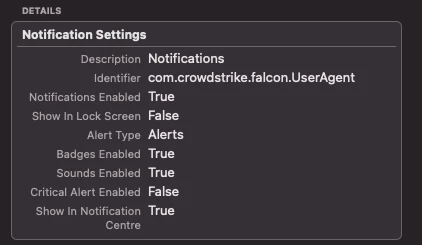
How are you guys suppressing Falcon Notifications prompt? I see no one talked about this on any other threads.

You guys are getting a prompt to approve or deny Notifications for Falcon?


Forum|alt.badge.img+4
  • Contributor
  • February 19, 2021

@danny.gutman Use a profile editor of your choice and then decide how you want it handled