Question

CrowdStrike Configuration Profile | BigSur

  • December 1, 2020
  • 112 replies
  • 652 views

Show first post

112 replies

Forum|alt.badge.img

Saw a Falcon Notifications prompt for the first time today, didn't even know what Falcon was so clicked Deny.

Then I realized Falcon Notifications may need to show important security notifications, but couldn't find Falcon in the Notification Setting app list.

How do I get to finally Allow Falcon Notifications after having Denied it in the initial prompt?


emojination
Forum|alt.badge.img+3
  • New Contributor
  • February 23, 2021

@danny.gutman This custom manifest approach worked well for me as a starting point: https://github.com/talkingmoose/jamf-manifests/blob/master/macOS%20Notifications%20(com.apple.notificationsettings).json

But with 10.27 just released, we can now do this natively with the new Notifications payload, so we'll be replacing the above implementation with a native method.


Forum|alt.badge.img+9
  • Contributor
  • March 2, 2021

I didn't read this whole convo, but I made this myself and all "things" Crowdstrike and Falcon work perfectly. The Profile provided by CS did not work. I built one myself. I don't even think you need the Approved Kernel Extensions payload any longer, just the sys ext one.


Forum|alt.badge.img+12
  • Valued Contributor
  • March 2, 2021

@B-35405 Can you please post the manual text information underneath it, it would be a tremendous help.
I can see its a pretty big Payload and would like to see what you have in each section for testing on my end.

Thanks in Advance.


Forum|alt.badge.img+4
  • Contributor
  • March 3, 2021

@B-35405 yeah, the mobileconfig would be cool to see. Did you just download CS profile, then literally port into jamf manually?


Forum|alt.badge.img+14
  • Honored Contributor
  • March 5, 2021

@B-35405 can you please post details on the profile you've gotten to work?


Forum|alt.badge.img+6
  • Contributor
  • March 5, 2021

This covers everything required except the notifications. If you are still getting prompts for KEXT (Install CS, disable network, no prompt? Enable network, prompt comes up within 5 minutes?), disable "BIOS/Firmware Standard Visibility" on the CS console.

https://www.jamf.com/jamf-nation/discussions/37488/crowdstrike-configuration-profile-bigsur#responseChild212391

As recommended earlier, having one profile with all the settings may be a problem in the future with Big Sur/M1 and kernel extensions. The general recommendation is to separate them out as per the above link. Makes scoping and troubleshooting easier as well.


Forum|alt.badge.img+4
  • Contributor
  • March 5, 2021

I came across this thread after having all the same issues posted here, did a lot of troubleshooting and think I have this working.
Manually recreating the settings doesn't seem to work; it messes up for some reason. I think it adds fields.
To fix this download the plist posted above at:
Posted: 1/27/2021 at 2:59 PM CST by ghart

Save that data as a .mobileconfig file
Take the time and follow the instructions OP posted on signing the file. THIS IS MANDATORY. I thought I'd be able to get around this; no dice.
Upload the newly signed file and distribute via configuration profiles.
Push the installation package via a package.
Push the script to connect with your customer ID via a package.
No pop ups.
I've tested this on a newly installed Big Sur. Next I am going to test this on Catalina (which is working without the signed file) and then upgrade the machine to Big Sur. This is important because even though it worked on Catalina without a signed file, when upgrading to Big Sur the machine gave pop ups.

-Edit. It installs fine on Catalina with the exact same process and configuration profile. Next I will upgrade the Catalina Machine to Big Sur to see if there are any pop ups.

-edit2: updating Catalina to big sur did not prompt any additional notifications. I consider my testing basically complete and ready for a small rollout followed by mass rollout.


Forum|alt.badge.img+1
  • New Contributor
  • March 8, 2021

Still getting message to allow the CS from system prefernces, even the profile has installed.

Any idea ?


Forum|alt.badge.img+6
  • Contributor
  • March 8, 2021

@sumitjha Check to see if you have "Firmware analysis" or "BIOS/Firmware Standard Visibility" enabled on the CrowdStrike console for your clients (Not sure exactly what it's called as I don't have access. If yes, that's where the prompt is coming from and until CrowdStrike updates that component to use a System Extension instead of a KEXT there is nothing that you can do, other than to disable this feature.


Forum|alt.badge.img+16
  • Honored Contributor
  • March 18, 2021

I have only tested twice but this config is working for me ( I am not seeing the update approval pop up) I have not asked the security team if it's working as they need from console side ... and we tried disable "BIOS/Firmware Standard Visibility" on the CS console.. that did not fix the issue according to the security team..

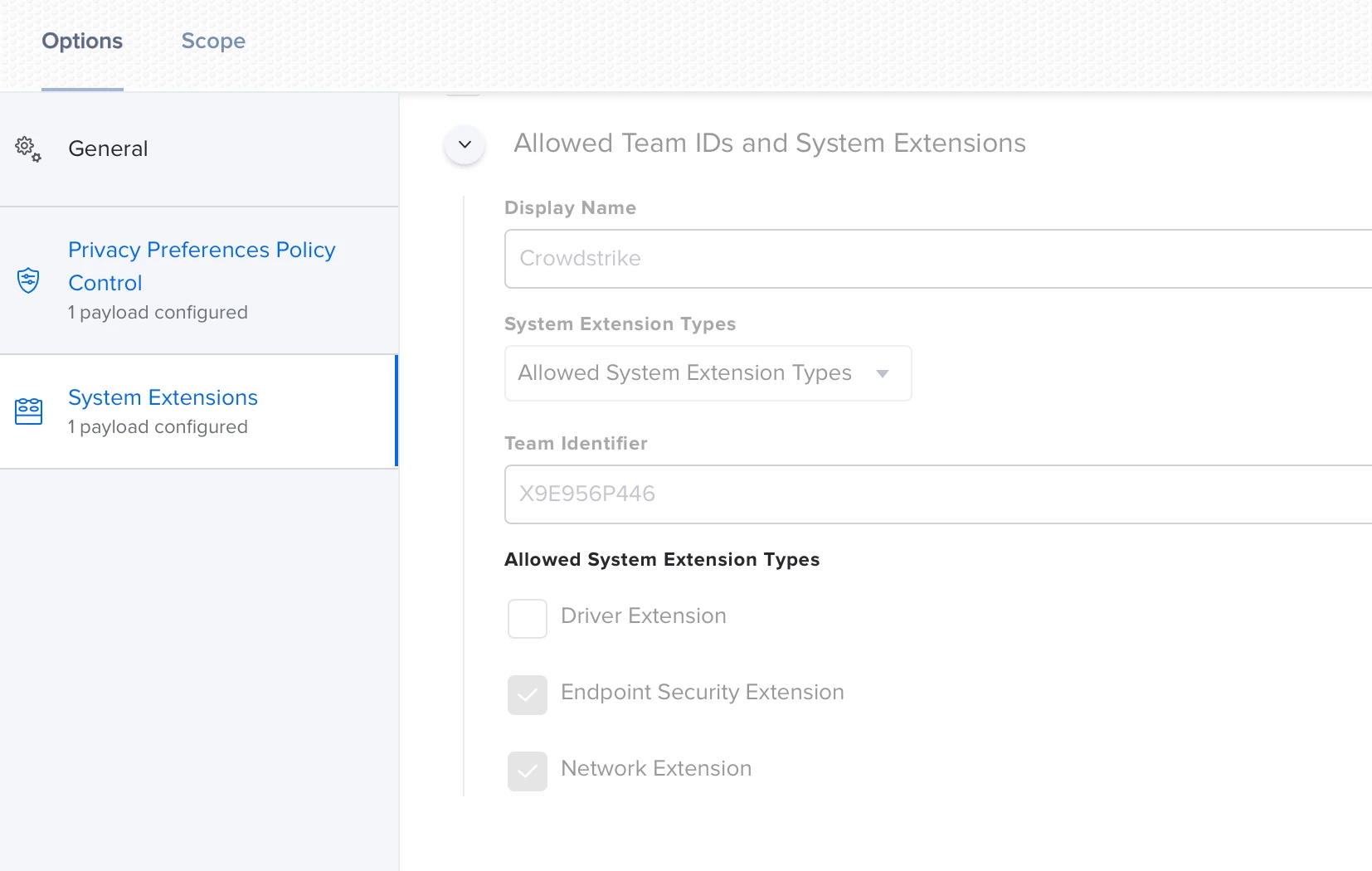
I think key is the "Network Extension" check box...


Forum|alt.badge.img+3
  • New Contributor
  • March 19, 2021

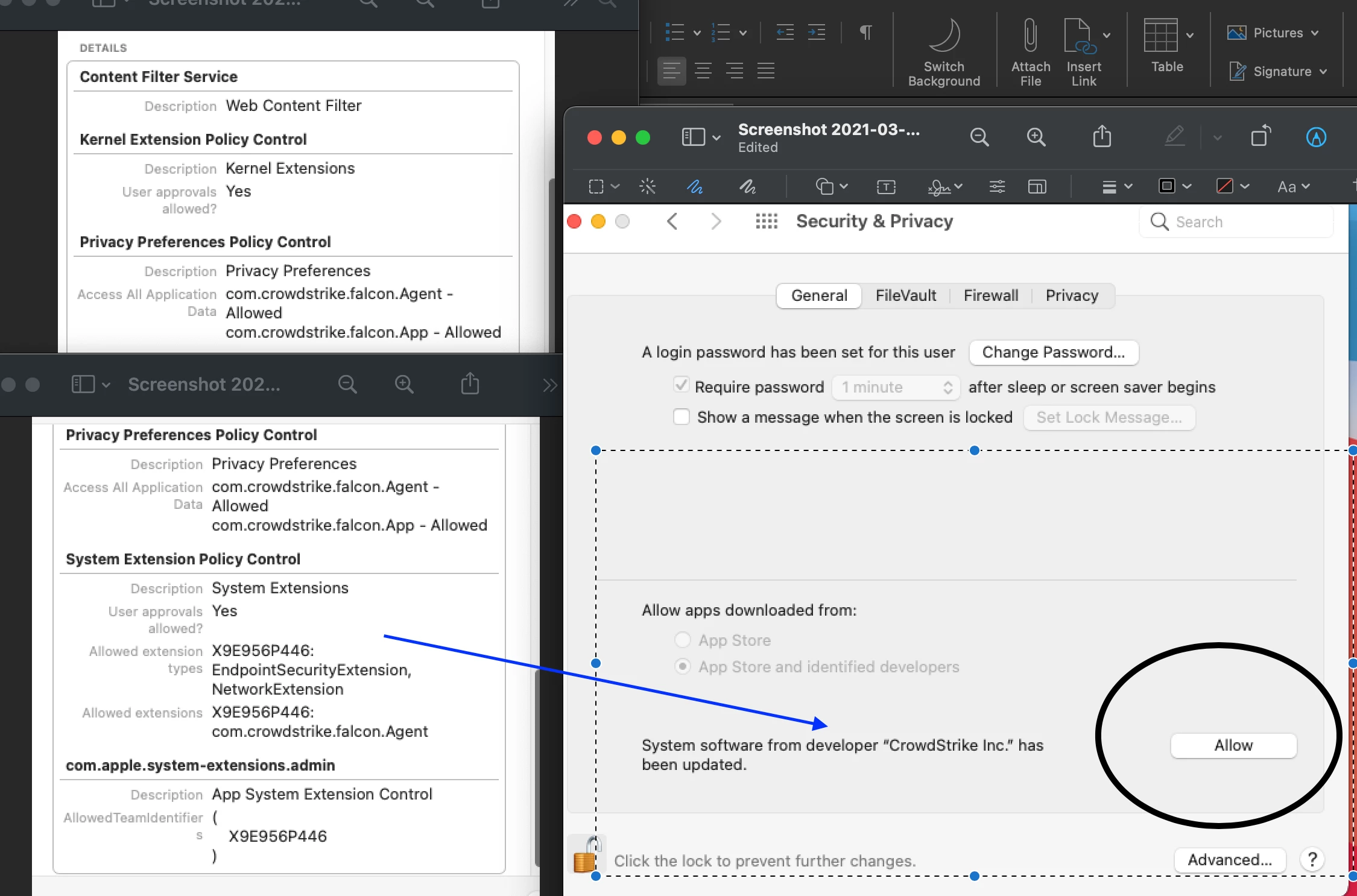
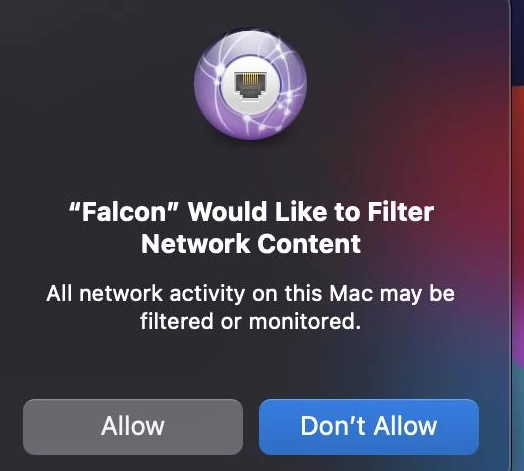
Has anyone run into the issue where the network content filter notification shows up for the user? i installed the config file first but on my test mac the network content notification still shows up and i still need to hit allow


Forum|alt.badge.img+16
  • Honored Contributor
  • March 19, 2021

Yep and if you don't allow it the install fails and then you get "already licensed" on reinstall


Forum|alt.badge.img+1

@nnguyen71 did you ever overcome this? Having serious issue with this and machines are falling out of cs now


Forum|alt.badge.img+1
  • New Contributor
  • March 26, 2021

Any one managed to fix network alert? Or alert after update?


Forum|alt.badge.img+4
  • Contributor
  • March 26, 2021

You should read the new update https://falcon.crowdstrike.com/support/documentation/22/falcon-sensor-for-mac#prerequisite:-using-mdm-to-sync-profiles-before-installing-or-upgrading


Forum|alt.badge.img+1
  • New Contributor
  • March 29, 2021

didn`t find information on how to edit application profile to set User approval of network filtering to false, would you mind to show me?


Forum|alt.badge.img+7
  • Contributor
  • April 1, 2021

Has anyone gotten FULL DISK to automatically enable for Falcon? Mine continues to stay blank; and the PPPC has been tested multiple times.


Forum|alt.badge.img+7
  • Contributor
  • April 6, 2021

Bumping.


Forum|alt.badge.img+16
  • Honored Contributor
  • April 6, 2021

@bilal.habib

Thanks for posting that link!!!

Looks like there are new directions on how to build the profile by hand...

https://falcon.crowdstrike.com/support/documentation/22/falcon-sensor-for-mac#prerequisite:-using-mdm-to-sync-profiles-before-installing-or-upgrading

Also it says download the CS made profile with Chrome ...so that could be causing an issue ...


Forum|alt.badge.img+18
  • Honored Contributor
  • April 6, 2021

The new profile directions work a treat! Make sure to have two profiles: one for M1 (without kext) and one for Intel (with kext).


Forum|alt.badge.img+8
  • Valued Contributor
  • April 7, 2021

Worth noting: The above recent links to the Crowdstrike site require you to be a CS admin. As a 'regular user', it just prompts me for a password to an account I do not have.

Going to ask an admin to grab the page as a PDF for me...


Forum|alt.badge.img+8
  • Valued Contributor
  • April 8, 2021

I'm trying to push the new Crowdstrike built configuration profile from Jamf 10.28 to my computer, however Jamf gives the status code "<Exception> -[__NSCFConstantString objectForKeyedSubscript:]: unrecognized selector sent to instance" and it tells me the installation failed.

EDIT: This apparently is an issue with the profile not being signed. Is this a my machine problem?


Forum|alt.badge.img+16
  • Honored Contributor
  • May 11, 2021

@dgreening

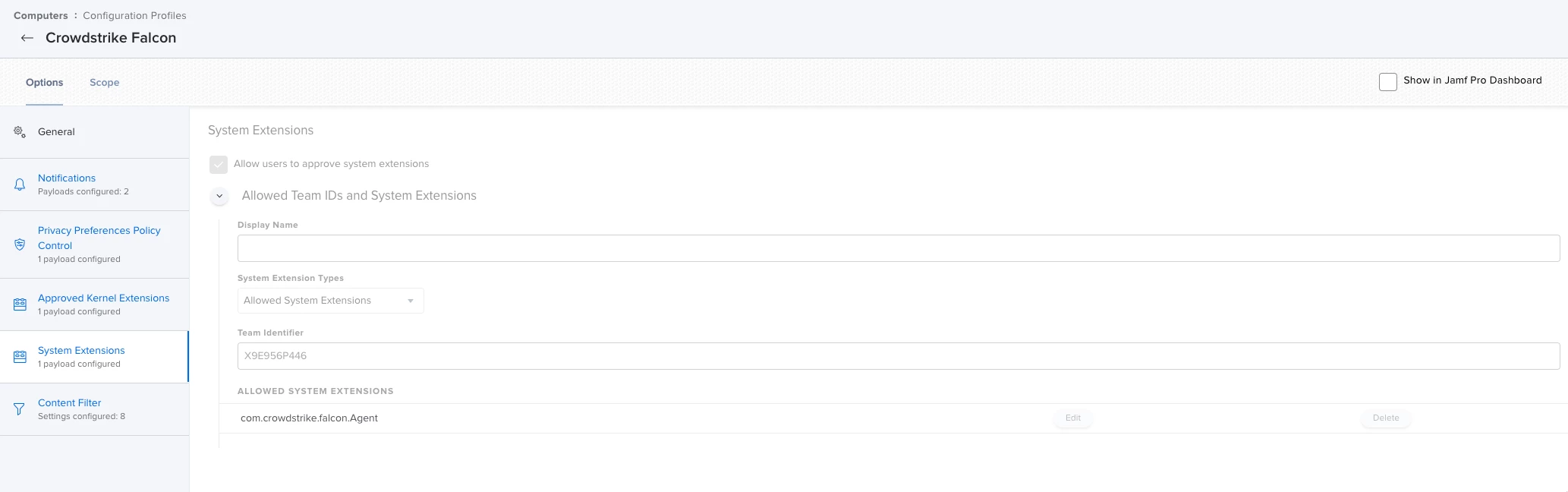
Any chance we can get screenshots of your CS profiles? I can't get mine to work : )

Thanks

C


Forum|alt.badge.img+7
  • Valued Contributor
  • May 12, 2021

Hey everyone, this has been a great resource for getting past some of the stuff I had going on with CS.

Did anyone find a way to bypass the "machine is already licensed" error? When I first did this, I was using a script I had from a POC we did about 8 months ago. It installed the program locally, but it did not show up in the portal. Basically almost all of my POC machines have this error, and since they are not in the CS portal I can't get a token to uninstall the program.

Would be very interested if anyone has a fix for this.